 Our use of cookies
Quality of Service (QoS): How it works against network congestion
Quality of Service (QoS) is what keeps voice calls, video meetings and business-critical applications working during network congestion.
Most organisations rely on it without realising, while the ones that don’t often blame their broadband for problems that QoS could have solved.
This guide covers what QoS is, how it works, the outcomes of successful QoS, when active configuration is needed, and the best practices behind deployment.
Contents:
- What is Quality of Service (QoS)?
- How does QoS work?
- What are the outcomes of QoS?
- Does your business need QoS?
- Best practices for QoS implementation
What is Quality of Service (QoS)?
Quality of Service (QoS) is a traffic management system that protects business-critical traffic from being affected by network congestion.
It works by giving latency-sensitive traffic, such as voice and video calls, priority over everything else when bottlenecks form at any of the network hops along its end-to-end journey. QoS does not increase bandwidth; it simply manages the available capacity more intelligently.
It can also limit or deprioritise less important traffic, such as scheduled backups or CCTV streams, which would otherwise consume bandwidth needed by more time-sensitive applications and cause them to degrade noticeably.
Most organisations receive a baseline level of QoS by default. Business-grade routers, switches, and firewalls recognise and honour the priority markings already applied by major platforms like Microsoft Teams, Zoom, and hosted VoIP services.
However, for true end-to-end QoS applied from endpoint to server, or when various types of important traffic compete for limited bandwidth, QoS must be properly implemented and configured to ensure markings are honoured throughout.
How does QoS work?
QoS manages traffic by identifying, labelling, sorting, limiting, and forwarding data packets as they move across network hops on their end-to-end journey.
The inner workings of this process are complex, spanning multiple protocols across various network layers depending on the architecture, and are covered separately in the QoS technical details section.
However, data packets always receive QoS through the following step-by-step process:
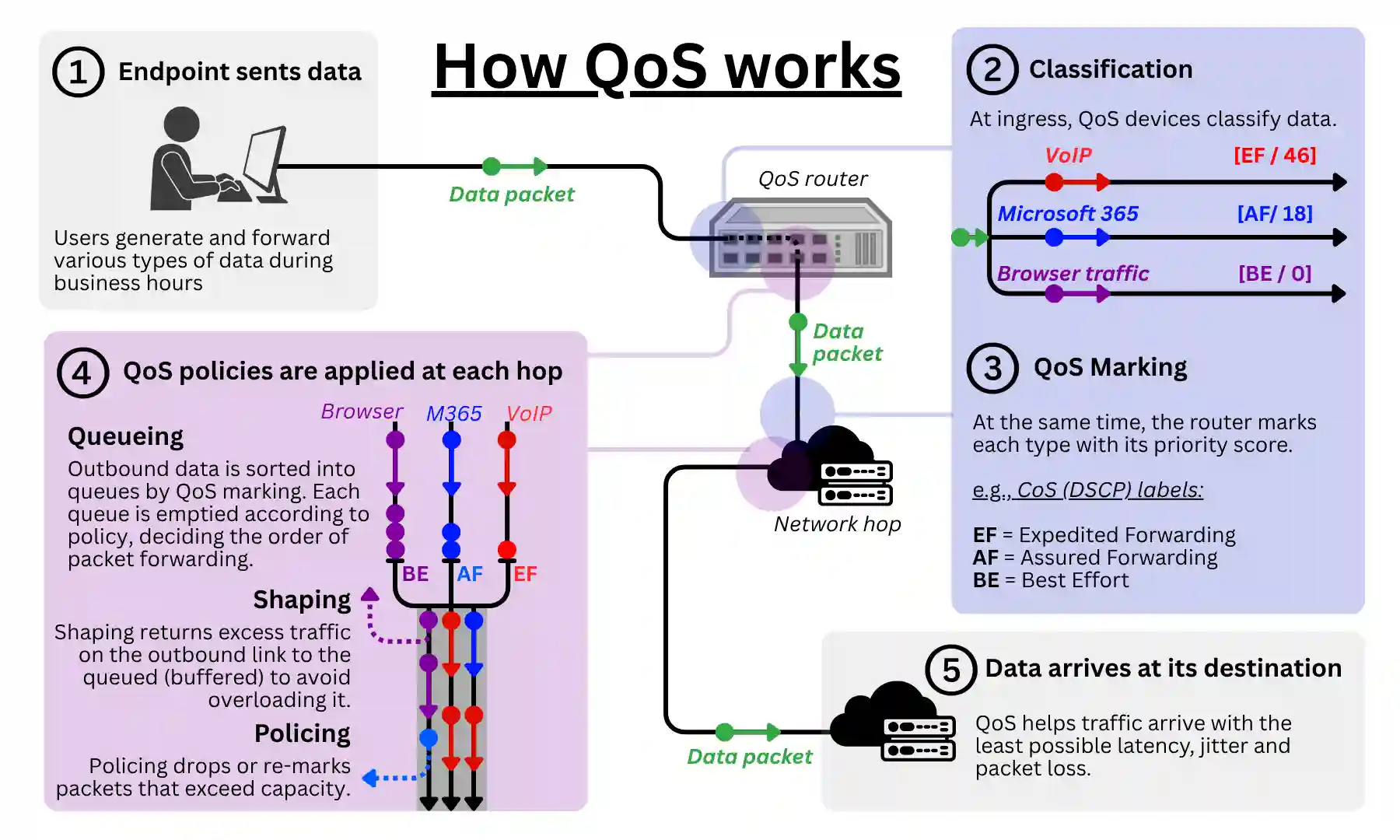
1. Data is generated and sent
Traffic subject to QoS policies can originate from user devices, cloud applications, local servers, micro-services, and similar sources.
Traffic from latency-sensitive applications often leaves the source pre-marked to indicate its end-to-end priority from the start.
The data packet then travels normally until it reaches its first network hop, usually a local network switch or a router at the LAN edge.
2. Data is classified into types
At the first network edge, unmarked data packets are classified by the networking device at that location, typically a switch, router, or a firewall.
Typical classifications include “VoIP” for all voice calls, “Video” for any streaming content, and “Default” for everything else.
Basic devices can classify data based only on IP headers (source and destination addresses) or VLAN tags (switch ports).
Enterprise-grade devices can inspect the contents of data packets and classify traffic more granularly by application, type, or both, allowing finer-grained QoS policies further down the line.
3. Data is marked with a priority score
Once classified, the same networking device at the edge tags the data with a QoS marking that carries its priority score.
The type of marking (its protocol and underlying technology) depends on the network through which the data is being forwarded. The most common are:
- DSCP markings, which are read across IP networks, such as public internet pathways.
- 802.1p markings, which are read across Ethernet networks such as local area networks and private Business Ethernet WANs.
Often, latency-sensitive traffic arrives pre-tagged from its source. These markings may then be preserved, translated, or overwritten as traffic crosses different network boundaries (ISP networks, MPLS, cloud WANs) on its end-to-end journey.
4. QoS policies are applied at each hop
As marked traffic arrives at each network hop, the device’s scheduler determines how and when to forward it using QoS queueing, traffic shaping, and policing policies:
- Queueing: Traffic is sorted into separate queues based on priority, such as voice, video, or default traffic. The device forwards higher-priority queues first when the link is congested.
- Traffic shaping: Devices smooth the outbound flow of traffic by buffering excess deprioritised packets and releasing them at a steady rate. This helps prevent bursts from overwhelming slower links.
- Policing: Devices enforce hard rate limits by dropping or re-marking traffic that exceeds the allowed threshold. This is often used to cap low-priority traffic or enforce contracted bandwidth limits.
5. Data arrives at its destination
QoS ends once data is forwarded from its last network hop to its destination. Prioritised traffic should arrive within milliseconds (low latency) and with minimal packet loss. The success of QoS is then assessed through four key KPIs.
What are the outcomes of QoS?
QoS exists to keep critical applications working properly during network congestion.
Four Key Performance Indicators (KPIs) measure how well it succeeds. When any of them drift past certain thresholds, problems become noticeable: VoIP call quality lowers, sound garbles, video streams pixelate, and so on.
The four metrics are:
- Minimal latency: The delay between a packet leaving its source and arriving at its destination, measured in milliseconds. Voice and video feel natural under 150ms one-way; past 200ms, conversations start stepping on each other. Web browsing and email are far less latency-sensitive.
- Minimal jitter: The variation in latency from one packet to the next. Even with good average latency, inconsistent arrival times wreck real-time media. Voice and video need jitter under ~30ms (ideally under 10ms); bulk traffic like file transfers is largely unaffected.
- Minimal packet loss: The percentage of packets that never arrive. Voice calls degrade past 1% loss and become unusable past 3%. Video tolerates slightly more thanks to error correction. TCP-based applications (web, email, file transfer) recover automatically, just more slowly.
- Consistent throughput: The actual data rate a flow achieves, measured in Mbps. Bandwidth is the link’s theoretical capacity; throughput is what an application gets in practice, and it drops when other traffic competes for the same pipe. When deliberately configured, QoS can reserve or prioritise bandwidth for important traffic, guaranteeing a minimum throughput for prioritised flows even under congestion.
Does your business need QoS?
In most cases, small organisations do not need to actively configure QoS. Modern business-grade routers apply basic prioritisation by default, and major platforms like Microsoft Teams, Zoom, and hosted VoIP services mark their own traffic automatically.
For most single-office SMEs, good connectivity comes down to removing bottlenecks in the underlying network:
- Adequate WiFi coverage, often through mesh networks.
- Local infrastructure with the appropriate configuration and capacity.
- Sufficient bandwidth (business broadband speeds), with a secondary connection for load balancing and failover at the local edge. Leased line business broadband is the best choice as it provides fully uncontended capacity when available.
- Service peering: Ensuring the business broadband provider or WAN vendor/service provider has peering with key cloud services ensures default QoS is applied end-to-end by avoiding the public internet.
With these foundations in place, default QoS only needs to step in during occasional congestion.
However, active QoS configuration becomes essential when architectures are more complex, traffic is more variable, or the stakes are higher:
- Multi-site and SD-WAN environments: SD-WAN needs explicit classifications to make path selection decisions. Sending voice over the MPLS link and business data backups over standard broadband, for example, requires policies that tell the overlay which traffic is which. See our SD-WAN explainer for more on this disruptive WAN technology.
- Bandwidth-constrained or asymmetric connections: When a link is regularly saturated, default QoS protects the top-priority class but leaves everything else fighting for scraps. A 20 Mbps SoGEA business broadband connection hit by a OneDrive sync will still prioritise voice, but the CRM, email, and web apps will struggle unless active shaping caps the backup traffic.
- Managing traffic beyond the top priority class: Default QoS is essentially “voice first, everything else best-effort.” Active QoS adds finer control, such as throttling or deprioritising backups, Windows Updates, guest WiFi, and CCTV uploads so they cannot crowd out business-critical traffic.
- Regulatory or SLA-driven environments: Financial services, healthcare, and other regulated sectors often need to demonstrate consistent performance for specific traffic types. QoS provides both the enforcement mechanism and the reporting trail to evidence it.
Where QoS makes a difference in business networks
The following examples show how QoS protects important traffic against congestion, both through default behaviour and through active configuration.
VoIP and video communications
A 25-person marketing agency runs hosted VoIP and daily Teams calls over a cost-efficient 500 Mbps symmetric, full fibre business broadband line with active QoS configured by the IT team.
QoS lets the agency ride out the 09:30 connectivity rush hour without dropped calls or pixelated video. Even under contended broadband, with most of the team on Teams calls, clients joining video meetings, and visitors hammering the guest WiFi, real-time applications stay responsive thanks to:
- High priority queueing: Teams and VoIP packets are classified, marked DSCP EF, and placed in a strict-priority queue at the router by default.
- Shaping: Browsing, OneDrive sync, and software updates are shaped to leave bandwidth headroom for calls.
- Policing: Guest WiFi is policed with a fixed maximum share of the connection, so it cannot crowd out business traffic.
Cloud applications
A 15-person accountancy practice runs all its workflows in the cloud: Xero, Microsoft 365, and a hosted client portal, sharing the same 500 Mbps fibre broadband line as the previous example.
QoS lets the practice absorb the heavy upload activity that peaks in the weeks before tax deadlines. Even when several colleagues are syncing large client folders to OneDrive while others work in Xero and the hosted portal, cloud applications stay responsive thanks to:
- Queueing: Xero and client portal traffic is classified as business-critical, marked DSCP AF21, and given a guaranteed bandwidth share through CBWFQ.
- Shaping: OneDrive uploads are capped at 60% of the line, keeping them reasonably quick without starving other applications.
- Low priority: General browsing and software updates are left at default priority and yield bandwidth whenever a higher class needs it.
- End-to-end priority: DSCP markings are honoured across Microsoft’s peered network, preserving priority all the way into Microsoft 365.
IoT and operational technology
A rural boutique hotel with 30 rooms runs payment terminals, a cloud booking system, CCTV cameras, smart room controls, and guest WiFi over a dedicated 500 Mbps wireless leased line.
QoS lets the hotel handle the busy evening period when guests are streaming in their rooms, the bar is processing card payments, and reception is checking in new arrivals over a bank holiday.
With everything happening at once, business systems stay responsive thanks to:
- Layer 2 priority: Payment terminals and the booking system sit on their own VLAN, tagged 802.1p priority 5, and given strict precedence at the router.
- IoT priority: Smart room controls (heating, lighting, keycards) are given a small guaranteed bandwidth share so commands always execute instantly.
- Policing: Guest WiFi is policed at 40% of the connection so room streaming cannot interfere with operations.
Multi-site setups managed through SD-WAN
A growing architecture firm has expanded to four studios across the South East, each connected via a Business Ethernet line for shared file and design workloads, with standard broadband as a secondary path.
With SD-WAN layered on top, the firm’s single IT manager applies consistent QoS policies across every site without configuring each router by hand. As the business grows, QoS scales with it:
- Application-aware classification: CAD file transfers, BIM collaboration, video conferencing, and general browsing are identified automatically across all four sites.
- QoS and route optimisation: CAD and BIM traffic is routed down the Business Ethernet line with strict priority, where 802.1p markings are honoured end-to-end across the carrier’s network.
- Path selection for low-priority traffic: Software updates, web browsing, and cloud sync are pushed out over the broadband path and shaped so they never affect studio workloads.
- Centralised policy management: Policies are applied from a single dashboard, so when the fifth site opens, the same rules apply from day one.
Best practices for QoS implementation
Active QoS deployments are handled by qualified parties, whether an in-house IT team or a third party such as a cloud-managed WAN service, SD-WAN provider or business broadband provider.
In any case, decision makers need to understand the principles behind a successful QoS implementation. The main best practices are:
- Classifying traffic before prioritising it: Business-critical, real-time and bulk traffic all need to be identified and mapped before any policies are applied.
- Using standard DSCP markings: Industry conventions (EF for voice, AF41 for video, and so on) ensure traffic is handled consistently across any boundary the network doesn’t control.
- Marking traffic as close to the source as possible: The earlier traffic is classified, the more consistently it’s handled downstream, ideally at the source or first switch.
- Applying policies where congestion actually happens: QoS only acts when a queue is full, which is almost always the LAN-WAN edge or inter-site links. In other words, at the site’s router or firewall.
- Keeping the number of classes manageable: Four to six traffic classes are enough for most businesses; more becomes hard to maintain and rarely improves outcomes.
- Testing under realistic load: Policies that look right on paper often behave differently when the link is actually saturated, so validation with real traffic matters more than configuration reviews.
- Revisiting policies as the business changes: Traffic patterns shift with new tools and workflows, so QoS policies need to be regularly reviewed.
The technical detail behind QoS
The general QoS process described above works as an overview, but ignores the key inner workings and subtleties of each QoS step, including classification, marking, and QoS policy mechanics.
Below we break these down in detail:
1. Classification methods and devices
There are three tiers of data classification for QoS prioritisation:
Basic inspection
Performed by basic switches, routers and firewalls
Analyses packet and frame headers such as VLAN ID, source and destination IP addresses, port numbers, or protocol type.
It relies on the appropriate mapping of switch ports to VLANs (e.g., VoIP deskphone plugs into port 23, which gets the VoIP VLAN).
It’s fast and supported by virtually all network hardware, but relies on admins mapping the data appropriately.
Deep Packet Inspection (DPI)
Performed by next-generation firewalls (NGFWs), enterprise broadband routers and SD-WAN appliances
Examines the actual contents of the packet rather than just the headers, recognising specific applications such as Microsoft Teams or Zoom even on shared or encrypted ports.
DPI continues to grow as more enterprises adopt NGFWs and SD-WAN, yet requires far more processing power and is more expensive.
Application-aware classification
Performed by next-generation firewalls and SD-WAN appliances
Builds on DPI with behavioural analysis and signature databases, identifying thousands of applications and distinguishing between their sub-features.
For example, it can discern between a Teams voice call and a Teams file transfer, or a Salesforce API request versus a Salesforce web session.
This is the most powerful form of classification and a defining feature of modern business SD-WAN solutions.
QoS marking standards and how they define priority
Several QoS marking standards have emerged over the years to accommodate different network types, devices, and layers, each with their own priority ranges, levels of detail, and quirks around backwards compatibility, wireless handoffs, and how they survive (or don’t) when crossing between networks.
For practical purposes, the four most commonly used marking systems in business networks today are:
- DSCP (Differentiated Services Code Point): This is a 6-bit field in the IP header offering 64 priority values, used for QoS across IP networks including the public internet, MPLS WANs, and SD-WAN overlays. It is the dominant standard in modern business networks. Common values include EF (Expedited Forwarding, value 46) for voice, AF41 (34) for video, and CS0 (0) for best-effort traffic.
- 802.1p (Class of Service): This is a 3-bit field within the 802.1Q VLAN tag offering 8 priority values (0–7), used for QoS within Ethernet LANs. It only works on tagged links, so the marking is lost once traffic leaves the VLAN trunk.
- MPLS Traffic Class: This is a 3-bit field in the MPLS header offering 8 priority values, used to carry QoS information across MPLS wide area networks. It is typically mapped to and from DSCP values at the edge of the carrier’s network.
- WMM (WiFi Multimedia): This is a wireless QoS standard defined by 802.11e that sorts traffic into four access categories: Voice, Video, Best Effort, and Background. Access points map these to and from DSCP values when traffic crosses between wired and wireless segments. Available on WiFi 4, 5 ,6 and WiFi 7.
Older standards such as IP Precedence (the 3-bit predecessor to DSCP) and ATM or Frame Relay markings still exist in legacy equipment but are rarely configured in new deployments.
QoS queueing, traffic shaping and policing mechanics
The conceptual roles of queueing, shaping and policing are straightforward enough, but the algorithms that make them work vary considerably depending on the device, the traffic mix, and the level of sophistication required.
Queueing algorithms
Every queueing system combines two components: a set of queues into which classified packets are placed, and a scheduler that decides which queue to service next. The differences lie in how the scheduler makes that decision.
There are many legacy scheduling algorithms in existence; however, two dominate in modern networking:
- Low Latency Queueing (LLQ): Combines a strict-priority queue for delay-sensitive traffic with weighted fair queueing for everything else. The priority queue is itself policed to prevent it starving the rest of the link. This is the default scheduler on most enterprise WAN edges, handling VoIP, video conferencing and general data on the same connection.
- Class-Based Weighted Fair Queueing (CBWFQ): Lets administrators define traffic classes manually and guarantee each a minimum share of bandwidth, without a strict-priority queue. Used where bandwidth guarantees matter more than latency, such as ensuring backup or replication traffic always gets its share.
LLQ is effectively the standard on enterprise routers and firewalls, with CBWFQ used either on its own or as the foundation LLQ is built on.
Traffic shaping algorithms
Shaping works by holding packets in a buffer and releasing them at a steady, configured rate.
The mechanism behind this is conceptually simple: the device tracks how much traffic has been sent against an allowance that refills over time, and only releases packets when there’s enough allowance available.
Short bursts above the rate are permitted, but sustained traffic is smoothed back down to the configured average. Shaping policies are usually defined by two numbers: a Committed Information Rate, which is the long-term average enforced rate, and a Burst size, which sets how much traffic can pass at full speed before the cap kicks in.
Shaping is what allows a fast office network to hand off cleanly to a slower contracted WAN circuit without overwhelming it.
Policing algorithms
Rather than buffering excess packets and releasing them later, policing drops them or re-marks them to a lower priority on the spot. This makes it cheaper to implement and instantaneous in effect, but harsher on traffic.
Most business-grade policing operates on a “traffic light” model with three outcomes:
- Green: Traffic within the agreed rate, forwarded normally.
- Yellow: Traffic exceeding the rate but within a tolerated burst, usually re-marked to a lower priority and forwarded if there’s room.
- Red: Traffic well over the rate, dropped immediately.
This is why business broadband and Ethernet contracts often quote both a committed and a peak rate; the figures map directly onto the policer enforcing them at the carrier edge, deciding what’s green, yellow or red.
Buffer management
Underpinning all three mechanisms is buffer management, the rules that decide what happens when a queue fills up. The simplest approach, tail drop, simply discards any new packet arriving at a full queue, and is still the default on basic switches.
More sophisticated devices use Weighted Random Early Detection (WRED), which begins dropping packets probabilistically before the queue is full, with higher drop rates for lower-priority traffic.
This signals TCP senders to slow down gracefully and prevents the synchronised retransmissions that cause throughput to collapse periodically on busy links. Standard on enterprise WAN routers carrying mixed voice, video and bulk traffic.
Quality of Service (QoS) – FAQs
Our business networking experts answer commonly asked questions regarding Quality of Service (QoS) in a business environment:
Why do my VoIP calls drop when someone downloads a file?
The upload side of the connection is saturating before QoS can protect voice traffic. VoIP uses very little bandwidth but is highly sensitive to delay, so a large upload or cloud sync can fill the upstream queue in seconds.
The fix is usually active QoS shaping at the broadband router, by using a higher speed connection from a leased line provider, or both. Compare business broadband deals to upgrade at the lowest cost possible.
Does QoS make my network faster?
No, QoS decides which traffic gets served first when capacity is full, but it doesn’t add bandwidth.
On an uncongested network it makes no measurable difference. If a network feels slow most of the time, the answer is more bandwidth.
What is a jitter buffer?
A jitter buffer is a small holding area on the receiving end of a VoIP or video call that smooths out variations in packet arrival times.
It’s a VoIP-specific QoS system that briefly holds incoming packets and releases them at a steady rate, which is what stops calls from sounding choppy. Larger buffers handle more jitter but add latency, so most systems tune them dynamically.
How does QoS help with Microsoft Teams performance?
Microsoft Teams marks its own traffic with standard DSCP values (EF for audio, AF41 for video, AF21 for screen sharing), which QoS-aware devices recognise and prioritise by default.
Do QoS markings work across the public internet?
Generally, no. Most ISPs and transit providers strip or ignore DSCP markings at network boundaries, so QoS is reliably honoured within managed networks (LAN, WAN edge, SD-WAN or MPLS paths) but not across the wider internet.
Default end-to-end QoS, therefore, works well for traffic staying within a single provider’s network, but loses its guarantees once it crosses into the public internet.
For businesses reliant on a specific cloud platform, options like Azure ExpressRoute, AWS Direct Connect, SD-WAN with cloud on-ramps, or ISPs with direct peering preserve QoS treatment end-to-end and deliver more predictable performance.
Does QoS work for IoT devices?
Yes, but usually instead of being prioritised, it is throttled or limited to ensure it can’t crowd out interactive business applications.
Most IoT devices generate constant background traffic that isn’t latency-sensitive but can consume meaningful bandwidth.
Do I need QoS on my switches and wireless access points or just my router?
End-to-end QoS works best when every device respects the same markings, but the router or WAN edge is where it matters most because it is where congestion typically occurs because the broadband connection to the internet (the WAN link) is usually slower than the LAN.
Switches and wireless access points pass markings through, but on most business networks the LAN has enough spare capacity that QoS rarely needs to act there.
What is WMM?
WMM (WiFi Multimedia) is the wireless equivalent of QoS. It defines four access categories (voice, video, best-effort and background) and gives higher-priority traffic faster access to airtime when the wireless medium is busy. Almost every modern access point supports WMM, and it is enabled by default.
How do I test if QoS is working?
The standard approach is to generate controlled congestion using a tool like iPerf, then run a VoIP call or Teams meeting alongside it to trigger QoS and confirm critical traffic stays clean.
DSCP markings can be verified at different points in the network with a packet capture tool such as Wireshark, and most business-grade routers expose queue statistics showing what is being prioritised, dropped or shaped.
Can QoS guarantee my VoIP calls will always be clear?
No. QoS improves call quality during congestion but cannot compensate for problems outside its control, such as packet loss on the wider internet, an undersized connection, or an ISP that strips DSCP markings.
QoS is one layer of a reliable voice setup; the others are sufficient bandwidth, a quality connection, and ideally a secondary circuit for failover.
Should I get more bandwidth or configure QoS?
If the connection is regularly saturated, more bandwidth is the right answer. QoS manages congestion but does not eliminate it.
If the connection has headroom most of the time but struggles during backup windows or peak periods, QoS is the more targeted fix. Most businesses benefit from getting the bandwidth right first, then using QoS to protect critical traffic against predictable spikes.
 Back to blog