Our use of cookies
What are business Virtual Local Area Networks (VLANs)?
VLANs group and segment local internet traffic at a business site. Network admins use them to keep guest WiFi separate from employee networks, voice and video calls prioritised, and traffic from different departments segmented at the switch port level.
This article explains how VLANs work, what they’re used for and by who, and how to configure them across various business environments.
Contents:
What is a VLAN?
A VLAN (Virtual Local Area Network) partitions a wired local area network (LAN) into separate, logical groups. Instead of building multiple physical networks, a VLAN lets an administrator create virtual network segments using the same switches and cabling.
VLANs act as isolated broadcast domains; self-contained sections of the network that group devices such as PCs, servers, printers, or even entire WiFi networks. Network switch ports are assigned to a VLAN, so devices plugged into those ports become part of that specific virtual subnetwork.
For example, an HR department might place its PCs, servers, and WiFi access points into an HR VLAN, assigning them only to the switch ports used by those devices (e.g., Ports 01 to 04). Other VLANs can be created for other departments, guests, contractors, or vulnerable IoT devices to keep their traffic separate.
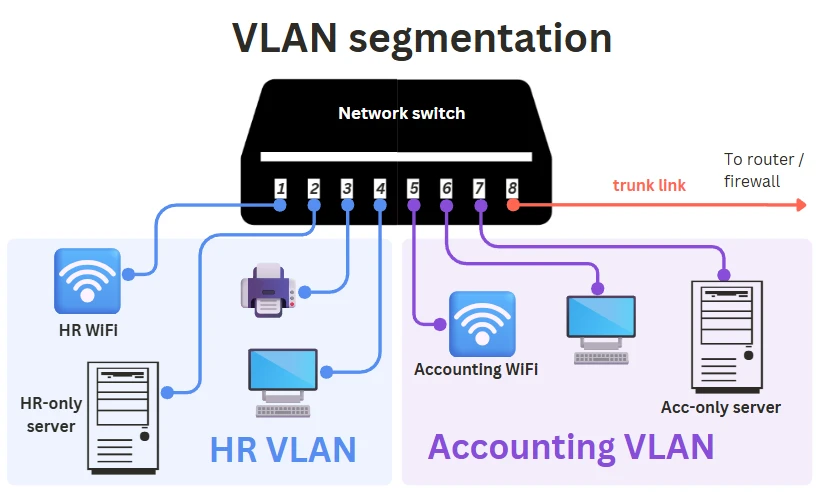
Unlike application-level access control (e-mail, cloud VoIP, CRMs), VLANs operate strictly at Layer 2 (at the local network), giving administrators control over how traffic is separated before it ever reaches higher-level systems or cloud services.
Overall, VLANs help keep local network traffic organised and contained without needing extra switches, routers, or cabling, and without relying on third-party cloud tools.
How does a VLAN work?
A VLAN works by separating a physical LAN into multiple virtual broadcast domains, each functioning as a self-contained subnetwork.
These VLANs are configured by administrators and enforced by VLAN-aware switches, routers, and WiFi access points using the standard IEEE 802.1Q tagging method.
In simple terms, VLANs let administrators organise and isolate traffic at the Ethernet/Layer-2 level, before it ever reaches higher-level applications or cloud services.
Here is a step-by-step of how a VLAN works:
1. Admins define the VLANs
Network admins decide which users, devices, or traffic types need segmentation and what each VLAN should achieve. Common goals include:
- VoIP call quality (QoS): VoIP VLAN prioritises voice/video packets.
- Department or role separation: HR, Finance, IT, or contractors isolated by team.
- Guest and IoT isolation: Unsafe or untrusted devices separated from the core LAN.
- WLAN separation: Each WiFi SSID (Guest, Office, IoT) is mapped to its own VLAN.
- Remote access alignment: VPN users are dropped into matching internal VLANs.
- Cybersecurity compliance: Sensitive traffic routed through isolated segments for HIPAA/FCA-style controls.
- Time-based access: Scheduled VLAN policies restricting access outside work hours.
Once requirements are defined, admins can assign devices to VLANs based on switch ports, MAC addresses, device types, 802.1X authentication, or WiFi SSIDs.
2. VLAN tagging (802.1Q)
To separate traffic, VLAN-aware switches label Ethernet frames with a VLAN ID using IEEE 802.1Q tagging. This is a globally standardised technology that groups switch ports (and their devices) into virtual networks. Tagging has two main components:
VLAN switch ports
There are two types of switch ports:
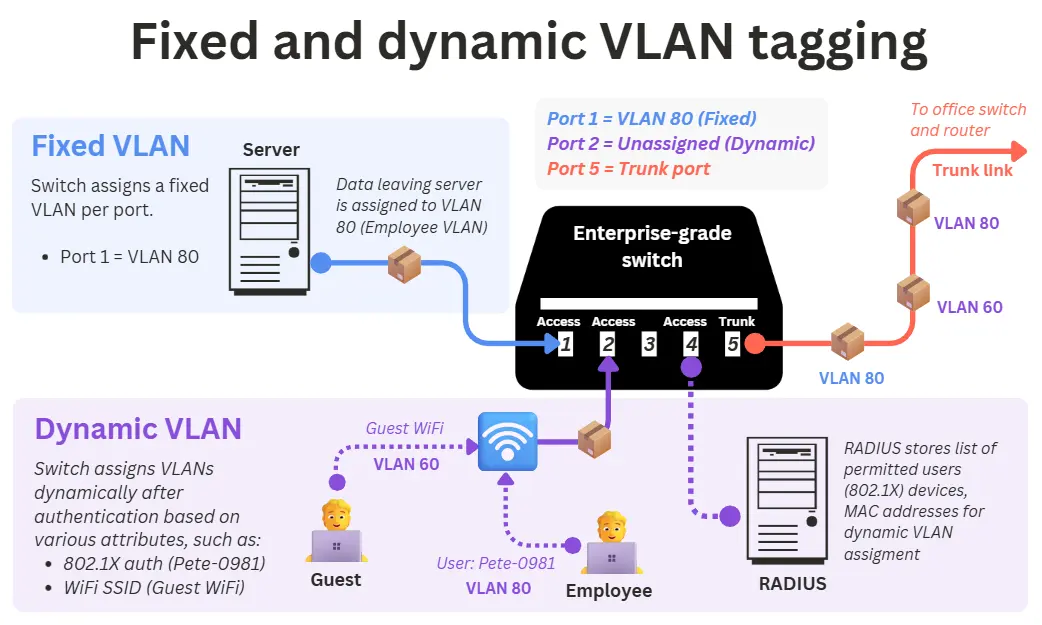
- Access ports: These connect end devices (PCs, printers, cameras) and carry traffic for a single VLAN. All Ethernet frames (data packets) are untagged on this link. Supports both fixed and dynamic VLAN assignment.
- Trunk ports: These connect switches, routers, and WiFi access points (APs) and carry multiple VLANs simultaneously. All frames on these ports are tagged with a VLAN ID, forming the core trunk links of the LAN.
Fixed or static VLAN assignment
VLANs are manually tied to specific switch ports. This is ideal for fixed devices such as desktops, servers, or printers.
Dynamic VLAN assignment
Dynamic VLAN assignment enables a switch to assign each authenticated device to the correct VLAN automatically. The switch forwards authentication requests (802.1X or MAC authentication) to a RADIUS server, which returns the correct VLAN ID.
This lets each device join the correct VLAN based on its identity (user credentials, device certificate, or MAC address). Dynamic VLANs are widely used in environments where user/device identity changes frequently, such as:
- Hot desking: Each user gets the correct corporate VLAN no matter where they plug in.
- IoT or printer networks: Non-802.1X devices use MAC Authentication Bypass (MAB).
- Wireless networks: A RADIUS server can dynamically assign VLANs to users, even on the same SSID.
- Mixed-device ports (PC + IP phone): Multi-domain or multi-auth lets voice and data devices get different VLANs on the same port.
However, they require enterprise-grade switches that support 802.1X, MAB, and RADIUS. The diagram below illustrates both dynamic and fixed VLAN tagging:
3. VLANs apply access and segmentation policies
After frames are tagged, VLAN-aware devices enforce the rules associated with each VLAN:
- Switches: Keep VLANs isolated and ensure traffic only moves within the correct broadcast domain.
- Routers: Perform inter-VLAN routing, directing traffic from one VLAN/subnet to another or out to the wider network.
- Wireless APs: Map VLAN-tagged traffic to the correct WiFi networks (e.g. Guest VLAN traffic is carried over the Guest SSID).
- Firewalls: Remove VLAN tags at Layer 3 and apply security rules (allow, deny, inspect, log) based on the VLAN’s assigned access permissions.
VLANs provide strong segmentation at the port and SSID level, but higher-level controls, such as Single Sign-On, Conditional Access, and app-level policies, are still needed to govern access to cloud services, user accounts, and apps.
Types of VLANs
All VLANs rely on the same IEEE 802.1Q tagging standard, but organisations use them in different ways depending on the traffic they need to separate. These are not fundamentally different technologies, only different design roles that determine how the VLAN is used.
Below are the most common VLAN roles found in business networks.
Data VLAN
VLANs are used to separate everyday business traffic by department, role, or user group.
A Data VLAN (also called a user or access VLAN) carries general business traffic such as web access, email, file transfers, and internal applications. These VLANs are often organised by department or security level, for example:
- VLAN 30 for Finance
- VLAN 40 for Executive devices
Voice VLAN
VLANs that prioritise VoIP and real-time call traffic.
A Voice VLAN carries business VoIP phone system traffic separately from regular data. Combined with QoS markings (e.g., DSCP EF 46), it ensures low latency, minimal jitter, and consistent call quality.
Management VLAN
A VLAN reserved exclusively for managing critical network devices.
A Management VLAN isolates the in-band management interfaces of switches, routers, firewalls, wireless APs, and controllers. Restricting access to this VLAN ensures that only authorised administrators can configure or monitor the network, greatly improving security. Under no circumstances should this be reachable from guest or IoT networks.
Default VLAN
The VLAN that is automatically assigned to unconfigured switch ports.
On many switches, this is VLAN 1 (though not universally). Devices may temporarily use the default VLAN during onboarding, after which they should be placed in the correct Data, Voice, or Management VLAN. The default VLAN usually has only basic privileges, often limited to internet access.
Guest VLAN
A fallback or low-trust VLAN for unauthenticated or visitor devices.
A Guest VLAN is used with 802.1X authentication. When a device connects but fails authentication, the network can place it on the Guest VLAN rather than blocking it entirely.
This VLAN typically offers limited connectivity, such as providing internet-only access or redirecting the user to a captive portal.
Guest VLANs are commonly used for onboarding new devices, supporting guest WiFi networks, and securing unmanaged or publicly accessible ports by preventing them from granting internal access.
IoT VLAN
A VLAN dedicated to isolating low-trust or unmanaged devices.
An IoT VLAN separates devices such as cameras, printers, sensors, TVs, and industrial equipment from the main corporate network. These devices often lack strong security, so an IoT VLAN limits their access to only the required servers or cloud services. This greatly reduces risk and prevents compromised IoT devices from reaching critical systems.
Transit VLAN
VLANs are used exclusively for routing traffic between network devices.
A Transit VLAN carries inter-device traffic such as routing updates, inter-VLAN routing, or Next Generation Firewall uplinks. No end-user devices should exist in this VLAN. Transit VLANs are common in router-on-a-stick setups, switch-to-firewall links, and redundancy protocols like HSRP or VRRP. They should be tightly controlled, as they often carry high-privilege traffic.
Trunked VLANs
The set of VLANs allowed to travel across a trunk link.
A trunk link (e.g., switch-to-switch, switch-to-router, or switch-to-AP) can carry multiple VLANs at once using 802.1Q tags. The VLANs permitted across that link are known as allowed VLANs or trunked VLANs. This is a port configuration, not a separate VLAN type.
Native VLAN
The VLAN that is used for untagged traffic on a trunk link.
On an 802.1Q trunk, all VLANs except one are tagged. Any untagged frame arriving at the trunk is assigned to the Native VLAN, often set to a dedicated, unused VLAN such as 99 or 999. Its main purpose today is troubleshooting and safely handling misconfigured or unexpected traffic.
Private VLAN (PVLAN)
A specialised VLAN type for isolating devices within the same VLAN.
PVLANs subdivide a primary VLAN into multiple isolated secondary VLANs. Devices can share upstream resources (e.g., internet access) but cannot communicate with each other. They are commonly used in hosting, VPS platforms, and multi-tenant data centres.
VLAN assignment criteria
Most VLANs in a business network are assigned based on which switch port the device is plugged into. This is the traditional method, and it still works well, but as businesses switch to Zero Trust Network Architecture for IoT, cloud applications, hot-desking, and hybrid work, relying solely on port-based trust is no longer enough.
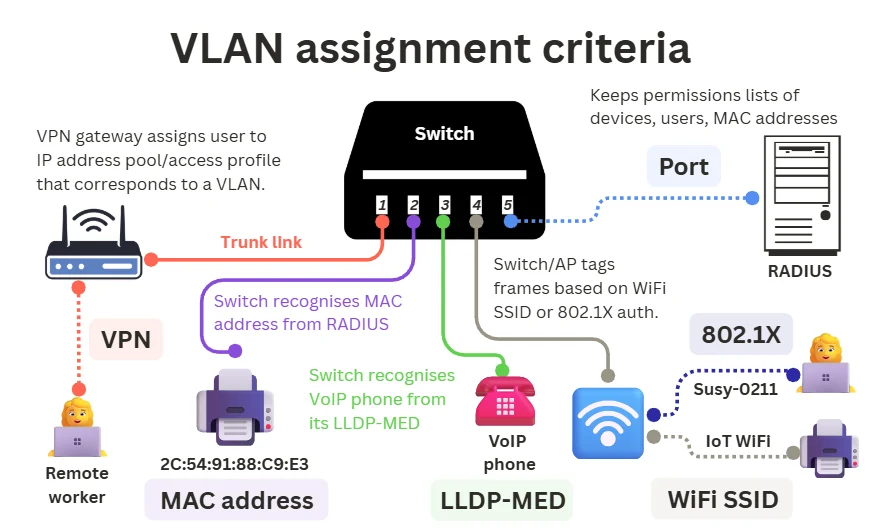
Modern networks use a combination of identity, device type, authentication, and wireless context to place devices into the correct VLAN automatically. Below are the main VLAN assignment methods used today.
Switch ports
Any switch port on a managed switch can be configured so that all traffic from port X goes to VLAN Y. This is the traditional “Fixed VLAN” method and remains the foundation of most networks.
In these setups, Zero Trust security can be enforced above the VLAN layer using 802.1X authentication and app-based access control.
MAC Addresses
Every device has a unique MAC address. Using MAB (MAC Authentication Bypass), the switch sends the MAC to the RADIUS server, which stores a list of allowed MACs and returns the VLAN to assign.
This is commonly used when devices cannot authenticate with 802.1X, such as printers, IP cameras, IoT devices and legacy equipment.
MAC-based assignment increases flexibility, allowing these devices to join the right VLAN regardless of which port they use. However, it is less secure than 802.1X and is usually combined with additional policies.
802.1X user or device authentication
In enterprise networks, VLANs can be assigned based on the authenticated identity, not the physical port. When a device connects over Ethernet or WiFi, the switch or AP sends authentication details to a RADIUS server (stores a list of allowed devices and users), which returns the appropriate VLAN.
This allows consistent access across desks, floors, and wireless networks. For example:
- HR users → HR VLAN
- Sales users → Sales VLAN
- Contractors → Restricted VLAN
WiFi SSID
On wireless networks, it is the access point (not the switch) that assigns VLANs. Each SSID is mapped to a specific VLAN, and the access point tags wireless traffic before forwarding it to the switch via a trunk link.
Examples:
- “Office” SSID → VLAN 20
- “Guest” SSID → VLAN 50
- “IoT” SSID → VLAN 60
Many enterprise systems also support dynamic VLAN assignment over WiFi via RADIUS, enabling per-user or per-device VLAN assignment.
LLDP-MED or CDP
Some devices, especially VoIP phones, identify themselves to the switch using LLDP-MED (Link Layer Discovery Protocol-Media Endpoint Discovery) or CDP (Cisco Discovery Protocol). These Layer-2 messages tell the switch what type of device has connected, so it can automatically assign the correct VLAN.
This allows a switch to differentiate between multiple devices on the same port, such as:
- the phone (Voice VLAN)
- a computer daisy-chained through the phone (Data VLAN)
VPN user profiles (remote access)
Remote users cannot join a VLAN directly because VLANs operate within the local network. Instead, the VPN gateway assigns users to IP address pools and access profiles based on their credentials. These pools correspond to the same network segments that internal VLANs connect to through the firewall or router.
In practice, this means:
- VPN users are routed into the correct internal segment
- The same firewall and access rules used for the on-site VLAN apply to remote workers
This keeps on-site and remote access consistent.
Device profiling
Some NAC systems (such as Cisco ISE or Aruba ClearPass) can identify what type of device has connected by analysing attributes like DHCP fingerprint, MAC addresses, LLDP/CDP information, and network behaviour. Once the device is profiled, the RADIUS server returns the correct VLAN without relying on 802.1X or static MAC lists.
This is commonly used for IoT devices, printers, cameras, TVs, and other devices that cannot authenticate but still need to be automatically placed into the correct segment.
DACL (Downloadable ACL)
In addition to assigning a VLAN, a RADIUS server can push a Downloadable ACL to the switch or access point after authentication. A DACL defines exactly what the device is allowed to access, providing finer control than VLAN separation alone.
This enables Zero Trust-style restrictions (for example, allowing a printer to reach only the print server) regardless of which VLAN the device is on.
VLAN security
VLANs enhance network security by separating traffic into isolated segments and supporting access-control policies.
However, VLANs do not encrypt data, and misconfigurations at the switching or trunking layer can create vulnerabilities that attackers may exploit.
Like any network control, VLANs strengthen security only when properly implemented.
VLAN vulnerabilities and how to prevent them
Below are the most common VLAN-related security risks and how to mitigate them.
Unauthorised access and VLAN hopping
Attackers may attempt to bypass segmentation by exploiting misconfigured switch ports or trunk links. Common techniques include:
- Switch spoofing: Tricking a switch into treating the attacker as another switch and enabling trunking.
- Double tagging: Inserting multiple VLAN tags to escape the native VLAN (rare but possible on misconfigured networks).
Although modern switches reduce these risks, weak configurations can still allow lateral movement.
Mitigations:
- Disable DTP or automatic trunk negotiation.
- Manually define all trunk ports.
- Assign an unused VLAN as the native VLAN.
- Disable unused switch ports and/or place them in a restricted VLAN.
Traffic manipulation and spoofing
Attackers may attempt to impersonate legitimate devices or manipulate traffic at Layer 2.
One common method is ARP spoofing, where an attacker sends forged ARP replies to associate their MAC address with another device’s IP (such as the gateway).
This allows them to redirect, intercept, or modify traffic on the VLAN. These attacks can lead to data exposure, tampering, or privilege escalation if additional protections are not in place.
Mitigations:
- Enable Dynamic ARP Inspection (DAI).
- Enable DHCP snooping and IP source guard.
- Use 802.1X and port security.
Denial-of-service (DOS) and network overload
A malicious user can flood a VLAN or trunk link with high volumes of traffic, overloading switch CPUs or exhausting MAC address tables. This may degrade performance or disrupt inter-VLAN routing.
Mitigations:
- Implement storm control.
- Limit broadcast/multicast rates.
- Use port security and access control lists (ACLs).
Misconfiguration and routing issues
Incorrect VLAN assignments, overly permissive trunk settings, or weak inter-VLAN ACLs can unintentionally expose systems meant to be isolated, expanding the attack surface.
Mitigations:
- Use explicit “deny-by-default” ACLs between VLANs.
- Audit switch and firewall policies regularly.
- Avoid using VLAN 1 for production traffic.
Man-in-the-middle attacks
VLANs segment traffic but do not encrypt it. Devices on the same VLAN or compromised access ports may still intercept or alter unencrypted communications.
This is particularly risky in flat or poorly segmented networks, networks without encryption, or open office ports/shared spaces.
Mitigations:
- Encrypt sensitive traffic (TLS/SSH/IPsec).
- Use strong authentication and port controls.
- Limit physical access to network jacks.
VLAN encryption
VLANs do not provide encryption or confidentiality. They only segment traffic into separate broadcast domains. Any organisation requiring privacy, tamper protection, or eavesdropping resistance must use additional encryption controls as part of a broader cybersecurity solution.
Common options include:
- Full Disk Encryption (FDE): Protects data stored on laptops, desktops, servers, and removable media by encrypting the entire drive. Even if a device is lost or stolen, the contents remain inaccessible without the proper credentials or keys.
- Transport Layer Encryption (TLS/SSH): Secures application and administrative traffic within the LAN. It prevents eavesdropping and tampering by encrypting data flows between clients, servers, and management interfaces.
- MACsec (802.1AE): Provides link-layer encryption between switches or endpoints, protecting Ethernet frames on the wire. It is particularly useful for securing switch uplinks and sensitive Layer 2 paths where VLANs alone offer no confidentiality.
- IPsec: Encrypts traffic once it leaves a VLAN and becomes routed IP traffic.
- Encrypted backups and databases: Ensures sensitive data remains protected in storage or in an archive, regardless of who can access the network. This prevents data exposure through backup media, snapshots, or unauthorised access to database files.
Key benefits of VLANs
Here are the core advantages of using VLANs in a business network:
Improved security
VLANs isolate groups of devices and the data they handle, reducing the risk of unauthorised access or lateral movement inside the network. Sensitive systems (e.g., finance, HR, or healthcare apps) can be placed in separate VLANs to support regulatory requirements such as GDPR or HIPAA.
If a breach occurs, its impact is usually contained within that VLAN rather than spreading across the entire network.
Improved network performance
By separating a network into smaller broadcast domains, VLANs reduce unnecessary traffic and improve network load balancing. This helps prevent congestion and ensures predictable performance.
VLANs also enable more effective Quality of Service (QoS) policies, ensuring that business-critical traffic (such as real-time communications or transaction systems) receives priority during periods of high load.
Simplified network management
VLANs make it easier to organise, structure, and scale the network. New teams, locations, or services can be added without disrupting existing segments. Configuration changes can be applied per VLAN rather than device by device, reducing administrative overhead.
Enhanced flexibility
Devices can be logically grouped, regardless of their physical location. For example, employees in different locations can be placed in the same VLAN (connecting remotely), allowing consistent access to shared resources and centralised IT control.
Cost effectiveness
VLANs eliminate the need for multiple separate physical networks. A single switch or access point can host several VLANs, allowing businesses to maximise existing hardware and minimise cabling and equipment costs.
Simplified troubleshooting
Segmentation makes diagnostics more precise. If an issue arises in a specific VLAN, such as a misconfigured device in the marketing VLAN, IT can isolate and resolve the problem without affecting other departments or services.
Setting up VLANs on a business network
Configuring VLANs is a structured process involving planning, implementation, testing, and ongoing management. Most business-grade switches, business broadband routers, and firewalls support VLANs natively, so IT teams can deploy them using familiar network tools.
Here’s a streamlined overview of how VLANs are typically set up and managed:
1. Define the VLAN structure
Administrators determine how the network should be segmented based on business requirements, such as security strategy, compliance, performance, and departmental needs.
2. Configure VLANs on network devices
Once the design is agreed upon, VLANs are created and applied across switches, routers, wireless access points, and relevant firewalls.
This involves:
- Creating VLAN IDs and names
- Assigning switch ports to access or trunk mode
- Mapping WiFi SSIDs to VLANs
- Enabling dynamic VLAN assignment (802.1X, device profiling, MAB, etc.)
- Configuring inter-VLAN routing on a Layer 3 switch or router
- Creating a separate IP subnet and DHCP scope for each VLAN (often using a central DHCP server with relay helpers)
- Applying VLAN-specific policies (QoS, ACLs, security rules)
In many small business environments, it is best practice to enforce inter-VLAN firewalling on the main firewall rather than only using Layer 3 switch ACLs. This provides clearer security policies, logging, and easier management.
VLANs can be configured through CLI (common on Cisco/Juniper) or via modern GUIs provided by platforms like Meraki, Ubiquiti, and other managed-switch vendors.
3. VLAN testing and validating
After configuration, admins verify that VLANs behave as intended. Testing usually includes:
- Confirming device placement in the correct VLAN
- Checking inter-VLAN communication and routing
- Verifying access controls and policy enforcement on the firewall and/or Layer 3 switch
- Confirming trunk links carry the correct allowed VLANs
- Monitoring performance and traffic separation
Testing ensures segmentation works before users rely on the environment.
4. VLAN maintenance and monitoring
VLANs require ongoing management as the organisation evolves. This includes:
- Updating VLAN assignments as new teams, devices, or sites are added
- Periodically reviewing ACLs, trunk configurations, and routing rules
- Auditing for misconfigurations or unused VLANs
- Ensuring documentation stays current
- Monitoring traffic patterns to identify congestion or security issues
Well-maintained VLANs keep the network secure, performant, and easier to scale across both local and wide area networks.
Business VLAN – FAQs
Our business networking experts answer common questions about VLANs for businesses:
What’s the difference between a LAN and a VLAN?
A LAN (Local Area Network) connects all devices within a local environment (e.g. an office or restaurant) through switches, routers, and other infrastructure.
A VLAN (Virtual Local Area Network) is a logical segment inside that LAN. It groups devices by role, department, or function, even if they connect through different switches.
For example, a single office LAN might include separate VLANs for HR, Finance, and Operations, each with its own access rules and traffic controls.
What’s the difference between a VLAN and a VPN?
A VLAN segments traffic within a local network, improving security and performance between internal groups.
A VPN (Virtual Private Network) provides a secure, encrypted tunnel for remote users to connect to the network over the internet. VLANs are used inside the office; VPNs connect users from outside the office.
What’s the difference between a VLAN and a subnet?
A VLAN separates traffic at Layer 2 (at the local area network, using MAC addresses) by grouping devices into isolated switching domains inside the local network.
A subnet separates traffic at Layer 3 (at the wide area network, using IP addresses) by dividing the IP into smaller networks that require routing between them.
In most business networks, each VLAN is paired with its own subnet, so VLAN boundaries and IP boundaries line up.
What’s the difference between a VLAN and MPLS?
A VLAN is used within a local network to isolate traffic between users or devices. MPLS (Multi-Protocol Label Switching) is a fixed wide area network technology that routes traffic efficiently between geographically distant locations (like multiple offices or data centres).
While both use tagging mechanisms, VLANs manage traffic locally, and MPLS manages traffic across large networks, often together with a Business Ethernet an SD-WAN solution or SASE.
 Back to blog