Our use of cookies
What is a network switch and what does it do?
A network switch is a physical device that connects wired devices such as routers, wireless access points, and PCs into a local area network, controlling how traffic flows between them.
It plays a central role in managing the network, where its type, capacity, and configuration have a direct bearing on performance, security, and scalability.
This guide covers the main types of network switches, how they fit into a business network, performance and capacity planning, and switch management and monitoring.
Contents:
- What is a network switch?
- Types of network switches
- How a switch fits into a business network
- Switch performance and capacity planning
- Managing and monitoring a network switch
What is a network switch?
A network switch is a physical device that connects wired devices to a network, typically a local area network (LAN) via Ethernet cables.
Besides its main role as a connectivity hub, modern switches handle local traffic management, security, performance optimisation, and power provisioning via PoE (Power over Ethernet).
Business devices connected to a network switch typically include:
- Office devices: PCs, printers, VoIP phone systems, servers, and network-attached storage (NAS) units.
- IoT and building systems: IP cameras, motion sensors, smart lighting, and access control systems.
- Networking devices: Routers, firewalls, wireless access points and other switches.
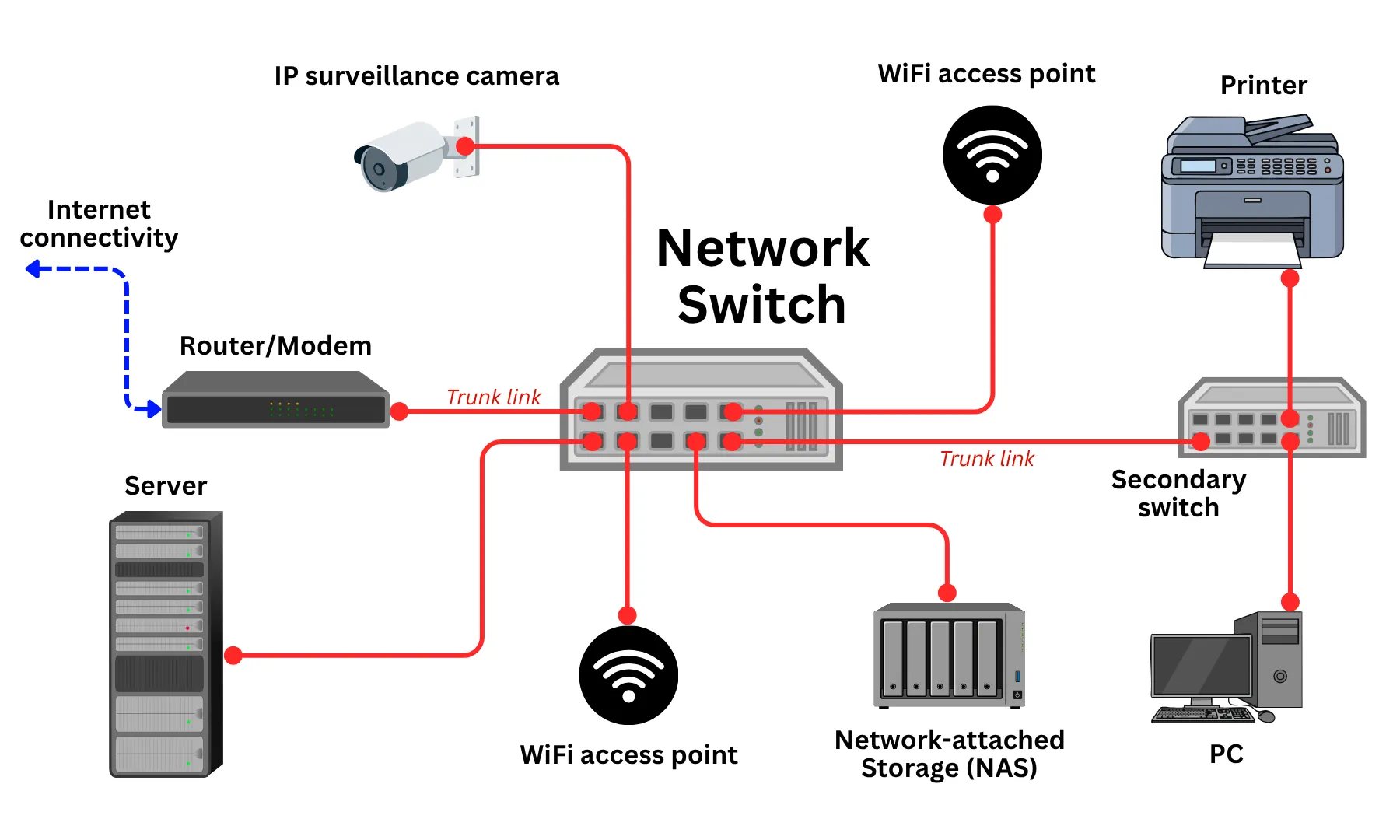
Most switches operate at Layer 2, forwarding traffic based on MAC addresses, pairing the MAC addresses of devices with their designated destination ports to forward traffic efficiently within the local network.
Some managed switches also operate at Layer 3, using IP addresses to route traffic between subnetworks and enabling advanced capabilities such as traffic prioritisation (QoS), network segmentation (VLANs), and access control.
Most businesses that operate a wired network need at least one switch, and they scale to fit networks of any size, from a small office connecting a handful of devices to a large enterprise managing hundreds of endpoints across multiple sites.
Types of network switches
Network switches can be distinguished in dozens of ways, categorised by how they manage traffic, how they handle routing, and how they are physically deployed.
Unmanaged, smart and managed switches
The most fundamental distinction between switches is how much control they give administrators over network traffic. There are three main levels of control:
- Unmanaged switches: These are simple, plug-and-play devices that require no configuration. They passively distribute traffic between connected devices and are best suited for small offices with simple, flat networks where security and performance optimisation are not a priority.
- Smart switches (Web-managed switches): These sit in the middle ground, offering a basic level of configuration through a web interface, including simple VLAN support and traffic monitoring, without the complexity of a fully managed system. They are a practical choice for SMEs that need some control without dedicated IT resources.
- Managed switches: These offer full administrative control over how traffic flows through the network. Administrators can configure VLANs, set quality of service (QoS) rules to prioritise certain traffic types, monitor performance, and enforce access control policies. Managed switches are standard in any environment where security, reliability, and performance are business-critical.
Layer 2 and Layer 3 switches
Switches also differ in how deeply they inspect and route network traffic, defined by which layer of the network stack they operate at.
- Layer 2 switches: These operate at the data link layer, forwarding traffic between devices on the same network based on MAC addresses (device identifiers). This covers the core function of virtually all switches and is sufficient for most small business environments.
- Layer 3 switches: These have the ability to route traffic between different subnetworks or VLANs based on IP addresses, combining the functions of a switch and a router in a single device. This makes them well-suited to larger or more complex networks that support guest Wi-Fi, staff devices, and VoIP traffic without relying on a separate router for every segment.
PoE and non-PoE switches
While Non-Power over Ethernet (PoE) switches handle data only, PoE switches can deliver electrical power through Ethernet cables to connected devices, eliminating the need for separate power supplies.
This is particularly useful for devices like VoIP phones, wireless access points, and IP cameras, which can be installed wherever an Ethernet cable reaches rather than being limited by proximity to a power outlet.
Note that the number of PoE-powered devices a switch can support at once depends on its maximum power delivery capacity.
Desktop, rack-mounted, and stackable switches
Switches also vary in their physical form factor, which affects how they are deployed and how well they scale. There are three varieties:
- Desktop switches: Compact, standalone units designed for small offices or workgroups. They are simple to deploy and do not require specialist equipment, making them a practical entry-level option.
- Rack-mounted switches: These are designed to be installed in a standard network rack alongside other infrastructure such as routers, patch panels, and servers. They are the norm in server rooms and larger office environments where multiple devices need to be organised and managed in one place.
- Stackable switches: These can be physically and logically linked together to function as a single unit. This allows businesses to expand network capacity incrementally by adding switches to the stack rather than replacing existing hardware, a cost-effective approach to scaling a network over time.
How a switch fits into a business network
A network switch is one of three core devices present in any wired business local area network:
- A business broadband router connects the site to the internet.
- A firewall is often integrated with or positioned alongside the router, ensuring suspicious data packets are not allowed into the network.
- The switch sits behind these two, acting as the central switching point connecting all internal devices, segmenting them into subnetworks, and distributing traffic between them.
In practice, this means the switch is key for both wired and wireless connectivity, network segmentation, and the physical extension of the network across a site or multiple locations.
Deploying a WiFi mesh network across a site with PoE switches
Aside from being the hub for wired Ethernet connectivity, switches are also key when deploying a Wireless LAN that goes beyond basic WiFi from a single wireless router.
Switches serve as the hub for wireless access points, the devices that broadcast WiFi across the site. These convert wireless traffic to the wired network via Ethernet, and ultimately relay all data through the switch.
Latest generation WiFi access points support PoE, meaning they can use a switch as both their power source and backbone for high-performance connectivity.
This facilitates implementing a mesh network that provides coverage for larger offices or sites, as access points can be placed more flexibly and without the hassle of power cables.
Also, the latest generation WiFi 7 connectivity can support speeds of 10+ Gbps, meaning all components like the switches, Ethernet cables, router and firewalls need to have similar capacity to prevent bottlenecks.
Network segmentation with VLANs with managed switches
A managed switch can divide a single physical network into multiple logical networks, known as virtual local area networks (VLANs).
Each VLAN operates as a separate subnetwork, meaning devices on one VLAN cannot communicate with devices on another unless explicitly permitted. This allows businesses to organise and secure their network without investing in separate physical infrastructure.
Common VLAN use cases in a business environment include:
Forming an isolated guest network
The most practical and universally relevant applications of VLAN segmentation are isolating guest WiFi from the main business network.
When visitors, staff bringing their own devices, or contractors connect to a guest network, the switch ensures their traffic is kept entirely separate from internal systems, shared drives, and staff devices, protecting sensitive business data without requiring a separate physical network or internet connection.
Segment VoIP phones into low-latency subnetworks
Voice traffic is sensitive to network congestion and latency. Placing VoIP phones on a dedicated VLAN, combined with QoS (Quality of Service, or bandwidth prioritisation) rules on a managed switch, ensures VoIP call quality is not affected by other activity on the network.
Read our complete page on business VoIP phone systems for more information.
Keep high-risk IP cameras separate from the LAN
Surveillance systems generate continuous data traffic and represent a potential security vulnerability if left on the main network.
Isolating IP cameras on their own VLAN keeps that traffic separate and limits exposure in the event of a device compromise.
Implement compliance-sensitive systems across a LAN
Finance, HR, and other systems handling sensitive or regulated data can be placed on isolated VLANs to limit access and reduce the risk of unauthorised exposure.
This is an increasingly important consideration for businesses subject to stringent data protection requirements (GDPR) or looking for insurance via Cyber Essentials Plus.
Managing a network across floors and buildings with switches
A single, unmanaged switch is sufficient for many small offices, but as a business grows, adding staff, floors, or sites, the physical reality of the network becomes more complex.
Switches can be interconnected via uplink ports, extending the network across rooms or floors while keeping it centrally managed.
In larger environments, a tiered or hierarchical network topology is common. Access switches connect end devices on each floor, feeding into a central distribution or core switch that manages traffic across the building.
Stackable switches offer another approach, allowing multiple units to be linked and managed as a single logical device, making it straightforward to add capacity without overhauling the existing infrastructure.
Switch performance and capacity planning
Aside from the type of network switch, different models have various performance and capacity constraints that also need consideration. The key performance variables to understand are port count, port speed, and overall switching capacity.
Number of switch ports
The number of ports a switch has determines how many devices can connect to it directly. Switches are commonly available in 8, 16, 24, and 48-port configurations.
The appropriate port count depends on the number of wired devices in the environment, with consideration for future growth. Uplink ports, which connect the switch to a router or another switch, consume ports and factor into the total count.
As a general reference point, a 20-25% buffer above the current device count is a commonly used planning margin.
Switch port speeds
Port speed determines how much data can flow through each port. The most common standards are:
- 10/100 Mbps (Fast Ethernet): Largely obsolete for business use, found only in legacy hardware.
- 1 Gbps (Gigabit Ethernet): The current standard for most business switches, sufficient for the majority of wired office devices, including PCs, printers, IoT devices, and VoIP phones.
- 2.5 Gbps and 5 Gbps: Increasingly relevant where Wi-Fi 6 or Wi-Fi 7 access points are in use, as these can carry traffic from multiple wireless devices simultaneously and saturate a standard 1 Gbps port.
- 10 Gbps (Uplink ports): Higher capacity ports, usually limited to one to four per switch and labelled as uplink ports, designed to carry aggregated traffic across routers, firewalls, or other switches, and to support high-throughput devices such as servers or NAS units.
Total switching capacity
Processing and forwarding large volumes of traffic requires significant computing power.
Aside from the capacity of individual ports, the switch itself has a total switching capacity (sometimes called switch fabric or backplane capacity) representing the total data it can process simultaneously across all ports, measured in Gbps.
This capacity can meet or fall short of the combined capacity of all ports:
- Non-blocking switch: Total switching capacity is equal to or greater than the sum of all port capacities. Suited to high-demand environments such as server rooms or dense office floors where simultaneous full-load across all ports is a realistic scenario.
- Oversubscribed switch: Total switching capacity is lower than the sum of all port capacities. Sufficient for most office environments where simultaneous full-load across every port is uncommon.
Switching capacity is typically listed in a switch’s technical specifications and can be compared against the theoretical port maximum to determine whether a switch is non-blocking or oversubscribed.
Fan-cooled and fanless switches
Switches generate heat under load and require a cooling mechanism to operate reliably. There are two main approaches:
- Fan-cooled switches: Use active cooling fans to manage heat, supporting higher port counts and switching capacities. Standard in server rooms and network cabinets, though fan noise can be disruptive in open-plan offices or meeting rooms.
- Fanless switches: Use passive cooling (heat sinks and chassis design) to dissipate heat silently. Well-suited to office environments where the switch sits on a desk or in a shared space.
A fanless switch is generally limited by thermal capacity and therefore has lower port counts and switching capabilities.
Managing and monitoring a network switch
The level of management and monitoring required depends largely on the type of switch deployed and how the network is configured.
Unmanaged switches require no administration by design, while managed switches offer a range of configuration, monitoring, and alerting capabilities that require initial setup and periodic oversight.
Initial setup
Unmanaged switches (Layer 2) need nothing beyond being plugged in.
For managed switches (Layer 3), initial setup typically involves assigning an IP address to the switch, configuring VLANs, setting up uplink ports, and establishing admin credentials. This is usually a one-time process, often handled by an IT provider or network administrator.
Day-to-day management
Ongoing management of a managed switch is handled through a web-based admin interface or dedicated network management software.
In practice, this covers tasks like adding or removing VLANs, adjusting QoS rules, and controlling which devices are permitted on which ports. For most SMEs, day-to-day intervention is minimal once the switch is correctly configured.
Network monitoring
Managed switches provide visibility into what is happening on the network in real time.
Administrators can track port activity, bandwidth usage, connected devices, and error rates through various network monitoring tools.
These are useful for identifying bottlenecks, spotting unauthorised devices, or catching hardware issues before they cause disruption.
Alerts and notifications
Most managed switches can be configured to send alerts when something unusual occurs, such as a port going down, a traffic spike, or an unrecognised device connecting to the network.
This allows businesses to respond to potential issues proactively rather than discovering them after the fact.
Enterprise switches can also feed their monitoring data and alerts to an organisation-wide SIEM platform to identify and mitigate sophisticated targeted attacks occurring simultaneously across various company systems.
Firmware updates
Like any networked device, switches run software that requires periodic updates to address cybersecurity vulnerabilities and maintain performance.
Firmware updates are easy to overlook, but they are an important part of keeping the network secure and stable.
Remote management
Many modern managed switches (particularly cloud-managed systems from vendors such as Cisco Meraki or Ubiquiti) can be administered remotely via a browser or mobile app.
This is particularly relevant for businesses without dedicated on-site IT, as it allows a network administrator or managed service provider to monitor and configure the switch from anywhere.
Network switches – FAQs
Our business networking experts answer commonly asked questions about network switches for UK businesses.
When does a business need a network switch?
Any business that needs to connect multiple wired devices requires a network switch.
Most business broadband routers include only one to four Ethernet ports, which is insufficient for any setup aside from a home or micro-business.
For small offices, a basic, unmanaged switch extends the number of available connections and ensures traffic is managed efficiently between computers, printers and wireless access points on the network.
Can I connect a network switch directly to my broadband router without any configuration?
Yes. Connecting an unmanaged switch directly to a broadband router requires no configuration. The switch plugs into one of the router’s LAN ports via an Ethernet cable, and connected devices are automatically assigned IP addresses by the router.
However, most managed switches do require some initial configuration (i.e., QoS, VLANs) before they function correctly on the network, but the physical connection process is the same.
What happens to the network if a switch fails or loses power?
All devices connected to that switch lose network connectivity immediately.
In a single-switch environment, this means the entire wired network goes down. In larger environments with multiple switches, only the devices connected to the failed switch are affected.
For businesses where network availability is critical, redundant switch configurations and uninterruptible power supplies (UPS) are worth considering to minimise downtime.
Can I use a PoE injector instead of a PoE switch, and when does that make sense?
A PoE injector adds power to a single Ethernet cable, allowing a non-PoE switch to power one PoE device.
This makes sense when a business only needs to power one or two devices (typically a single wireless access point or IP camera) and does not want to invest in a full PoE switch.
For environments with multiple PoE devices, a dedicated PoE switch is more practical and cost-effective than deploying multiple injectors.
Can I cascade two switches together, and does it affect performance?
Yes, switches can be interconnected via uplink ports, a practice known as cascading or daisy-chaining.
This extends the number of available ports across the network, with traffic between the two switches passing through a single uplink connection.
In theory, this uplink can become a bottleneck if both switches are heavily loaded simultaneously, but in practice, this is rarely a problem for most SME environments. In high-demand setups, a stackable switch configuration or a higher-capacity uplink is preferable.
What is the difference between a PoE switch and a PoE+ switch, and which do wireless access points typically need?
Standard PoE (IEEE 802.3af) delivers up to 15.4W per port, while PoE+ (IEEE 802.3at) delivers up to 30W per port.
Modern wireless access points supporting WiFi 6 and WiFi 7 require PoE+ to operate at full capacity, as their power draw exceeds what standard PoE can deliver.
When specifying a switch to power access points, it is worth checking the power requirements of each device against the switch’s per-port PoE output.
How do I calculate the PoE budget I need for my office devices?
Add up the maximum power draw of all PoE devices that will connect to the switch simultaneously and make sure it meets or exceeds the switch’s total PoE budget, which is listed in its specifications.
For example, if four IP cameras draw 10W each and two access points draw 25W each, the total PoE demand is 90W. Switch PoE budgets fluctuate between 50W and 740W, depending on the model, so some basic models may fall short.
It is advisable to build in headroom for additional devices, as the PoE budget is shared across all active ports and cannot exceed the switch’s maximum output.
How do I know if my network switch is the cause of slow file transfers between office devices?
The most reliable way is to check the switch’s management interface, if it is a managed switch, for port error rates, packet loss, and bandwidth utilisation.
High error rates on a specific port often indicate a faulty cable or port. If utilisation is consistently at or near capacity, the switch or its uplink may be a bottleneck.
For unmanaged switches, the process is less direct: Swapping cables, testing different ports, and checking network adapter speeds on the affected devices are the usual starting points.
Can a network switch run out of MAC address table entries, and what happens if it does?
Yes, though it is uncommon in typical SME environments, as business-grade switches typically support several thousand devices. This is tracked on the switch’s MAC address table, which records which devices are connected to which ports.
If the table fills up, the switch can no longer learn new device locations and begins broadcasting traffic to all ports, similar to an unmanaged hub. This degrades network performance and can create a security risk, but it is only a realistic concern in very large or complex network environments, rather than in a standard office setup.
What is a network switch uptime specification, and does it matter for a small business?
Uptime specification, often expressed as mean time between failures (MTBF), indicates how long a switch is expected to operate before a hardware failure.
Enterprise-grade switches carry higher MTBF ratings and are built with components designed for continuous operation.
For most small businesses, the standard reliability of a reputable business-grade switch is sufficient.
Where network availability is genuinely critical (e.g., healthcare, financial services), specifying a switch with a higher MTBF rating and considering a warranty with next-business-day hardware replacement is worth the additional cost.
Are network switches secure?
Switches themselves are generally reliable components, but they can introduce security risks if not properly configured or maintained.
Unmanaged switches offer no security controls. Any device plugged into a port joins the network without restriction.
Managed switches address this through features like port security, VLAN segmentation, 802.1X authentication, and access control lists, which limit which devices can connect and what they can access.
Keeping switch firmware up to date and restricting physical access to the switch hardware are also important baseline security measures for any business network.
Can my ISP provide me with network switches?
Some business broadband providers and managed service providers include network switches as part of a broader business connectivity or managed network package, particularly at the enterprise level.
However, most standard broadband contracts supply only a router or gateway device.
Switches are typically sourced and managed separately, either purchased outright or provided by a managed IT or networking provider.
Businesses looking for a fully managed network solution (where a third party oversees switches, routers, and connectivity under a single contract) should look specifically for managed LAN or business SD-WAN service offerings.
Are network switches exclusive to local area networks?
No. In most business contexts, “network switch” refers to a device used within a local area network, but switches are deployed across networks of all scales, from virtual segments within a data centre to the wide area networks and major carrier broadband infrastructure that underpin internet connectivity.
Do all switches use RJ45 ports?
Not always. Entry-level and mid-range switches typically use standard RJ45 ports (the same connector as an Ethernet cable). Enterprise switches often swap some or all ports for SFP or SFP+ slots, which support fibre or DAC connections for longer runs between floors or buildings. Many switches offer a mix of both.
 Back to blog