Our use of cookies
WiFi 7 for Businesses: Benefits, setup and upgrade guide
WiFi 7 is the latest standard for local wireless connectivity. It manages wireless traffic more intelligently and can support up to twice the usable capacity of WiFi 6E, delivering a major improvement for busy networks.
However, WiFi 7 offers limited benefit unless WiFi 7-compatible devices are in use and the wired LAN and broadband connection can support the increased load.
This article explains what WiFi 7 is, how it works, which businesses benefit most, and its key benefits and limitations.
Contents
- How WiFi 7 works
- WiFi 7 vs WiFi 6E
- WiFi 7 requirements for businesses
- WiFi 7 speed and performance expectations
What is WiFi 7?
WiFi 7 (IEEE 802.11be) is the latest generation of WiFi, succeeding WiFi 6 and WiFi 6E. It improves both wireless bandwidth and connection quality, allowing more devices to connect, transmit data more efficiently, and maintain consistent performance in busy environments.
WiFi 7 can deliver up to twice the usable bandwidth compared to previous generations. Rather than introducing a new frequency band, it makes more effective use of the existing 2.4 GHz, 5 GHz, and 6 GHz bands through wider channels, more efficient modulation, and the ability to use multiple bands simultaneously.
Upgrading to WiFi 7 is straightforward and primarily involves replacing existing WiFi access point hardware with WiFi 7–compatible models. It is fully backwards compatible, so older devices continue to operate without disruption.
However, the full performance benefits will only be realised if the rest of the local network (including Ethernet cabling, switches, the router, and broadband connection) can support multi-gigabit speeds without creating bottlenecks. In addition, only the latest devices support WiFi 7, with most laptops, phones, and tablets released before 2025 supporting WiFi 6E or earlier.
How WiFi 7 works
WiFi 7 does not fundamentally change how a business wireless LAN operates. Devices still connect wirelessly to access points, and existing WiFi 6E or earlier devices continue to work as normal.
What changes is how efficiently compatible devices can use available wireless spectrum, bandwidth, and network capacity, especially in busy offices and other high traffic environments.
Here are the changes explained through how a wireless device uses WiFi 7:
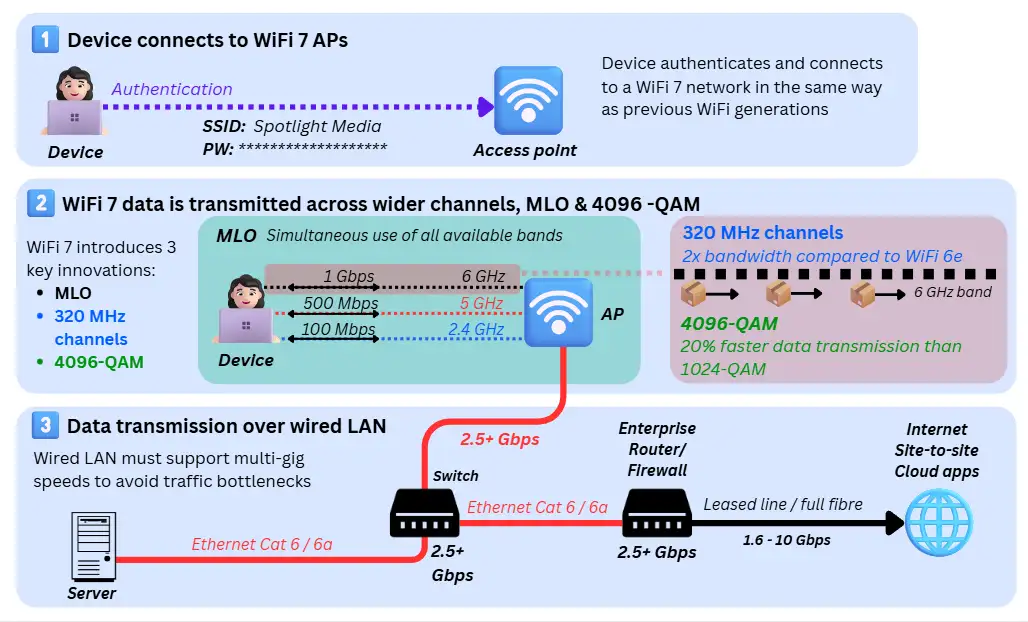
1. Device connects to WiFi 7 access point
A WiFi 7 compatible device connects to a wireless network in the same way as previous WiFi generations. When WiFi is enabled, the device scans for nearby access points, selects a network, and completes authentication using standard WiFi security methods (such as WPA3), just as it would on WiFi 6 or 6E.
There are no changes to how devices discover networks or authenticate. Older WiFi devices remain fully supported and continue to connect and operate normally on a WiFi 7 access point.
Once authenticated, the device is ready to transmit data over the wireless LAN using WiFi 7 capabilities.
2. Wide channel, multi-band wireless transmission
Once connected, a WiFi 7 device transmits and receives data using MIMO (Multiple Input, Multiple Output) antennas, as with earlier WiFi generations. The key improvement is the amount and reliability of data transmission when many devices are active or moving across the network.
WiFi 7 introduced three new technologies for this:
Multi-Link Operation (MLO)
Outcome: More stable real-time connections, even when moving or switching applications
Multi-Link Operation enables compatible devices to use multiple frequency bands simultaneously, rather than being restricted to a single band. WiFi 7 operates on the same bands as WiFi 6E (2.4 GHz, 5 GHz, and 6 GHz) and can actively balance traffic across them.
Because multiple links are active simultaneously, traffic can be shifted instantly if signal quality changes, congestion occurs, or demand suddenly increases (for example, starting a UCaaS video call). This eliminates short interruptions that previously occurred during roaming, band changes, or congestion recovery.
Wider (320 MHz) 6GHz channels
Outcome: Higher capacity and fewer slowdowns in busy environments
WiFi 7 supports channel widths of up to 320 MHz in the 6 GHz band, double the maximum supported by WiFi 6E. Wider channels allow more data (about twice as much) to be transmitted at the same time, similar to adding extra lanes to a motorway.
This significantly increases total wireless capacity and reduces contention when many users or devices are active. These wide channels are only practical in the 6 GHz band, which provides cleaner, less congested spectrum than 2.4 GHz or 5 GHz.
Higher efficiency transmissions (4096-QAM)
Outcome: Faster data delivery using the same number of signal transmissions
WiFi 7 can encode about 20% more data per wireless transmission when signal quality is strong (compared to the older 1024-QAM used in prior generations).
This allows devices to send the same information in fewer transmissions, increasing speed and reducing congestion, particularly in good coverage areas or when using the 6 GHz band.
3. Data transmission over the wired LAN
Once wireless traffic reaches the WiFi 7 access point, it is forwarded onto the wired local area network (LAN) and then out to on-site systems or the internet. Because WiFi 7 can deliver multi-gigabit wireless speeds, the wired network must be able to carry this traffic end-to-end to avoid performance bottlenecks by:
- Ethernet cabling should be Cat 6 or 6a to reliably support multi-gigabit speeds
- Network switches should provide 2.5, 5, or 10 Gbps ports for access points, with routing and firewall equipment capable of processing traffic at similar speeds
- Business broadband speeds should be in the gigabit range to ensure external applications and cloud services are not constrained
WiFi 7 vs WiFi 6E
WiFi 6E is already a strong, modern WiFi standard and works well for many businesses today. WiFi 7 builds on this foundation, focusing on capacity, consistency, and performance under load, particularly in offices where many users and devices are active simultaneously.
The table below summarises the key differences between WiFi 6E and WiFi 7, based on the factors that matter most in real business networks:
| Aspect | WiFi 6E | WiFi 7 |
|---|---|---|
| Technical name | IEEE 802.11ax (6 GHz extension) | IEEE 802.11be |
| Frequency bands | 2.4 GHz, 5 GHz, 6 GHz | 2.4 GHz, 5 GHz, 6 GHz |
| Maximum channel width | Up to 160 MHz | Up to 320 MHz (6 GHz) |
| Typical speed (real-world, per device) | 1–2 Gbps | 1–4 Gbps |
| Latency (light network load) | 2–5 ms | 1–4 ms |
| Latency (heavy load / congestion) | 10–30 ms spikes | 5–15 ms with fewer spikes |
| Reliability (connection behaviour) | High (single active band; brief interruptions possible during roaming or interference) | Very high (multi-link connections allow instant traffic shifting with fewer interruptions) |
| Capacity (aggregate throughput) | High (baseline capacity using 160 MHz channels and single-band operation) | Very high (2–4× higher usable capacity in dense environments) |
| Support for simultaneous devices | Moderate to High (performance drops as more devices contend on one band) | High (more devices can sustain high throughput concurrently) |
WiFi 7 requirements for businesses
WiFi 7 can deliver major improvements in capacity, consistency, and performance under load, but only if the rest of the network can keep up. If other components become bottlenecks, many of WiFi 7’s benefits are reduced or lost entirely.
Below are the key requirements businesses need in place to fully benefit from WiFi 7.
WiFi 7-compatible devices
To benefit from WiFi 7 features, end-user devices must support WiFi 7. This includes laptops, smartphones, tablets, and other performance-sensitive wireless endpoints.
Devices that do not support WiFi 7 will still connect and function normally, but will operate at WiFi 6 or 6E performance levels. As a result, the benefits of WiFi 7 are realised gradually, increasing as devices are refreshed rather than being rolled out instantly across the organisation.
Switches, routers, firewalls and Ethernet cables
WiFi 7 access points can deliver several gigabits per second of wireless traffic, so the wired local area network must also support multi-gigabit throughput to avoid bottlenecks. This includes:
- Network switches with 2.5 GbE, 5 GbE, or 10 GbE ports: Designed to handle the higher uplink speeds required by modern, high-capacity WiFi deployments.
- Multi-gig routers and firewalls: Capable of processing multi-gigabit traffic without introducing latency. These are commonly found in modern enterprise and mid-market platforms such as Cisco, Fortinet (FortiGate), and Ubiquiti
- Multi-gig Ethernet cables: Specific categories include:
- Cat6: Suitable for 1-5 Gbps over shorter cable runs (typically under 55 metres)
- Cat6a: Recommended for consistent 10 Gbps performance over standard Ethernet distances (up to 100 metres)
WiFi 7 access points will continue to work with older wired infrastructure, but overall performance will be limited by it.
A business broadband connection
While a site’s broadband connection has no impact on local device-to-device traffic, it can quickly become a bottleneck for device-to-internet and cloud connectivity if capacity or latency is insufficient.
This effectively creates two categories of broadband in the context of WiFi 7: connections that limit the benefits and those that support them.
Business broadband connections that are insufficient for WiFi 7
Lower-tier and legacy broadband services can significantly restrict internet performance (cloud access, SaaS apps, site-to-site traffic), even when WiFi 7 is deployed locally. These include:
- SoGEA / FTTC: Unsuitable as speeds are limited to 80–100 Mbps download with low upload speeds and added copper latency.
- Ethernet in the First-Mile: Unsuitable as bonded copper limits throughput and latency, and low-capacity Ethernet offers no practical advantage for WiFi 7.
- Business satellite broadband: Even the fastest Starlink enterprise packages fail to deliver the speeds and consistency required to fully leverage WiFi 7.
- Business mobile broadband: Typically unsuitable due to fluctuating performance, even when bandwidth can exceed 1Gbps over 5G.
- Cable broadband: High download speeds (1+ Gbps), but lower upload capacity and variable latency can restrict dense or upload-heavy usage.
- Low to mid-tier contended full fibre business broadband: Sub-gigabit speed full fibre broadband packages will throttle WiFi 7 under heavy load.
Business broadband connections that are sufficient for WiFi 7
Only higher-capacity business broadband services can support WiFi 7’s performance at scale, particularly in busy or cloud-dependent environments:
- High-tier full fibre business broadband: 1.6 Gbps, symmetrical broadband plans can support WiFi 7 usage under medium loads.
- Leased line business broadband: Dedicated, symmetrical connections (1–10 Gbps) with predictable latency; ideal for high-density WiFi 7 networks.
- Business Ethernet and Point-to-point leased lines: Dedicated site-to-site links delivering multi-gig performance for private WAN and data centre access.
- Dark fibre: Dark fibre links are the highest performance enterprise connections available, and support the multi-gigabit speeds of WiFi 7.
Network design and configuration
WiFi 7 also benefits from an adequate LAN architecture and configuration. This includes:
- Proper access point placement, density and mesh networks
- A wired backhaul of Cat 6 and 6a Ethernet cables
- Logical network segmentation through VLANs (corporate, guest, IoT)
- Network monitoring and management to detect congestion and bottlenecks early
Which businesses benefit from switching to WiFi 7 now, and which can wait?
WiFi 7 is not a universal upgrade requirement. WiFi 6 and WiFi 6E already deliver gigabit performance, and in many cases, the practical difference is marginal, especially when Ethernet plug-ins are available.
WiFi 7 offers the most value in specific environments where scale, latency sensitivity, or operational risk justify the investment. The sections below break this down by business type and use case.
Businesses that benefit from WiFi 7 now
Here are the specific business environments where upgrading to WiFi 7 would bring clear benefits:
High device density environments
WiFi 7 delivers clear benefits where large numbers of devices are active simultaneously, and usage is ‘bursty’ or unpredictable. In these environments, WiFi 7’s higher aggregate capacity and congestion handling help maintain consistent performance during peak usage.
Examples:
- Corporate or large SME offices with 50–200+ devices per floor
- Exhibition centres and expo pavilions
- Airports, transport hubs, and large public venues
Video and collaboration-heavy organisations
Businesses that rely heavily on real-time collaboration tools using mobile devices benefit from WiFi 7’s improved latency consistency under load. WiFi 7 significantly reduces the likelihood of call degradation when many users are active simultaneously.
Examples:
- Professional services firms (consulting, legal, finance)
- Creative agencies using video, media, or large file syncs
- Sales organisations running frequent demos and webinars
Latency-sensitive and mobile technology environments
Some businesses depend on low-latency, reliable wireless connectivity for operational technology rather than general office work. In these cases, even small latency spikes or brief interruptions can have outsized operational impact, making WiFi 7’s consistency improvements valuable.
Examples:
- Warehouses using autonomous robots or AGVs
- Manufacturing facilities with wireless control systems
- Healthcare environments with mobile diagnostic equipment
Hybrid work, hotdesking, and highly mobile offices
WiFi 7 delivers incremental yet meaningful improvements in environments where users frequently move between access points and network demand fluctuates throughout the day. Here, WiFi 7 helps smooth transitions and reduces performance drops during busy periods.
Examples:
- Hybrid offices with hot desking policies
- Co-working spaces
- Universities and training centres
Businesses where the cost of WiFi 7 is relatively marginal
For some organisations, the cost of poor connectivity far exceeds the cost of network upgrades. In these cases, investing early in WiFi 7 makes commercial sense.
Examples:
- Financial trading floors
- Media production environments
- Technology companies where downtime or poor performance directly affects revenue
Businesses where WiFi 6/6E remains sufficient
For most SMEs, WiFi 6/6E remains largely sufficient, for example:
Low to moderate device density offices
Smaller offices with fewer concurrent users and predictable usage patterns often see little immediate benefit from upgrading, especially when Ethernet cables are available at each desk, distributing load across the wired LAN.
Examples:
- Small professional offices
- Regional branch offices
- Back-office environments
Light or predictable WiFi usage
If WiFi is primarily used for email, browsing, and occasional video calls, current-generation WiFi is usually adequate.
Examples:
- Administrative teams
- Customer service centres with wired desktops
- Organisations with limited cloud or media usage
Recently deployed WiFi 6E networks
Businesses that have already invested in WiFi 6E and are not experiencing congestion or reliability issues can safely defer an upgrade.
Examples:
- Offices refreshed within the last 1–2 years
- Organisations with low complaint rates and stable performance
Infrastructure-limited environments
If broadband or wired network capacity is capped below 1 Gbps, WiFi 7’s additional wireless capacity will be underutilised.
Examples:
- Sites with part-fibre, cable, or low-tier full fibre
- Temporary or remote locations with constrained connectivity
- Upgrading WiFi before addressing these constraints rarely delivers strong returns
WiFi 7 speed and performance expectations
Real-world performance of WiFi 7 depends on the environment, device capabilities, and network design. The table below sets realistic expectations for what businesses can expect to see day-to-day:
| Factor | Real-world expectation |
|---|---|
| Max speed (per device) | 1-4 Gbps in good conditions (clear line of sight or minimal obstructions, strong signal, low interference) |
| Total wireless capacity | 2–10+ Gbps aggregate across many devices, depending on access point model and configuration |
| Internet speed | Limited by broadband connection (WiFi 7 does not increase internet bandwidth on its own) |
| Latency (light load) | 2–5 ms, suitable for voice, video, and cloud apps |
| Latency (busy network) | 5–15 ms, with far fewer spikes than WiFi 6/6E |
| Latency consistency (jitter) | Low: Reduced variability under load compared to WiFi 6/6E |
| Impact of walls | High: Walls and floors reduce performance, same behaviour as previous WiFi generations |
| Impact of distance | High: Speeds decline with distance from the access point, as with all WiFi |
| Interference sensitivity | Low: Improved resilience compared to earlier generations, but interference still exists |
| Client hardware impact | High: Older devices connect normally but operate at WiFi 6/6E speeds |
| Performance under load | High performance: Multiple devices can sustain high performance simultaneously |
WiFi 7 routers and access points
WiFi 7 hardware is available as high-end consumer routers and business-grade access points. Both use the same WiFi 7 standard, but each is designed for very different environments and requirements:
Consumer WiFi 7 business routers
Consumer WiFi 7 routers combine routing, firewall, and WiFi access into a single device. They are designed for home offices and very small businesses with limited users and simple networking requirements.
These routers offer the core benefits of WiFi 7 (e.g. strong headline speeds and wide 6 GHz channels), but are optimised for a small number of connected devices and a single coverage area.
Management is typically basic and locally administered, with limited network monitoring, security controls, and no support for centralised or cloud-based management. Broadband redundancy and scalability are also limited compared to enterprise solutions.
As of early 2026, most consumer-grade deals from business broadband providers in the UK continue to include WiFi 6 or WiFi 6E routers as part of the service. WiFi 7 routers are usually purchased separately, although this is expected to change over time as WiFi 7 becomes more widely adopted.
Enterprise-grade WiFi 7 access points
Enterprise WiFi 7 access points are designed to integrate into larger IT environments, where wireless, switching, routing, and security are handled as separate layers.
Unlike all-in-one routers, access points focus purely on delivering reliable wireless connectivity. Multiple access points are deployed across a site to provide consistent coverage and are connected via multi-gigabit Ethernet to switches, with routing and security handled by dedicated network infrastructure.
In a typical deployment:
- Coverage: Provided by multiple access points distributed across the building, ensuring consistent performance as users move around.
- Network segmentation: Handled using VLANs, allowing separate corporate, guest WiFi, and device networks over the same wireless infrastructure.
- Access management: Uses enterprise authentication (such as WPA3-Enterprise and 802.1X), with user and device identity often linked to existing directory services. Authentication and connection events can be exported to monitoring platforms or a SIEM for visibility and auditing.
- Security: Network traffic is inspected and filtered by upstream Next-Generation Firewalls, while endpoint-level threats such as malware are addressed by business antivirus or Endpoint Detection & Response (EDR) solutions on connected devices.
- Centralised management: Provides monitoring, updates, and performance control across all access points.
Does WiFi 7 improve security?
WiFi 7 maintains the same security standards as WiFi 6 and WiFi 6E. It does not introduce new security features, but it indirectly supports stronger security outcomes through modern encryption, stable connections, and newer endpoint hardware. In practice:
- Maintains WiFi 6E security standards: WiFi 7 continues to rely on WPA3 and enterprise authentication methods, preserving the same encryption and access-control model as previous generations.
- WPA3 required for 6 GHz operation: Use of the 6 GHz band requires WPA3 encryption, a rule that predates WiFi 7 but continues to apply to WiFi 7 networks using this spectrum.
- Preserves encryption while shifting traffic across links: Multi-Link Operation ensures each active wireless link is encrypted individually, maintaining protection as traffic moves between bands.
- Encourages newer, more secure endpoints: Devices with built-in WiFi 7 typically include modern hardware security features such as encryption acceleration, secure boot, and biometric authentication, indirectly improving overall security posture.
- Improved reliability and visibility: More stable wireless connections reduce dropped sessions and re-authentication events, making it easier for firewalls, endpoint protection, and monitoring platforms to track device activity consistently.
WiFi 7 doesn’t make networks inherently more secure, but it helps modern security controls work more effectively by removing legacy constraints and improving consistency.
How to upgrade a business to WiFi 7
Upgrading to WiFi 7 is primarily an infrastructure refresh, not a redesign. In most cases, it’s an upgrade from prior WiFi generations, where the focus is on replacing access points and ensuring the existing wired network can sustain higher throughput.
1. Select and acquire WiFi 7 access points
The first step is choosing WiFi 7–capable access points that align with the size and complexity of the environment:
- Small offices typically deploy 1–3 WiFi 7 access points, often from the same vendor as their existing firewall or router
- Larger offices may deploy multiple enterprise-grade access points with centralised management, roaming optimisation, and multi-gigabit uplinks
Because WiFi 7 uses the same 2.4 GHz, 5 GHz, and 6 GHz bands as WiFi 6E, existing RF designs and placement models usually remain valid.
2. Install and replace access points
WiFi 7 access points are typically deployed as direct replacements for existing WiFi 6E (or earlier) units:
- Mounting locations usually remain unchanged unless they were designed for the older WiFi 5
- Power and cabling are reused where multi-gigabit capable
- Configuration can often be cloned or migrated from the existing WLAN
Most organisations can complete the physical replacement in a single maintenance window, or progressively if uninterrupted access is required.
3. Validate performance and operations
After deployment, confirm that the upgrade is delivering expected outcomes:
- Test real-world throughput and latency under load
- Verify security, authentication, and segmentation remain intact
- Ensure monitoring and logging tools reflect increased traffic volumes and device concurrency
Does WiFi 7 require 6 GHz in the UK?
WiFi 7 can operate on 2.4 GHz and 5 GHz in the UK, but without access to the 6 GHz band, it behaves much like earlier WiFi generations and delivers only incremental improvements.
The most significant WiFi 7 features (i.e. 320 MHz channels and consistently low interference) depend on the availability of 6 GHz spectrum. Without 6 GHz, WiFi 7 still works, but most of the headline advantages cannot be used.
In the UK, regulators have approved 500 MHz of the 6 GHz band for WiFi use (from 5.925 GHz to 6.425 GHz). This provides a clean spectrum for high-capacity wireless networking, though it is more limited than in some other regions like the US and Canada.
WiFi 7 – FAQs
Our business networking experts answer commonly asked questions about WiFi 7 in business environments.
Can WiFi 7 replace Ethernet?
No. WiFi 7 and Ethernet serve different purposes.
WiFi 7 improves wireless connectivity compared to prior generations, but it still does not provide the fixed, low-latency, and highly reliable connections that wired Ethernet networks deliver. In business environments, WiFi and Ethernet operate in parallel rather than as replacements for one another.
WiFi 7 reduces the need for wired connections at desks and shared workspaces, but Ethernet remains essential for servers, network infrastructure, access points, and performance-critical systems.
Is WiFi 7 better for video conferencing and VoIP?
Yes, particularly in busy environments. WiFi 7 improves the consistency of video and business VoIP phone system calls by handling congestion more effectively when many users are active at the same time.
This reduces short drops in VoIP call quality, jitter, and audio distortion during peak usage. WiFi 7 does not change voice or video codecs, but it provides a more stable wireless layer for real-time applications.
How to find out whether a device supports WiFi 7?
The simplest way to check is to look up the device’s wireless specification in its technical details or datasheet. WiFi 7 support will be listed as “Wi-Fi 7” or “IEEE 802.11be”.
You can also check directly on the device:
- Windows: Open Device Manager → Network adapters → view the WiFi adapter model, then search that model online
- macOS: Hold Option and click the WiFi icon → check the supported PHY modes (WiFi 7 will be shown on newer models)
- iOS / Android: Review the manufacturer’s specifications; most mobile operating systems do not clearly display the WiFi standard in settings
If WiFi 7 is not explicitly mentioned, the device does not support it. Devices that support WiFi 6 or 6E will still connect and work normally, but without WiFi 7 performance benefits. Many devices released before 2024 do not support WiFi 7.
 Back to blog