Our use of cookies
Business VoIP installation setup
Thousands of businesses are switching from traditional phone lines to VoIP to cut costs and streamline operations. Others are expanding, opening new sites, or hiring staff who need to be integrated into existing phone systems.
Although IT specialists handle the setup, business leaders should understand the process to make informed decisions and align it with company goals.
Business VoIP installation checklist
Like any IT deployment, setting up a dedicated business VoIP phone system is a systematic process that varies depending on the type of setup but broadly follows the same pattern, from initial assessment to system maintenance and monitoring.
This guide provides a step-by-step VoIP installation checklist designed to help decision-makers track progress and understand each stage.
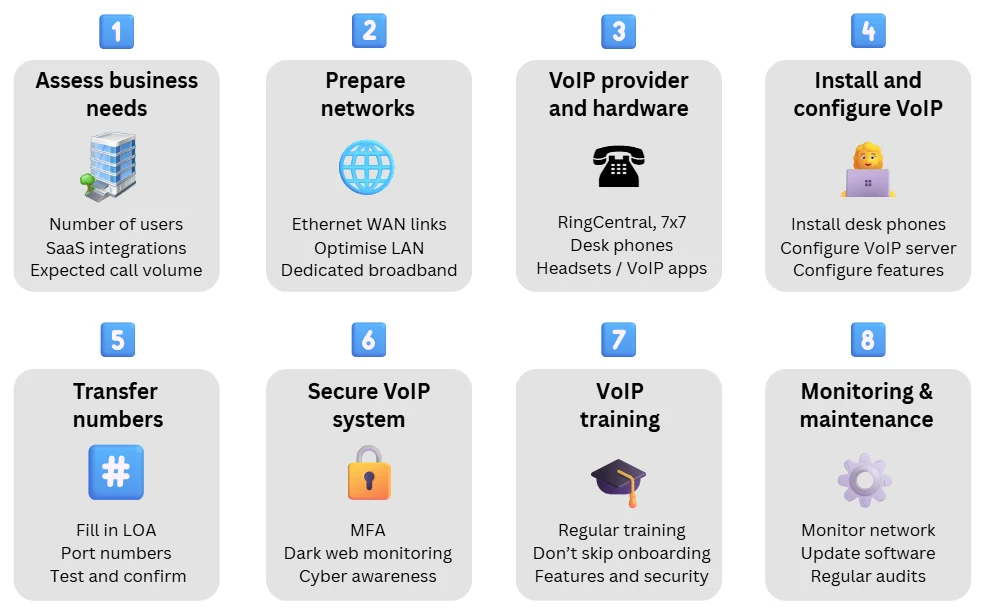
Step 1: Assess business needs
Before engaging with VoIP providers, it’s crucial to define your business requirements. Understanding your communication needs will help you choose the right platform, hardware, and configuration. Key considerations include:
Number of users
Determine how many employees require VoIP access. This affects provider choice, license costs, and network capacity.
Call volume
Estimate daily call volumes to ensure your network can handle the load. High volumes require sufficient bandwidth and Quality of Service (QoS) settings to maintain VoIP call quality.
User privileges and security
If different departments require separate access levels or data handling rules, you’ll need VLANs, managed switches, and a clear user management policy.
Remote and hybrid working
If staff will make or receive calls remotely, ensure you include a remote VoIP solution that supports secure, reliable connections for mobile and home users.
VoIP integrations
List the business tools you need your VoIP system to connect with: CRMs, Microsoft Teams, or helpdesk platforms. These integrations improve workflow efficiency and reporting.
Scalability
Choose a VoIP system that can grow with your business. Consider:
- Future growth: Will you add users, departments, or locations over the next 1 to 2 years?
- Feature expansion: Even if you start with voice-only, plan for features like video calls, VoIP analytics, or AI tools.
- Flexible pricing: Select a provider that allows easy user and feature upgrades.
- Modular hardware: Opt for plug-and-play devices that can be expanded easily.
- Cloud-based platforms: Cloud VoIP simplifies scaling across hybrid or multi-site teams.
Step 2: Prepare your network for VoIP
Reliable, high-quality VoIP calls depend on a strong network foundation. Before installation, ensure your broadband, LAN, and WAN are optimised to handle voice traffic efficiently and securely.
Prepare your broadband connection
Your broadband connection is the backbone of your VoIP system. Without enough bandwidth or reliability, call quality will quickly degrade. Key considerations:
- Dedicated leased lines: The gold standard for VoIP. Leased line business broadband offers uncontended bandwidth with symmetrical speeds, making it ideal for medium to large businesses or smaller firms that can afford the premium leased line prices.
- Business-grade broadband: Full fibre business broadband offers solid performance for small businesses. SoGEA can provide a reliable business broadband redundancy option for small business VoIP.
💡 Use our business broadband comparison service to find the best package for your VoIP setup.
Prepare your local network (LAN)
Your Local Area Network (LAN) must be capable of handling voice data efficiently while maintaining security and reliability.
- Routers: Choose business-grade broadband routers with sufficient bandwidth capacity, load balancing, and an integrated VPN/SD-WAN endpoint.
- QoS settings: Configure Quality of Service to prioritise VoIP traffic during high network usage, either on-site or through cloud-based SD-WAN for multi-site businesses.
- Firewalls: Look for VoIP-friendly features such as Deep Packet Inspection (DPI), DDoS protection, NAT traversal, and Session Border Controller (SBC) support.
- Network Switches: Managed switches with VLAN and QoS support help isolate VoIP traffic and prioritise it across the network.
- Mesh networks: Maintain strong wireless coverage, particularly if using cordless or mobile VoIP devices.
- Guest WiFi: Isolate guest access from your VoIP network to reduce congestion and limit security risks.
Prepare your wide area network (WAN)
For larger or multi-site organisations, the wide area network (WAN) setup is critical to maintaining consistent call quality and uptime. Smaller businesses can often rely on standard broadband alone. Key considerations:
- Business Ethernet services: Dedicated, high-performance connectivity between sites and VoIP data centres.
- MPLS (Multiprotocol Label Switching): Low-latency, prioritised connections ideal for enterprises, though it can be costly and less flexible for remote users.
- SD-WAN business solution: A modern, cost-effective alternative that dynamically routes VoIP traffic across broadband, 5G, or satellite connections for maximum uptime, perfect for hybrid or distributed teams.
- VPNs: A VPN-over-Ethernet provides a secure, low-cost method for connecting branch offices or remote workers to the VoIP network while keeping voice traffic segregated and encrypted.
Step 3: Choose your VoIP provider and hardware
Once the network is ready, the next step is selecting a VoIP provider and compatible hardware. Here are the details:
Choose a VoIP provider
There are over a dozen business VoIP phone providers serving the UK, specialising in various cloud and self-hosted setups. The right choice depends on how much control you want, your internal IT resources, and your compliance requirements.
Book a free call with our experts to help compare options and choose the best fit for your business.
- Provider type: Decide between a fully managed VoIP service, where setup and maintenance are handled for you, or a self-managed system overseen by your IT team.
- Compliance and data handling: Ensure the provider offers secure, compliant call recording and data hosting that meets UK and EU regulations such as the Data Protection Act.
- Cost structure: Review all charges, including licences, call rates, and support fees, to understand the true long-term overall business VoIP costs.
- Support and scalability: Look for clear Service Level Agreements, responsive support, and upgrade options that grow with your business.
Select VoIP hardware
Choosing the right hardware ensures your VoIP system performs reliably and fits how your teams work.
- VoIP phones: Choose from desk phones, conference units, cordless handsets, or mobile VoIP phones. High-end models offer HD voice, touchscreens, and built-in conferencing.
- Softphones and mobile apps: Ideal for hybrid or remote teams, allowing staff to make and receive calls from laptops or mobiles without dedicated handsets.
- Headsets and accessories: Invest in quality wired or wireless headsets with noise cancellation to maintain clarity in busy or open offices.
- Analogue Telephone Adaptors (ATAs): These can connect legacy phones to VoIP but restrict functionality; upgrading to modern hardware is usually a better long-term investment.
Step 4: Install and configure your VoIP system
Once your network is ready and your VoIP contracts are in place, your IT team can install, configure, and test the system.
For most SMEs, setup takes one to three days, depending on network readiness, user count, and system complexity.
Set up and connect VoIP phones to the internet
Each VoIP phone connects to your internal network via Ethernet, typically using Power-over-Ethernet (PoE) for both power and connectivity.
This simplifies cabling and ensures a clean setup. The phones connect through switches and firewalls to the internet, enabling IP-based calls and system configuration.
Configure the VoIP system (auto-provisioning vs manual configuration)
Most modern VoIP solutions support auto-provisioning, meaning devices arrive preconfigured by your provider and work immediately when plugged in.
For self-hosted or more complex setups, manual configuration may be required, including entering SIP credentials, assigning extensions, and applying security settings such as VLAN segmentation and encryption.
Configuration is usually managed through an intuitive web-based dashboard, either on-site or remotely, depending on your deployment.
Your provider or IT team will also ensure essential measures are in place to prevent cybersecurity threats like SIP attacks or unauthorised access.
VoIP feature setup and integration
During installation, key VoIP features are activated and integrated with your existing business tools, such as CRMs, collaboration platforms, or helpdesk systems.
This is also the stage to set up call handling options like voicemail, call routing, and user permissions, ensuring every department is aligned with business needs from day one.
Step 5: Transfer business phone numbers to VoIP
Most businesses moving to VoIP choose to keep their existing phone numbers. This process, called “number porting,” ensures continuity for customers and suppliers while you upgrade systems.
If you don’t need to retain existing numbers, your VoIP provider can assign new local, national, or non-geographic numbers to match your business profile.
How to port your business numbers to VoIP
Here’s how the number porting process typically works:
- Filling in Letter of Authorisation (LOA): Complete the LOA form provided by your VoIP provider, authorising them to handle the number transfer.
- Provide details: Supply accurate business information, including registered name, billing address, and the numbers to be ported, exactly as they appear with your current provider.
- Porting process: Transfers usually take 3–10 working days, depending on provider cooperation and account complexity. Some providers issue temporary numbers to avoid downtime.
- Test and confirm: Once porting is complete, test all numbers to ensure proper routing and notify teams when the switchover is live.
Common issues with number porting
While number porting is generally smooth, some issues can arise, including:
| Porting issue | Reason behind issue | Solution |
|---|---|---|
| Incorrect account details | Details don’t match what the existing provider has on file | Double-check and match exact names, addresses, and account numbers before submitting the LOA |
| Number is locked or tied to a contract | Some numbers are contract-bound or locked by your existing provider | Contact the existing provider to unlock or release the number. There may be a termination fee |
| Partial porting delays | Only some numbers are ported, causing confusion | Clearly specify which numbers are to be ported and how others will be handled (cancelled, forwarded, etc.) |
| Downtime during porting | Calls are not routing correctly or are going to the old system | Request temporary call forwarding from your old provider or use a standby VoIP number |
| Unexpected rejection from old provider | Porting is rejected without clear reason | Ask for a rejection code or explanation, correct the issue, and resubmit the LOA |
Step 6: Secure your VoIP phone system
VoIP systems carry sensitive business and customer data, making VoIP security a top priority. While most protections are handled by your provider and IT team during setup, decision-makers should understand the key safeguards that keep systems secure and compliant.
Essential VoIP security measures
In addition to the firewalls, encryption, VPNs, and network segmentation configured during network setup, make sure these basics are covered:
- Use strong passwords: Replace defaults immediately and enforce complex credentials for all users and admins.
- Multi-Factor Authentication (MFA): Enable MFA on all dashboards and admin tools to prevent unauthorised access.
- Network monitoring: Watch for unusual call patterns or logins that could signal fraud or intrusion.
- Dark web monitoring: Use dark web alerts to detect stolen credentials early and act before a breach occurs.
- Phishing awareness: Run regular cybersecurity awareness training to help staff spot and report phishing attempts.
Ensuring compliance
If your business operates in a regulated sector or handles personal data, ensure your VoIP setup aligns with all applicable legal and industry requirements.
- Review your data retention settings: Configure how long call recordings and voicemails are stored and ensure they can be deleted or exported on request.
- Request compliance documentation: Get certificates or statements of compliance for data protection, PCI DSS, or ISO 27001 if relevant to your industry or for insurance purposes.
- Include VoIP in your audits: Make sure your IT team includes VoIP in ongoing cybersecurity compliance reviews.
- Follow industry-specific rules: Ensure you meet any extra finance, healthcare, legal or card payment obligations.
Step 7: Train your team on the new system
Even the best VoIP system delivers limited value without proper user training. To ensure adoption and maximise ROI, training should be structured, role-based, and ongoing, not a one-off session.
Effective VoIP training focuses on three areas:
- Core features: Call handling, transfers, voicemail, and call forwarding.
- VoIP apps: How to install, log in, and use desktop or mobile softphones.
- Security basics: Part of cybersecurity awareness training when securing a system.
These are delivered in various ways, including:
- Short video guides and quick-start sheets.
- Role-specific Q&A sessions post-launch.
- Marked tests to ensure effectiveness.
- Internal “champions” for peer support and ongoing feedback.
These methods are proven, as well-trained staff know how they can use features fully, reduce IT support requests, and maintain stronger security practices.
Common VoIP training pitfalls to avoid
Avoid these missteps to ensure your training programme is effective:
- Skipping VoIP onboarding for new hires.
- Training only IT staff or admins, leaving actual users underprepared.
- Delivering generic training that does not match team roles.
Step 8: Monitor and maintain performance
VoIP isn’t a set-and-forget system. Like any part of your business network, it needs regular monitoring to stay reliable, secure, and cost-effective.
Although upkeep is minimal compared to traditional phone systems, skipping routine checks can result in:
- Declining call quality due to unnoticed network issues
- Security vulnerabilities from outdated firmware or weak configurations
- Misconfigured or unused features cause user confusion
To keep your system running smoothly, follow this suggested maintenance schedule:
| Frequency | Maintenance activities |
|---|---|
| Weekly | - Monitor system health: review call quality metrics such as Mean Opinion Score (MOS), latency, jitter, and dropped calls. - Run test calls to verify audio clarity and consistency. |
| Monthly | - Review user accounts: deactivate inactive users, update roles, and enforce multi-factor authentication. - Test system backups and restoration procedures. - Perform security checks: inspect for unusual activity, confirm firewall and VPN configurations. |
| Quarterly | - Update firmware and software on phones, apps, routers, and PBX systems. - Test failover and redundancy systems: simulate outages to confirm business continuity. - Analyse feature usage and adjust settings based on team needs. |
| Annually | - Audit provider performance: evaluate reliability, support responsiveness, and SLA compliance. - Contact your VoIP provider for a review of system health and potential optimisations. - Explore new features, integrations, or upgrades to align with evolving business goals. |
 Back to blog