 Our use of cookies
What is network disaster recovery and how does it keep businesses connected during an outage?
When connectivity drops due to an outage or failure, a system is needed to minimise downtime and keep critical business systems such as payments, security and phone calls available.
This system is called network disaster recovery, and this guide explains how it works and where it fits within a larger business continuity plan.
Contents:
- What is network disaster recovery?
- Why does network disaster recovery matter?
- What causes network failures and outages?
- Network disaster recovery mechanisms
- Creating a network Disaster Recovery Plan (DRP)
- The first 15 minutes of a network outage
What is network disaster recovery?
Network disaster recovery (DR) is the system that restores and maintains connectivity across key links from the moment there is a disruption until normal operations are restored.
It considers all connections deemed critical to an organisation, such as device-to-router, site-to-internet, site-to-cloud, site-to-site or site-to-remote-device connectivity.
It involves using redundant paths, carriers, providers and controls at various layers to restore connectivity and keep a minimum level of throughput throughout an incident, as set out in a network disaster recovery plan.
Typical disruptive events include severed cables, hardware failure, a business broadband provider outage, a cyberattack, or a natural disaster.
Where does network disaster recovery sit in a business continuity strategy?
Network DR is the connectivity component of the broader IT disaster recovery (ITDR), which focuses on keeping critical servers, cloud, data and endpoints available to a business.
This in turn is part of business continuity, the organisation-wide strategy for staying operational through any disruption, covering people, premises and suppliers as well as technology.
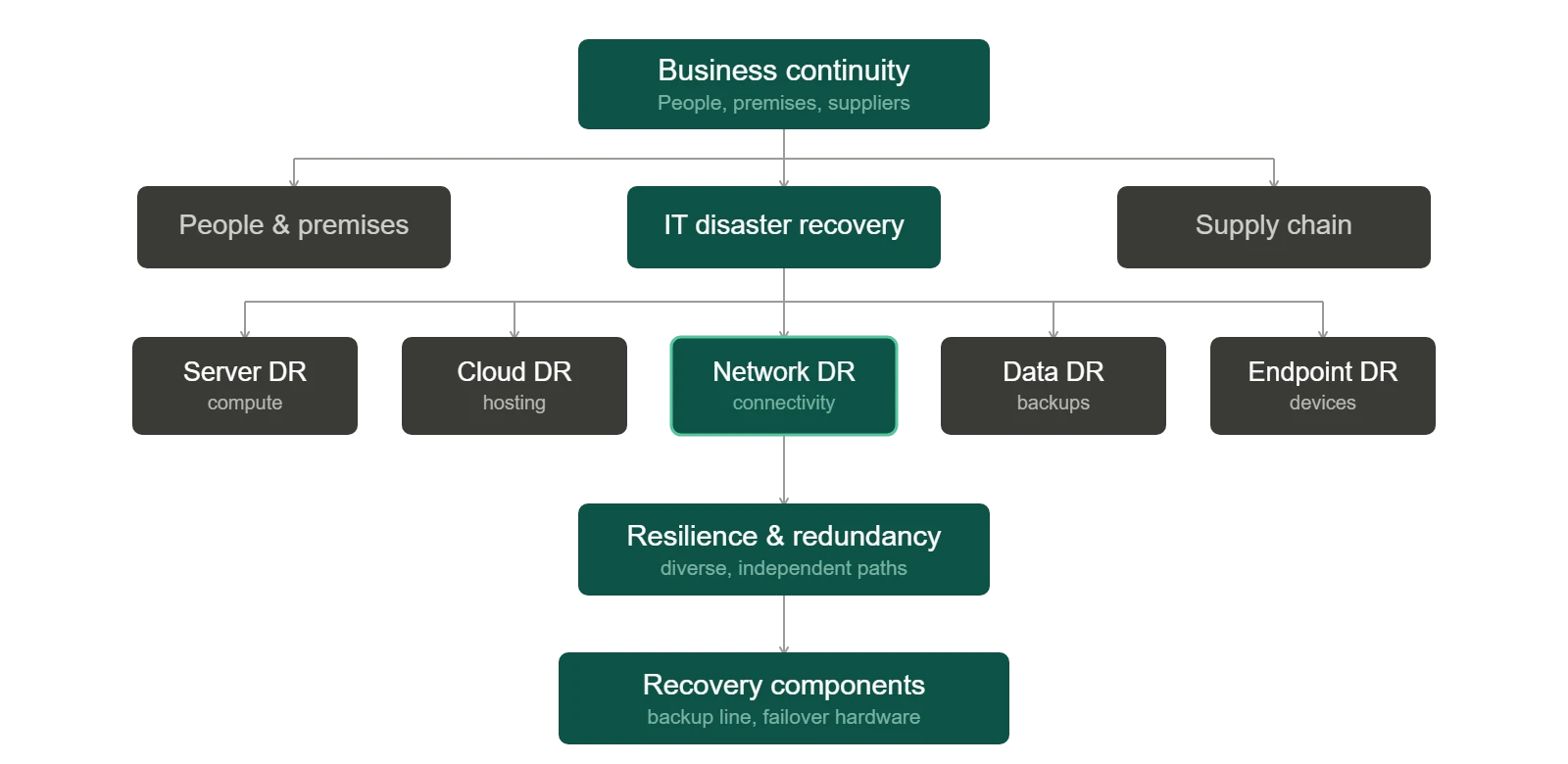
Each layer supports the one above it. Network DR restores connectivity, which keeps IT infrastructure running, which helps keep the overall business running.
Why does network disaster recovery matter?
Having a system for recovering connectivity quickly and maintaining critical availability during an incident is key to an organisation’s resilience.
Here are the key reasons network DR matters for businesses:
- Avoiding revenue loss: Order processing, payment systems, e-commerce sites and other customer-facing services stay online, so transactions can continue without interruption.
- Preventing workforce downtime: Staff retain access to email, files and the on-site and cloud applications they rely on, whether working from the office or remotely.
- Avoiding communication blackouts: Keeping business VoIP phone systems and UCaaS operational ensures teams remain reachable, including those working remotely.
- Meeting SLA commitments: Where you owe guaranteed uptime to your own customers, sustained connectivity prevents the downtime that triggers penalties, service credits or lost contracts.
- Protecting safety-critical systems: Where smart alarms, access control, CCTV, or other safety systems depend on an internet connection, maintaining availability can keep them functioning during an incident.
What causes network failures and outages?
There are many reasons a network can fail, from upstream issues with providers to network equipment failures or power cuts. Some outages last for minutes, others for hours, and the impacts differ depending on the business.
Below are the most common:
Business broadband provider outages
A loss of service from a business broadband provider is among the most common causes of business downtime.
It occurs when a physical line, exchange or backhaul fails, or when scheduled provider maintenance interrupts the link between the site and the wider internet.
Brief drops may last only minutes, while a confirmed fault requiring an engineer visit can run from several hours to a working day or more.
It has a bigger impact on sites without broadband redundancy, and those on weaker service level agreements (SLAs), where guaranteed fix times are longer or absent.
Upstream infrastructure provider outage
Faults in the services that host a business’s systems, or route traffic to them, can also occur, causing disruption even when the local network is perfectly healthy.
This includes:
- Cloud platform outages: AWS or Google Cloud can take all hosted applications, compute and data offline.
- Business web hosting outages: Namecheap, WordPress and other platforms failing can bring down websites and the services running on them.
- DNS failure: Failure with ISP or Cloudflare DNS can break the translation of domain names into addresses, so services become unreachable even while the systems behind them run normally.
- BGP failure: A faulty routing update or hijack at an ISP or transit provider can misdirect traffic across the internet, so requests never reach your services even though everything is running normally.
Organisations that concentrate applications, hosting or DNS with a single provider or region, without redundancy across providers or locations.
Network misconfigurations or hardware failures
Networking equipment such as network switches, firewalls, and wireless access points can unexpectedly malfunction or be mistakenly misconfigured, hampering connectivity.
The impact depends mainly on which device is affected and if failover is possible across a redundant link or port, whether that is automatic or manual.
Power loss
Connectivity relies on a stable power supply to the equipment that delivers it. A tripped circuit, an electrical fault on the premises or, a wider grid failure cuts power to the networking equipment and takes the connection down with it.
Its effects tend to stack up quickly, and may include data corruption caused by an abrupt shutdown, lost productivity, and lost revenue where the site hosts customer-facing or transactional services.
Cyberattacks
Malicious activity is a less frequent but increasingly serious cause of network disruption. Ransomware, distributed denial-of-service DDoS floods and network breaches disable systems or force them offline.
Any organisation can be targeted, though those holding valuable data or running weaker defences face the greatest exposure.
Physical damage and natural disasters
Events that physically damage infrastructure are the rarest cause, but uniquely destructive. Depending on the damage, it is possible to lose connectivity for days, and in rare cases, weeks. Examples include construction work that severs cabling, storms, flooding and fire.
Businesses in flood-prone areas, exposed rural or coastal locations, or close to major construction or roadworks are particularly vulnerable.
Network disaster recovery mechanisms
The effects of connectivity outages can be mitigated through various network DR mechanisms.
These act on different layers of redundancy to ensure the various scenarios are covered and failover across a secondary system can be executed.
Redundant connectivity and automatic failover
Connectivity resilience rests on having more than one independent path to the internet, and the means to move traffic onto the secondary path automatically.
At the LAN edge, the following provide redundant connectivity paths:
- A second fixed broadband line: A separate full fibre business broadband or business leased line broadband connection is typically preferred, because high throughput and low latency can be maintained during an outage.
- Wireless backup: A business mobile broadband, business satellite broadband connection, or wireless leased lines provide a fully independent, wireless route to the internet.
- Business Ethernet: Not strictly a broadband line, but a site-to-site leased line lets one site fall back onto another site’s connectivity, as long as that site’s underlying line stays online.
Switching between these is handled by a multi-WAN router, with QoS policies controlling what traffic takes priority to ensure critical traffic (e.g., communication, security and payment systems) receives the necessary emergency bandwidth to operate.
Multi-site and distributed businesses can control various routers simultaneously through a central SD-WAN solution.
Redundant hardware
Physical hardware necessary to operate business networks also needs to have redundancy as it can always fail unexpectedly. There are three main options to add resilience at this layer:
- High-availability pairs (automatic failover): A standby device that takes over automatically and near-instantly when its partner fails. This is best where operations are truly critical.
- Cold spares on site (manual failover): This is the most common option given running two routers is overkill for most organisations. A replacement unit is held locally and can be swapped in manually by IT staff in minutes. This is significantly cheaper than a live pair, but slower to restore.
- Vendor/MSP replacement cover: If networking is provided as a service (NaaS), a support agreement guaranteeing replacement hardware within a defined window may be stipulated, with SLAs determining timelines.
Redundant power
Hardware can also fail due to a power outage. In this case, backup power is required to keep it working through an interruption. The options differ by how long they sustain the load:
- Uninterruptible power supply (UPS): Covers brief interruptions and allows a controlled shutdown that avoids data corruption.
- Generator: Sustains equipment through longer outages where a UPS alone would be exhausted.
Crucially, the failover networking equipment must sit on the protected supply. Even a mobile or satellite backup, or WiFi access points are of no use if the device delivering it has no power.
Redundant hosting and DNS
While a site’s connectivity can sit under the organisation’s control, other critical upstream services such as web hosting and domain resolution does not, so providing resilience is to avoid concentrating these in a single location or provider:
- Multi-region hosting: Running services across more than one region of a provider, so a single regional failure does not take everything offline.
- Multi-provider hosting: Spreading critical workloads across different providers, removing reliance on any one platform.
- Secondary DNS: A second managed DNS service with failover, so name resolution continues if the primary provider fails.
Change control and configuration management
When outages are self-inflicted by the IT team due to human error, it is necessary to have mechanisms to revert changes rapidly.
- Configuration backups with rollback: Saved known-good configurations that let a faulty change be undone quickly.
- Staged changes and testing: Validating changes away from the live network and applying them within planned maintenance windows.
- Review and documentation: Peer approval of significant changes and documented procedures, so fewer errors reach production in the first place.
Cybersecurity and segmentation
Mitigating cyber attacks requires mechanisms across various layers, since no single measure prevents every attack. This involves prevention, reducing attack surfaces, and ultimately having the ability to recover.
- Preventative controls: Firewalls, timely patching, access management and staff awareness, which stop the majority of attacks before they land.
- Network segmentation: Dividing the network so an intrusion in one area cannot spread freely across the whole estate, for example, using VLANs on local networks.
- Tested, isolated business data backups: Clean copies kept separate from the live environment, enabling recovery without paying a ransom or rebuilding from scratch.
Creating a network Disaster Recovery Plan (DRP)
A network Disaster Recovery Plan is the blueprint for executing network disaster recovery. It takes the risk of losing connectivity and turns it into a structured, repeatable system that holds up over time.
Building a plan involves the following steps:
1. Identify key assets and connections
Set the plan’s boundaries, then map and rank what the business depends on.
- Scope and assumptions: State which sites, connections and services the plan covers, and what it treats as a given. For example, that off-site backups exist or that a named supplier handles the primary line.
- Critical connections: Map what the business relies on, from server-to-device through to site-to-cloud and site-to-remote-worker, alongside the services and user groups that depend on them.
- Priority ranking: Rank these by the cost of their loss, so effort and budget can be prioritised. For a single-office, cloud-based organisation, that is usually the device-to-router, site-to-cloud and site-to-internet connections.
2. Set recovery priorities
Define how quickly each critical service must return, and which take precedence.
- Recovery time objective (RTO): Set how long each service can be offline before the impact becomes serious. For example, minutes for card payments, hours for internal file access.
- Minimum business continuity objective (MBCO): Define the minimum level of service the business can operate at during a disruption, shaped by uptime needs, user numbers and budget.
- Business impact analysis (BIA): Rank the importance of separate services and restore the trading-critical ones first. Typically internet access, business VoIP phone systems, card payments, VPN, and critical cloud applications.
3. Establish failover paths
Confirm that backup paths are genuinely independent. Assess the real diversity of a secondary connection or provider, whether it uses a different carrier, route, street cabinet, building entry, power supply and edge device from the primary.
A backup that shares any of these links inherits the same single point of failure. See our guide on business broadband redundancy for how these dependencies relate.
4. Define manual workarounds
Where an automatic backup path may not be enough, set out manual fallbacks for the services that matter most.
For example, a mobile card reader when the payment route is down, or call routing diversion to mobiles when hosted VoIP fails. These keep the business trading even when both primary and secondary connections are unavailable.
5. Set out the detailed plan
Set out a comprehensive, yet realistic plan in writing.
- Roles and escalation: Record team responsibilities during an outage, the order of escalation, the provider names and account numbers to call, and where SLA and contract copies are kept.
- Communications plan: State who informs staff and customers, through which channels and how often, avoiding updates that add no value.
- First response: Set out a clear first response which includes confirming the source, escalating and switching over, then communicating internally.
- Failback: Where failover or a workaround was manual, confirm the primary is stable, switch back, and tell staff to stop using the workaround.
6. Test and review
Keep the plan current through a regular testing and review process.
- Scheduled testing: Test failover paths, supplier escalations and procedures on a regular basis, not only after an incident. Many businesses take an annual review as a baseline.
- Triggered review: Revisit the plan whenever the network changes, such as a new site, a new service provider or a migrated application.
- Post-incident review: After any outage, review the cause, failover speed, user impact and any shared-risk weaknesses, then feed the findings back into the plan.
The first 15 minutes of a network outage
When connectivity drops, the opening quarter-hour of following the DRP sets the tone for the whole response. The priority is to understand what’s happening, get suppliers moving, and keep staff informed.
Here are the recommended steps during the first 15 minutes of a network outage:
- Confirm the outage and its scope: Verify the scope of the outage, and establish how many sites, users, and systems are affected and what’s still working.
- Determine the source: Pin down whether the fault is local (local hardware, cabling, or configuration), carrier-side (broadband or Ethernet provider), or a shared external service such as DNS, cloud or business VoIP provider.
- Trigger supplier escalation: Open a ticket or call the relevant provider straight away so their clock starts running in parallel with yours, noting reference numbers and expected response times as per SLA agreements.
- Activate failover or a workaround: Switch to the appropriate backup, such as a secondary line, mobile/4G failover, or a manual process, depending on what’s affected.
- Communicate and log: Tell staff clearly what’s down, what still works, and what’s being prioritised, while recording the timeline and actions taken for the provider and the post-incident review.
Network disaster recovery FAQs
Our business networking experts answer commonly asked questions regarding network disaster recovery:
Is a backup internet connection enough to count as network disaster recovery?
No. A backup connection is one component of network disaster recovery, not the whole system. Network disaster recovery also covers risk assessment, recovery priorities, defined roles and escalation, failover procedures and testing.
The backup line is only useful within that wider framework, not to mention the multi-layered redundancy required beyond a secondary broadband line.
Is 4G or 5G backup enough for business continuity?
Rarely on its own.
Mobile business broadband backup may restore basic internet access, but business continuity depends on resilience across the entire tech stack (equipment, power, key services), and on a plan for how the business keeps operating when different failures occur. It is a valuable fallback, not a complete solution.
How do you stop the backup connection failing with the primary one?
Ensure the two paths are genuinely independent. A true backup should not share the same carrier, route, street cabinet, building entry, power supply or edge device as the primary, since any shared element can take both down at once.
Can VoIP and card payments run properly on a backup link?
Often, but not always. Both can run on a backup connection provided it offers enough bandwidth and stable, low-latency performance.
VoIP call quality in particular is sensitive to the performance of the backup. A basic mobile fallback may keep them working but with reduced capacity, so testing these services on the backup path is necessary.
What critical business services does network disaster recovery protect?
Any service that depends on connectivity, wherever it is hosted is protected.
That includes customer-facing and payment systems, communication tools such as VoIP and UCaaS, core applications like CRMs, ERPs, and finance systems, shared data and file access, and security systems such as cloud-hosted NGFWs and web-application firewalls.
 Back to blog