 Our use of cookies
What is DNS and how the domain name system functions
DNS is the system that translates internet domain names such as “www.google.com” into the IP addresses where resources are found.
It underpins internet access, and is something organisations actively manage to keep both the services they offer and those they rely on fast, reliable, and secure.
This guide covers how DNS works, how to configure it, and how to choose the right provider.
Contents:
- What is DNS?
- How does DNS work?
- What are DNS records?
- DNS settings and how they affect domains
- What is a DNS provider?
- Domain Name Service (DNS) – FAQs
What is DNS?
The Domain Name System (DNS) is the protocol that finds the IP address (e.g., 142.250.187.206) corresponding to a request to a human-readable domain name (e.g., www.google.com).
It involves searching for the address across a hierarchy of internet servers, with the depth of the lookup depending on the DNS capabilities of both the client endpoint (a user, app or email) and the host (the service or resource).
Lookups begin locally at the browser and operating system, then move to a global network of recursive resolvers operated by companies such as Google and Cloudflare, and if no answer is found, the DNS search must escalate to the deeper global network of Root, TLD, and Authoritative Nameservers.
Most users interact with DNS passively, relying on the public infrastructure their internet provider, or device designates. However, many businesses take a more active role and invest in the DNS providers, configurations, and records that allow for DNS resolve faster.
How does DNS work?
DNS resolution is a hierarchical, least-effort process which always tries to locate the IP address at the closest and least resource-intensive source available, only escalating to the next layer when no answer can be found.
Regardless of whether a lookup is locally cached or has to traverse the entire global DNS hierarchy, the process is near-instant.
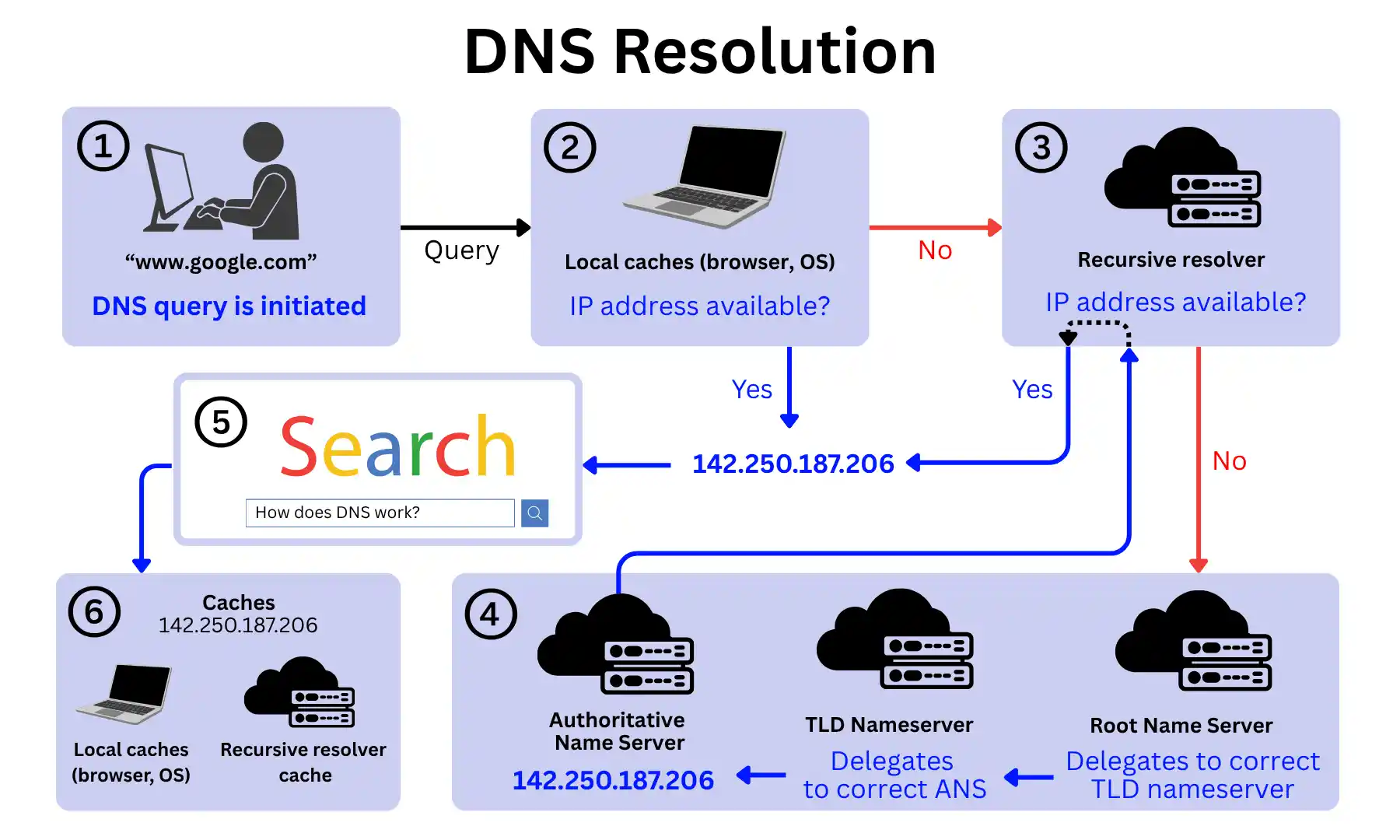
1. A DNS request is made
DNS resolution begins the moment a domain name needs to be resolved to an IP address. This happens continuously in the background of normal internet activity, such as:
- A user entering a URL into a browser
- An application automatically retrieving data from an external API or service
- A VoIP phone connecting to the cloud server of a business VoIP provider.
- An email client looking up the mail server for a recipient domain
- A cloud service resolving the address of another service it depends on
Globally, over a trillion DNS queries are initiated every day.
2. Local cache lookup
Before reaching any external server, DNS checks for a locally stored IP address.
Both the browser and the operating system maintain their own caches of recently resolved domain names. If a match is found, the IP address is returned immediately and the process ends here.
3. Recursive resolver lookup
If no local answer is found, the request is forwarded to a Recursive resolver, a server that handles the query on behalf of the requesting system and coordinates with the broader DNS hierarchy if needed.
These resolvers can be operated by three distinct types of providers:
- Internet service provider (ISP) resolvers: ISPs such as BT, TalkTalk or Virgin Media run their own resolvers, but these are seldom used as they tend to be slower, less globally distributed, and less private than the alternatives.
- Public resolvers: Google (8.8.8.8) and Cloudflare (1.1.1.1) operate free, globally distributed resolvers built on Anycast networks, making them faster and more reliable than ISP resolvers. Cloudflare in particular is built around a no-logging privacy policy, making it a popular choice for privacy-conscious organisations.
- Managed resolver services: Providers such as Cisco Umbrella and Infoblox offer paid resolver services aimed at businesses, adding DNS-based security filtering, threat intelligence, and administrative controls on top of standard resolution.
4. Global Hierarchical DNS lookup
If neither the local cache nor the resolver cache holds an answer, the resolver begins a full hierarchical lookup. This typically occurs for domains that have never been queried before, or whose cached records have expired.
The resolver works through the following servers in order:
- Root Nameserver: The top of the hierarchy. Root Nameservers do not hold IP addresses themselves, but direct the resolver toward the correct TLD Nameserver based on the domain extension (.com, .net, .org, .uk, etc.).
- TLD (Top-Level Domain) Nameserver: Manages all domains under a given extension and points the resolver to the Authoritative Nameserver for the specific domain being queried.
- Authoritative Nameserver: The final stop. Holds the official DNS records for the domain and returns the corresponding IP address to the resolver. These servers are typically managed by domain registrars such as GoDaddy or Namecheap, or DNS hosting providers such as Cloudflare, AWS Route 53, or NS1.
5. Connection is established
With the IP address returned, the requesting system establishes a connection to the resource.
For many websites and applications, this connection is not made directly to the origin server but to a Content Delivery Network (CDN) node, a server geographically closer to the user that holds a cached copy of the content.
This is made possible through Anycast routing or GeoDNS, both of which operate at the DNS level.
Rather than returning a single fixed IP address, DNS returns the address of the nearest available CDN node based on the user’s location. The user gets the same content, served faster, without the request ever needing to travel to the origin server.
6. Caching and TTL
Aside from outputting an IP address, DNS also caches it (stores a copy) at multiple levels, including the resolver, the operating system, and the browser.
This speeds up any future lookups as DNS can find the target IP address without having to search internet-wide hierarchical servers.
How long the IP address remains cached is determined by the domain’s Time to Live (TTL) value, set by the domain owner. Once the TTL expires, a fresh lookup is triggered.
What are DNS records?
DNS records are the individual lookup instructions stored within a domain’s Authoritative Nameserver. Each record tells the DNS system how to handle a specific type of query for that domain.
This could be directing web traffic to the correct server, routing emails to the right email provider, or verifying domain ownership.
Every DNS record consists of three core components:
- Type: Defines the function of the record and how it should be interpreted.
- Value: The corresponding IP address, hostname, or configuration string the record points to.
- TTL (Time to Live): Determines how long the record can be cached before a fresh lookup is required.
For example, the DNS record for spotlightmedia.io simply maps the domain to a given IPv4 address (Type A record), which can be cached for 3600 seconds (TTL) before a fresh lookup is required:
| Name | Type | Value | TTL |
|---|---|---|---|
| spotlightmedia.io | A | 99.83.190.102 | 3600 |
DNS Record Types
Each record type serves a distinct purpose within the DNS system. Below are the most common types and what each one does:
- A Record (Address Record): Maps a domain name to an IPv4 address. This is the most fundamental DNS record type, and the one responsible for directing web traffic to the correct server.
- AAAA Record (IPv6 Address Record): The IPv6 equivalent of an A record. As the internet continues its transition to IPv6, these records are becoming increasingly important for businesses to configure alongside their A records.
- CNAME Record (Canonical Name Record): Maps a domain alias to another domain name rather than an IP address. Commonly used for subdomains and cloud services, allowing multiple domain names to point to the same destination without duplicating records.
- MX Record (Mail Exchange Record): Directs inbound email to the correct mail server for a domain. Correctly configured MX records are critical for reliable email delivery.
- TXT Record (Text Record): Stores arbitrary text values associated with a domain, most commonly used for domain verification and email authentication protocols such as SPF, DKIM, and DMARC.
- NS Record (Name Server Record): Specifies which Authoritative Nameservers are responsible for a domain. These records determine where DNS queries for the domain are ultimately directed.
- PTR Record (Pointer Record): Used in reverse DNS lookups, mapping an IP address back to a domain name. Commonly used for email server verification and network diagnostics.
- SRV Record (Service Record): Specifies the location of servers for specific services, such as VoIP or messaging protocols. Used by applications to discover the correct server and port for a given service.
- SOA Record (Start of Authority Record): Contains administrative information about a domain, including the primary nameserver, the email of the domain administrator, and settings that govern how the zone is managed and replicated.
DNS settings and how they affect domains
DNS settings are how organisations control the behaviour of their domain across every online service they operate, from a public-facing website to an internal application.
These settings are managed through the management interface of their domain registrar (e.g., GoDaddy or Google Site) or a dedicated DNS hosting provider (e.g., Cloudflare or AWS), where records can be added, edited, or removed.
Below are the key areas of DNS configuration:
Web hosting and subdomain
Accessing a website requires the DNS system to read the domain’s A or AAAA record and route the request to the IP address of the server handling incoming web traffic.
These records need to be set up manually by whoever manages the organisation’s DNS, either directly or through a hosting provider, and must be kept up to date as infrastructure changes. This is essential for business web hosting.
Subdomains work the same way. For example, app., mail., shop., or portal.companyname.com will not exist unless a separate DNS record is explicitly created for it, pointing to the relevant server.
This allows organisations to run distinct services under the same domain, but each one requires its own record to be created and maintained.
Email routing and authentication
For email to work correctly with a domain (for example, sending and receiving email from hello@companyname.com rather than a generic provider address), the right DNS records need to be in place and kept accurate.
The MX record tells the internet which mail server is responsible for receiving inbound email for the domain. If an organisation switches email provider, the MX record must be updated accordingly, or inbound email will continue going to the old server.
Outbound email authentication is handled through SPF, DKIM, and DMARC records, which together tell receiving mail servers that emails sent from the domain are legitimate. Without these, outbound email is more likely to land in spam or be rejected, and the domain becomes easier to spoof.
Most email providers supply the exact records needed during setup, but it is the organisation’s responsibility to ensure they are correctly entered into their DNS settings.
Third-party Services
DNS records are also central to integrating third-party cloud platforms with an organisation’s domain.
For example, when signing up to Google Workspace, Google requires a TXT record to be added to confirm domain ownership before activating the service.
Similarly, platforms like HubSpot or Salesforce may require CNAME records so that hosted pages or tracking links resolve through the organisation’s domain rather than a generic platform URL.
These records are provided by the platform during onboarding, but must be manually added to the organisation’s DNS settings to take effect.
TTL and DNS propagation
Every DNS record has a TTL value that controls how long it is cached before a fresh lookup is required.
When a record is changed, the update does not take effect instantly across the internet, but has to propagate, meaning each server that has cached the old record needs to expire it before picking up the new one.
This process is known as DNS propagation and can take anywhere from a few minutes to 48 hours, depending on the existing TTL. Organisations planning infrastructure changes normally lower their TTL values in advance to minimise disruption during the transition.
Dynamic DNS
Most DNS records point to a static IP address, a fixed address that doesn’t change. However, some smaller businesses run on-premise infrastructure on their default dynamic IP address, which changes periodically, meaning their DNS records quickly become outdated.
Dynamic DNS solves this by automatically updating DNS records whenever the IP address changes, keeping hosted services and business VoIP phone systems consistently reachable without manual intervention.
DNS security
DNS is a common attack vector because it was not originally designed with security. Several protections are available, and most require active configuration:
- DNSSEC: Adds cryptographic signatures to DNS records, allowing resolvers to verify that responses have not been tampered with. Protects against spoofing and cache poisoning. Must be enabled through the DNS hosting provider and is not on by default.
- DNS over HTTPS (DoH) and DNS over TLS (DoT): Encrypt DNS queries in transit, preventing them from being intercepted or modified. Configured at the resolver or device level, and increasingly supported by major public resolvers and browsers.
- DNS Filtering: Blocks queries to known malicious domains before a connection is established, reducing exposure to malware and phishing across the organisation’s network. Available as a feature within managed resolver services such as Cisco Umbrella and Infoblox, typically on paid tiers.
- DDoS Protection: DNS infrastructure can be targeted with volumetric attacks designed to take a domain offline. Protection is typically provided by the DNS hosting provider and included in business and enterprise service tiers.
- DNS Tunnelling Detection: A technique used by attackers to exfiltrate data by encoding traffic within DNS queries, bypassing traditional firewalls. Requires dedicated DNS monitoring or filtering tools to detect and prevent.
What is a DNS provider?
A DNS provider is an organisation that manages and serves DNS records on behalf of a domain, operating the Authoritative Nameservers that respond to queries and return the correct records. Every organisation with a domain will interact with at least one. There are two main types:
Domain Registrars
GoDaddy, Namecheap, Cloudflare Registrar
Companies accredited by ICANN to sell and manage domain name registrations. When an organisation purchases a domain, the registrar handles the registration with the relevant TLD registry and provides basic DNS hosting as part of the package.
It’s a paid service, though costs are typically low, usually an annual fee for the domain registration itself.
Dedicated DNS Hosting Providers
Cloudflare, AWS Route 53, NS1
Providers that focus specifically on operating fast, reliable, and globally distributed Authoritative Nameserver infrastructure, offering better performance, uptime guarantees, and advanced security features than a registrar’s default offering.
Available on both free and paid tiers, with paid plans offering higher query volumes, advanced features, and SLA-backed uptime guarantees.
Domain Name Service (DNS) – FAQs
Our business networking experts answer commonly asked questions regarding DNS:
What is the difference between DNS and DHCP?
DNS and DHCP are both foundational network protocols, but serve different purposes:
- DNS translates domain names into IP addresses, allowing systems to locate resources on the internet.
- DHCP (Dynamic Host Configuration Protocol) automatically assigns IP addresses to devices on a local area network, so they can communicate in the first place.
In practice, both work together. DHCP gives business broadband routers their network configuration (often through Zero touch Provisioning), including which DNS resolver to use, and DNS then handles the resolution of domain names from that point.
What happens if a DNS record is configured incorrectly?
The consequences depend on which record is misconfigured:
- An incorrect A record will prevent users from reaching the website.
- A misconfigured MX record will cause inbound email to fail.
- Missing or incorrect SPF, DKIM, or DMARC records will cause outbound email to land in spam or be rejected.
In most cases the impact is immediate but goes unnoticed, with users simply unable to reach the service, with no obvious indication that DNS is the cause. This makes correct DNS configuration and regular auditing essential.
Can a DNS failure take an entire website offline?
Yes. If the Authoritative Nameserver for a domain becomes unavailable and there is no redundancy in place, DNS queries for that domain will return no answer, making the website and any associated services unreachable regardless of whether the origin server itself is functioning.
This is why organisations with high availability requirements use multiple Authoritative Nameservers across different DNS providers or locations.
How do businesses ensure DNS reliability across multiple locations?
The most common approach is to use a DNS hosting provider that operates a globally distributed Anycast network, which ensures queries are always routed to the nearest available node.
Organisations with stricter requirements may also implement secondary DNS, where a second independent Authoritative Nameserver acts as a backup if the primary fails.
Enterprise DNS providers such as Cloudflare, AWS Route 53, and NS1 all offer infrastructure designed for high availability across multiple regions.
Why might a website work in one location but not another?
This is typically caused by DNS propagation. When a DNS record is changed, the update does not take effect globally at once; it spreads gradually as cached records expire across resolvers worldwide.
During this window, some users will resolve the old record while others resolve the new one, meaning the website may appear to work in some locations but not others. The duration depends on the TTL value of the record that was changed.
Can DNS records stop working during a website migration?
Yes, and it is one of the most common causes of downtime during migrations. If the A record is updated to point to the new server before the migration is complete, traffic will be directed to a destination that is not yet ready.
Conversely, if the record is not updated after the migration, traffic will continue going to the old server. The safest approach is to lower the TTL value well in advance of the migration, complete the move, verify the new server is functioning correctly, and only then update the DNS record.
Does DNS filtering work on all broadband connections?
Yes. Managed resolver services such as Cisco Umbrella operate independently of business broadband providers.
However, organisations with higher security requirements may want to consider dedicated business leased line broadband to ensure consistent, uncontended performance for business-critical traffic.
 Back to blog