 Our use of cookies
Network Access Control (NAC): What it is and why its important
Network Access Control (NAC) is a framework for managing and securing access across business networks of all sizes and levels of complexity.
This guide explains NAC, how it works, how it compares to other security technologies, and what organisations need to consider when implementing it.
Contents:
- What is Network Access Control (NAC)?
- How does Network Access Control work?
- Types of Network Access Control systems
- Considerations for implementing a Network Access Control system
- Network Access Control business use cases
What is Network Access Control (NAC)?
Network Access Control (NAC) is a framework that unifies access control management across business networks (LANs, WANs, cloud environments) and distributed endpoints (employee laptops, phones, IoT).
It centralises network access management components under a single umbrella:
- Identity security: NAC identifies all legitimate users, devices and services and authenticates them.
- Endpoint security: NAC receives security posture data from endpoints to calculate risk.
- Policy enforcement: NAC enforces least-privilege access for identities through a network of firewalls, switches and gateways.
- Monitoring: NAC continuously monitors and adjusts all of the above from a single platform, ensuring compliance with various security frameworks.
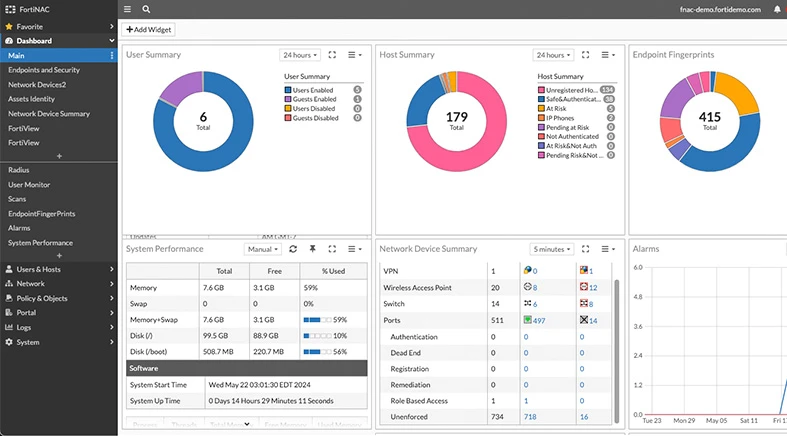
While seemingly complex, NAC is a versatile framework that can be implemented at any scale, from a simple 802.1X and RADIUS setup for a single LAN, to a full multi-site enterprise deployment through dedicated solutions such as FortiNAC, Cisco ISE, or HPE Aruba.
How does Network Access Control work?
The NAC framework is highly adaptable and can be implemented across a wide range of networks and businesses, both small and large.
Here is how it works, end-to-end, through six key components:
1. Discovery of identities
NAC relies on continuously taking inventory of all identities that request and have access to the networks under its control.
Networking devices across the edge and within networks, such as firewalls, routers, switches, and virtual gateways, continuously relay identity telemetry to the central policy engine:
- In on-premise environments: This identity ledger is typically maintained by Microsoft Active Directory.
- In cloud and hybrid environments: Microsoft Entra or similar IAM platforms such as Okta serve the same function
The result is a live identity inventory, giving network admins full visibility of all users, devices, APIs, and services with network access.
2. Identity authentication
NAC ensures that all identities attempting to access are authenticated, meaning they must prove they are who they claim to be.
The mechanism depends on the network environment:
- In LAN environments: Authentication is typically handled via 802.1X and RADIUS, which validate devices at the network switch or WiFi access point.
- In cloud and distributed environments: This is handled by IAM platforms such as Microsoft Entra or Okta, which validate credentials, digital certificates, and multi-factor authentication (MFA).
Any identities that fail authentication are not allowed access and do not proceed further, regardless of whether they are connecting from inside the office or remotely.
3. Identity risk assessment
NAC typically requires authenticated identities to be risk-assessed. This assessment determines the level of access that users, devices and systems gain.
This is done by collecting telemetry from endpoints via lightweight agents or agentless techniques, which can be used to calculate risk, such as:
- The version and patch level of the device’s Operating System (OS)
- Whether it has the required business antivirus and Endpoint Detection and Response
- Geo-location and IP address of the user and device
- Whether the API has valid certificates
4. Risk-adjusted permissions
The NAC framework has a central policy engine that aggregates the data collected in the previous steps to determine each identity’s access permissions.
There are four policy models for imparting least-privilege access:
- Role-Based Access Control (RBAC): Access determined primarily by the identity’s role within the organisation, without dynamic posture evaluation. The most common enterprise model.
- Attribute-Based Access Control (ABAC): Access determined by evaluating role, security posture, and context together. The model modern NAC deployments increasingly operate within.
- Mandatory Access Control (MAC): Access decisions made based on security classifications, typically used in government or defence environments.
- Privileged Access Management (PAM): Additional controls applied to high-privilege identities, ensuring elevated permissions are tightly governed even after network access is granted.
The result is that two employees may be equally authenticated but given different levels of access depending on whether they are using their own or the company’s device, logging in from the office or a public network, or depending on their department and role within the business.
5. Policy enforcement
With the policy decision made, the network infrastructure carries it out depending on the environment and network architecture:
- In a traditional office environment: Switches and routers segment traffic using VLANs so that different identity groups can only reach their respective resources.
- In remote or hybrid setups: VPN or SD-WAN gateways apply the same logic, restricting which internal resources a remote identity can reach.
- At the application and infrastructure level: NAC policies can be applied by Web Application Firewalls.
- In fully distributed, cloud-heavy environments: SASE and Cloud-Managed WAN platforms handle enforcement at the cloud edge, closest to wherever the identity is connecting from.
In each case, a device failing authentication or posture assessment may be blocked outright, quarantined, or redirected to a remediation portal for resolution before access is granted.
6. Monitoring, maintenance and compliance
NAC not only controls access at the point of entry, but continuously monitors identities using various network monitoring and analytics platforms, depending on the setup.
- With a dedicated solution (e.g., FortiNAC or Cisco ISE): Monitoring is centralised within that platform across all environments, ingesting telemetry from all network components and feeding back into its own policy engine.
- When monitoring is environment-specific: A SIEM may be used for log aggregation, SD-WAN analytics for WAN visibility, endpoint agents for device telemetry, and cloud-native tools for cloud environments, etc.
These platforms flag anomalies and compare the state of security with compliance frameworks such as ISO 27001.
Should an identity fall out of compliance after gaining access, the monitoring platform feeds this back into the policy engine, which can automatically restrict or revoke access without manual intervention.
Types of Network Access Control systems
For NAC to suit all networks, various types have arisen so it can be implemented across different architectures:
Inline vs out-of-band
In local area networks, there are two main ways to enforce NAC controls, depending on what the organisation needs.
Inline NAC through a dedicated appliance
A dedicated NAC appliance is installed inline with the data flow, enforcing controls on live traffic. It works separately from any firewalls, routers, gateways or switches already in the path.
That gives tighter, real-time control, which is favoured in high-security settings like finance or healthcare.
Its capacity needs to match the traffic throughput to avoid becoming a chokepoint, and redundancy is necessary in case it goes down.
Out-of-band NAC utilising existing appliances
Relies on existing switches, wireless controllers or firewalls to enforce controls. These devices grant, block or quarantine a device (typically via 802.1X) on behalf of the NAC engine, which sits elsewhere, in the cloud or on a local server.
This brings greater scalability and resilience, since it uses infrastructure you already have along with its built-in redundancy, making it the better fit for most enterprise and SME deployments.
Agent-based vs agentless
Networks are often accessed by both company-managed and third-party devices. To get the necessary security telemetry from both types of endpoint, two NAC alternatives were developed.
Agent-based NAC
Company-managed devices can run a lightweight NAC agent that feeds security telemetry to the policy engine continuously.
Because it sits on the device itself, it gives the deepest, most reliable data on security posture, including patch level, encryption and running processes.
Agentless NAC
For devices outside the company’s control, such as employee-owned laptops, IoT or contractor hardware, NAC profiles them remotely using:
- Fingerprinting: NAC reads the information a device gives off just by being on the network, such as its MAC address, DHCP requests and browser user-agent strings, to work out what kind of device it is.
- Network scanning: NAC probes the device from the outside, checking which ports are open, what services are running, whether it responds to an SNMP query, etc.
This is often the only practical option for these devices, with the trade-off being depth. With less visibility, NAC usually enforces stricter controls.
Considerations for implementing a Network Access Control system
The right approach to deploying a NAC System depends on the existing infrastructure, the device landscape, and the organisation’s security requirements. These are the main things to consider:
- Network scope: The complexity and scale of the deployment depends largely on the environments that need to be governed, including any LANs, WANs, cloud and remote access.
- Perimeter vs zero trust security: Traditional NAC deployments focus on controlling access at the network perimeter through fixed firewalls. Modern deployments increasingly follow a zero trust approach, extending continuous verification to every identity regardless of location or network segment.
- Identity infrastructure: Existing IAM platforms such as Microsoft Entra or Okta must integrate cleanly with the NAC policy engine. Fragmented or immature identity infrastructure should be addressed before deployment begins.
- Hardware compatibility: Switches and WiFi access points must support the 802.1X standard for NAC enforcement to function in LANs. This should be confirmed early, as unsupported hardware will require upgrades.
- Deployment model: On-premise deployments offer greater control, cloud-managed deployments offer easier scalability, and hybrid deployments suit organisations with mixed environments.
Network Access Control business use cases
By unifying various powerful technologies, a NAC framework gives organisations consistent, automated control over who and what can access all of their network. Here is what organisations achieve when rolling out a NAC system:
Improved network visibility
NAC provides a real-time inventory of every device, user, and service connecting to the network, capturing device type, OS, connection method, location, and compliance status.
Organisations commonly discover significantly more devices than expected during initial deployment, particularly IoT equipment and personal devices connected without IT knowledge.
This becomes even more powerful in combination with a SIEM platform to help manage and store the wealth of telemetry.
Secure remote access
By placing checkpoints at the device level (instead of at network perimeters) NAC enforces consistent controls whether the request comes from within the office or remotely.
When implemented through SD-WAN solutions, remote employees don’t even notice; they just authenticate their identity through their devices and receive the permissions assigned to them by pre-configured policy.
Guest and contractor access
Many NAC deployments also include secure (yet user friendly) ways of incorporating guests and contractors. They usually connect to guest WiFi via a captive portal, receive time-limited internet-only access on an isolated segment, and are automatically expired.
Contractors receive role-specific access restricted to designated systems, with credentials automatically set to revoke at the end of an engagement.
IoT and unmanaged device control
NAC discovers and classifies IoT and external devices automatically using agentless techniques, placing them in isolated network segments. This means a compromised IoT device cannot reach the corporate network, containing the threat before it can spread.
Automated compliance and remediation
In compliance-sensitive sectors, NAC continuously assesses devices against defined security standards, quarantining or redirecting non-compliant devices to a remediation portal before access is granted.
Every connection, authentication, and policy decision is logged, providing a verifiable audit trail for Cyber Essentials Plus and UK GDPR compliance.
Automatic threat response
Connected identities are continuously monitored throughout their session, with access automatically restricted or revoked if compliance status changes or anomalous activity is detected, without requiring manual intervention from the IT team.
Network Access Control (NAC) FAQs
Below we answer several commonly asked questions regarding Network Access Control:
What is the difference between NAC and a firewall?
A firewall is a network device that controls which traffic is permitted to enter or leave a network. It can operate independently, or as part of a broader NAC solution, in which it serves as a source for identity data (who gets access, who is blocked, etc.) and to enforce NAC policies at the network edge.
Does NAC work on both wired and wireless networks?
Yes, NAC can work over any network. In the context of local area networks, 802.1X (the IEEE standard for port-based network access control) can authenticate devices across wireless access points and switch ports.
Most business-grade switches and wireless access points support it, making it the most common technical foundation for NAC enforcement at the network edge.
What happens if a device fails the NAC posture check?
Depending on the organisation’s policy, a failing device is typically blocked outright, placed in a quarantine zone, or redirected to a remediation portal where the issue can be resolved before access is regranted.
In local area networks, non-compliant or unrecognised devices are typically assigned to a “quarantine VLAN” when they fail NAC checks, leaving them isolated from the rest of the network until they become compliant.
Is NAC only for large enterprises?
No, NAC can be applied to organisations of all sizes and networks of all levels of complexity.
Basic NAC encompassing a standard 802.1X deployment with a RADIUS server provides meaningful access control for LANs without the overhead of a full enterprise platform.
Open source options such as PacketFence also make NAC accessible to smaller organisations with capable IT teams.
What is the difference between open source and commercial NAC?
Open source platforms such as PacketFence offer full NAC functionality at zero licensing cost, but require Linux administration skills and community-based support.
Commercial solutions offer vendor support, pre-built integrations, and faster deployment, but come with licensing costs. The deciding factor is usually the IT team’s technical capability and willingness to self-manage.
How do I evaluate a NAC solution?
Key criteria include deployment model, agent and agentless support, IAM and Active Directory integration, 802.1X and switch compatibility, scalability, integration with existing security tools, and total cost of ownership.
Switch compatibility with 802.1X should always be confirmed first, as unsupported hardware will require upgrades before deployment can begin.
What is the difference between NAC and ZTNA?
NAC is the framework for managing access control across all network environments. ZTNA is a security philosophy that requires continuous verification of every identity rather than trusting anything that has already passed the network perimeter.
Modern NAC deployments increasingly follow the ZTNA model, though traditional perimeter-based approaches still exist.
 Back to blog