Our use of cookies

What is bandwidth and what it means for business broadband and networking
Bandwidth is the maximum amount of data a connection can carry, whether over broadband, local Ethernet, or WiFi.
It is the same as connection ‘speed’ and is of major importance to any business network, alongside latency and throughput.
This guide explains what bandwidth is, how it works across typical business sites, and how to apply it when designing or troubleshooting a network.
Contents:
- What is bandwidth?
- How does bandwidth work across business broadband and internal networks?
- Why does download and upload bandwidth matter?
- How does shared and dedicated bandwidth affect broadband performance?
- How much broadband bandwidth does a business need?
What is bandwidth?
Bandwidth is the maximum amount of data a connection can carry at once, usually measured in megabits per second (Mbps) or gigabits per second (Gbps).
It is typically described as a connection’s ‘speed’, although in reality a higher bandwidth connection does not move data any faster, but simply moves more data at the same time.
It determines how many activities the connection can support simultaneously, such as video calls, cloud applications, VoIP telephony, file transfers and web browsing.
When demand for bandwidth exceeds capacity, typically during peak usage times, queues of data packets form at the edge of connections, causing them to slow down or degrade as data takes longer or is lost before reaching its destination.
Bandwidth can be asymmetric (i.e., higher for downloads; lower for uploads), or contended (i.e. variable depending on the activities of other users on the same shared infrastructure).
How does bandwidth differ from speed, latency and throughput?
Bandwidth is often used interchangeably with speed, throughput, and blamed for latency, but each term describes something different:
- Bandwidth vs speed: “Speed” is marketing shorthand for bandwidth, the capacity of a connection, not how fast data travels. Data moves at roughly the same velocity on a 40 Mbps line as on a 1 Gbps one; the larger connection simply carries more data at once.
- Bandwidth vs throughput: Bandwidth is the theoretical maximum; throughput is the rate data actually gets delivered, reduced by protocol overhead, WiFi conditions and congestion. A 100 Mbps connection delivering 85 Mbps is normal.
- Bandwidth vs latency: Latency is how long data takes to reach its destination, measured in milliseconds. It depends on distance and routing but can also be impacted when a connection becomes saturated due to limited bandwidth.
How does bandwidth work across business broadband and internal networks?
Businesses receive internet bandwidth through a broadband service, delivered via an internet access line that terminates at the site’s router.
Alongside switches and wireless access points, this bandwidth is managed across the local area network and distributed downstream onto end users, servers, and IoT devices.
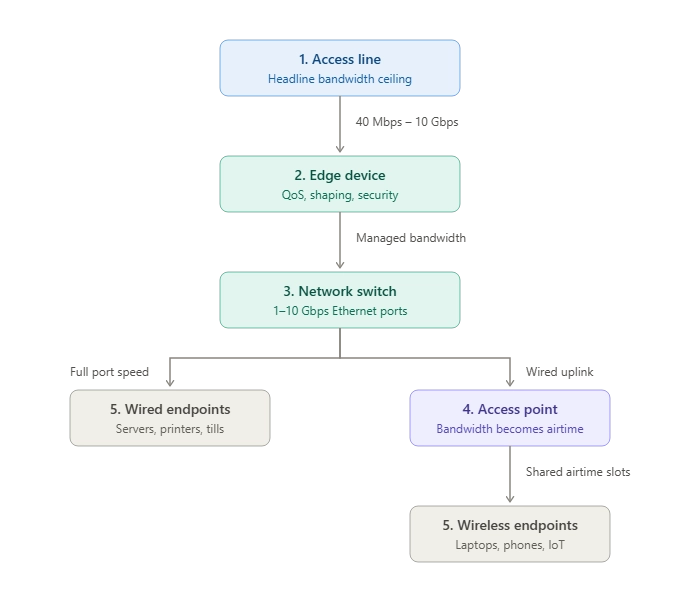
Here is how the headline bandwidth makes its way step-by-step from the network edge and onto endpoint devices:
1. Access line receives the headline bandwidth
The access line that connects the premises to the internet receives a headline bandwidth capacity, typically called the maximum “business broadband speed”.
This capacity depends on the type of connection and the service level agreement (SLA) with the broadband provider.
Wired options range from copper-based SoGEA broadband at the lower end (40-80 Mbps) through to leased lines reaching 10 Gbps. Wireless options include 4G/5G broadband and satellite internet services such as Starlink or OneWeb.
Beyond raw capacity, contention (whether bandwidth is shared with other subscribers or dedicated) and symmetry (whether upload matches download) affect effective throughput.
2. Edge router manage the headline bandwidth
The access line connects to a business broadband router, which handles the inbound and outbound capacity delivered by the connection.
It uses the following traffic management techniques to ensure optimal use of this bandwidth:
- Quality of Service (QoS) rules: Gives latency-sensitive traffic such as VoIP and video conferencing priority over bulk transfers like backups or large downloads. It starts making a difference as maximum throughput is approached.
- Traffic shaping and rate limiting: Caps the bandwidth available to specific applications, users or guest networks, preventing any single source from saturating the line.
An underpowered router can become a bottleneck in its own right, while a device rated below the access line’s capacity will throttle the whole site, regardless of the connection purchased.
Additionally, a firewall can be installed in front of the router, securing traffic at the expense of processing overhead from inspection, VPN encryption, and content filtering.
3. Network switches manage bandwidth across the LAN
In simple local area networks (LANs), the router that receives internet connectivity also distributes bandwidth across devices, applying the traffic management rules described above.
In larger sites with tens to hundreds of wired devices, the router instead plugs into a network switch, which fans the feed out to wired devices and wireless access points through its ports.
The traffic management rules defined at the router are extended across the LAN by segmenting traffic from each port into virtual subnetworks called VLANs.
But unlike the access line, local Ethernet (i.e., the cables that carry local traffic) capacity is significantly higher. Standard business Ethernet runs at 1 Gbps per port, with 2.5 Gbps, 10 Gbps and higher available for uplinks and server connections.
A typical 12-port switch can therefore offer well over 24 Gbps of concurrent throughput, enough to handle dozens of standard leased lines’ worth of traffic simultaneously.
This bandwidth surplus exists to accommodate local-only traffic that does not touch the access line, such as server-to-server file transfers, internal video calls, and local compute.
Bottlenecks are therefore uncommon on wired LANs. Where they occur, they usually trace back to legacy hardware, such as older 100 Mbps switches, or daisy-chained switches funnelling through a single uplink port.
4. Wireless access points offer bandwidth as airtime slots
Wireless access points convert the bandwidth capacity of the wired network into WiFi, using airtime transmission slots available on each WiFi band (2.4 GHz, 5 GHz, and 6 GHz).
The access point allocates traffic from connected devices to these slots according to its own QoS rules, typically mirroring those of the edge router.
Beyond this, several other factors shape how bandwidth is distributed across wireless devices:
- Shared band speed: 2.4 GHz tops out at around 600 Mbps, while 5 GHz and 6 GHz can reach 2-5 Gbps under ideal conditions. This bandwidth is shared across every device connected to the same band at once.
- Access point quality matters: A basic access point might comfortably handle 20 to 30 devices while a higher-spec business one can handle 50 or more without individual speeds dropping.
- Signal strength: Devices further away or blocked by walls have a weaker signal, so they use slower, more cautious transmission rates to stay connected, taking up more airtime and slowing things down for every other device nearby, not just themselves.
- Range vs speed: 2.4 GHz travels further through walls and floors but offers less bandwidth; 5 GHz and 6 GHz offer more bandwidth but are shorter range. Where a device sits, and which band it ends up on, affects how fast it runs.
- Interference and congestion: Neighbouring networks, thick walls, and overlapping channels all eat into usable bandwidth, particularly on the busier 2.4 GHz and 5 GHz bands.
Due to these factors, WiFi bandwidth is always more variable than a wired connection, which delivers a fixed, dedicated amount of throughput to every device plugged in.
5. Endpoints receive bandwidth
The final share of bandwidth reaches laptops, phones, tills, card machines, IoT devices, printers, and all other endpoints.
The traffic management rules (QoS and shaping) enforced across wireless access points, switches, and routers determine how much bandwidth each endpoint gets.
Without these rules, distribution at this level would effectively be first-come, first-served. One large upload or streaming session could crowd out business-critical applications during periods of congestion.
Why does download and upload bandwidth matter?
Download and upload bandwidth are terms used mainly for broadband (the access line), where capacity is either symmetric (equal in both directions) or asymmetric (higher download than upload).
Symmetric business broadband better supports real-time applications, but asymmetric costs less, as providers skim away upload capacity and split it as download across more subscribers.
Whether a business needs symmetric capacity depends on how its workload splits across the two directions:
Download bandwidth
Download bandwidth supports data arriving from the internet to the site, and determines how many inbound activities the connection supports at once.
Typical use cases include:
- Cloud applications: Loading pages, dashboards and records from remote servers.
- Video streaming: Consumes sustained capacity per participant.
- Software updates and patches: Often downloaded across many devices at once.
- Receiving large files: Design assets, media or datasets from clients and suppliers.
Typical symptoms of limited download bandwidth include slow-loading pages, buffering streams and sluggish updates.
Upload bandwidth
Upload bandwidth carries data leaving the site for the internet, and determines how many simultaneous real-time activities a site can support.
Typical use cases include:
- Cloud data backups and file syncing: Pushing business data off-site continuously or overnight.
- Outgoing video calls: Each participant’s camera feed consumes upload capacity.
- Business VoIP phone systems: Need a small but constant, stable stream per call.
- Hosting and remote access: On-site servers, CCTV viewed remotely, or staff connecting via VPN.
Typical symptoms of limited upload bandwidth include frozen video calls, degraded VoIP call quality and backups spilling into working hours.
How does shared and dedicated bandwidth affect broadband performance?
Business broadband providers can assign a fixed amount of bandwidth to a site (dedicated) or share it among multiple subscribers who compete for it (contended broadband).
Dedicated bandwidth delivers consistent performance at any time of day, but shared costs less, as providers spread the same network capacity across more subscribers.
Which model suits a business depends on how much its operations tolerate performance dips:
Dedicated bandwidth
Dedicated bandwidth reserves the full contracted capacity for a single site, so performance stays consistent regardless of what other subscribers are doing.
Options available for business include:
- Business leased line broadband: A private circuit with symmetric, uncontended bandwidth and a service level agreement.
- EoFTTP: Ethernet over full fibre, a lower-cost dedicated option delivered over existing FTTP (full fibre) infrastructure.
- EFM: Ethernet in the first mile, dedicated bandwidth over bonded copper pairs, with lower capacity but resilience across multiple lines.
- Wireless leased lines: Dedicated bandwidth delivered over a point-to-point radio link, useful where fibre is unavailable or slow to install.
- Dark fibre: Leased physical fibre the business lights with its own equipment, for full control at the highest cost.
These options suit sites where connectivity is business-critical, such as hosting servers or handling constant cloud workloads.
Shared bandwidth
Shared bandwidth spreads network capacity across multiple subscribers, expressed as a contention ratio (for example, 20:1 means up to 20 subscribers share the same capacity).
Typical options include:
- Full fibre business broadband: High headline bandwidth, contended, with performance dipping at peak times.
- SoGEA broadband: Copper-based and contended, with lower headline capacity.
- Mobile business broadband: Shares 4G and 5G cell capacity with every user on the mast.
- Business satellite broadband: Shares beam capacity across a wide coverage area.
Typical symptoms of contention include slowdowns at predictable busy periods, such as mid-morning, lunchtime and early evening, even though the connection performs well off-peak.
How much broadband bandwidth does a business need?
The right bandwidth depends on many factors, including headcount, the applications in daily use and how much of the workload runs in the cloud.
A five-person design studio moving large files needs more capacity than a thirty-person office running only email and browsing.
Below are the practical factors to consider, some examples, and other things to consider:
Practical factors to estimate bandwidth needs
Rather than guessing from headline packages, a workable estimate comes from looking at how the business actually uses its connection at its busiest:
- Concurrent users: Count the people and devices online at the busiest point of the day, not the total headcount. Allow 10-15 Mbps per active user for cloud-based office work, and 20 Mbps or more for data-heavy roles such as design, media or development.
- Application demand: Video conferencing needs 3-5 Mbps per participant in each direction, VoIP around 0.5 Mbps per call, and cloud backups or large file transfers consume whatever is left. Real-time applications also need stable upload, not just download.
- Growth and headroom: Adding 20-30% above current peak usage avoids outgrowing the connection mid-contract.
- Network disaster recovery: Reserving bandwidth across a secondary redundant connection is key to ensure business-critical applications can continue operating through broadband failover in case of a provider outage.
Bandwidth need business examples
Every business is different, but the following reference points give a sense of where sites of a similar size and workload tend to land:
- Small office (up to 10 staff): 150-300 Mbps asymmetric full fibre typically runs cloud email, browsing and occasional video calls comfortably. Sufficient for an accountancy practice, estate agency or small consultancy.
- Growing business (20-50 staff): 1+ Gbps, symmetric, fully dedicated leased line supports regular video conferencing and daily cloud applications. For example, a marketing agency, software team or busy sales office.
- Data-intensive site: 2-10+ Gbps, through a bonded dual-leased line setup with network load balancing suits businesses hosting servers, handling media or running constant backups. For example, a video production studio, a medical imaging clinic or a multi-till retail site with CCTV.
Other networking considerations outside of bandwidth
The reality is that the headline bandwidth figure is only half the decision.
Bandwidth contention and symmetry determine how much of that figure survives peak times and upload-heavy workloads.
Beyond the line itself, traffic management such as QoS keeps VoIP and video calls stable when the connection runs near capacity, while broadband bonding, broadband redundancy, or SD-WAN solution spreads traffic across multiple lines to protect against outages and congestion.
Bandwidth for business broadband and networks FAQs
Our business broadband experts answer commonly asked questions regarding bandwidth across local and wide area business connections:
Should a business upgrade broadband or fix the internal network first?
The advice is always to diagnose before spending. If the connection performs well off-peak but slows at busy times, the access line or its contention is the issue. Compare business broadband deals to upgrade to a higher bandwidth service.
If a wired business broadband speed test hits the contracted bandwidth while WiFi lags, the internal network is the bottleneck and a faster line changes nothing.
Fixing WiFi coverage through mesh networks, replacing legacy switches or adding QoS is often cheaper than upgrading the connection.
What causes bandwidth problems and how can performance be improved?
Most bandwidth problems trace to a saturated access line, an underpowered router, ageing switches, or congested WiFi. Here is how to identify and fix each of them:
| Possible Cause | How to Identify It | Recommended Fix |
|---|---|---|
| Saturated access line | Router dashboard shows constant utilisation saturation, even off-peak | Upgrade the broadband link where demand has outgrown the connection |
| Underpowered router | Wired speed test stays slow even during off-peak times; router admin panel shows high CPU/memory usage | Hardware upgrade |
| Ageing switches | Wired speed test to switch-plugged devices is slow, but healthy when plugged straight to the router; switch logs show errors or drops | Hardware upgrade |
| Congested WiFi | Wired vs. wireless speed test shows a large gap; WiFi analyser reveals channel congestion | Upgrade to WiFi 7 and add more access points |
Can WiFi be the bottleneck even if the broadband line is fast?
Yes, and it frequently is. WiFi shares airtime across every connected device, so a fast access line can still feel slow over a congested or weak wireless network.
If a wired device achieves full bandwidth while wireless devices do not, the WiFi setup needs attention.
How much bandwidth does a business need for VoIP and video calls?
Allow around 0.5 Mbps per VoIP call and 3-5 Mbps per video call participant, then multiply by the maximum number of concurrent calls.
Note that connection stability matters more than volume, so QoS prioritisation and sufficient upload capacity do more for call quality than headline bandwidth.
 Back to blog