 Our use of cookies
What is SIP ALG and why it affects VoIP calls
SIP ALG is a legacy router and firewall feature that still lurks in modern devices, causing various frustrating VoIP issues.
This article covers what SIP ALG is, why it’s still enabled by default in so many routers, how to spot the signs it’s disrupting your calls, and how to safely troubleshoot it.
Contents:
- What is SIP ALG?
- How does SIP ALG work with SIP and NAT?
- What are the signs SIP ALG is affecting VoIP calls?
- Should SIP ALG be enabled or disabled?
- How to troubleshoot SIP ALG
What is SIP ALG?
SIP ALG (Session Initiation Protocol Application Layer Gateway) is a legacy router and firewall feature that still exists in modern devices, despite being largely obsolete.
When accidentally left enabled, it can cause a variety of sporadic VoIP issues, such as sudden one-way audio, calls connecting and disconnecting unexpectedly, or inexplicable connectivity problems when plugging in a new phone.
SIP ALG was necessary in older VoIP systems, where routers and/or firewalls had to ensure SIP messages (fundamental to how VoIP calls are set up) reached the intended phone on the local network.
Modern cloud-hosted VoIP, however, no longer needs this as it relies on mechanisms such as STUN, symmetric RTP, and Session Border Controllers (SBCs) to handle SIP instead.
Almost every major business VoIP provider explicitly lists “Disable SIP ALG” as step one when setting up a business VoIP phone system, precisely to avoid these issues.
How does SIP ALG work with SIP and NAT?
SIP ALG is the legacy method for making SIP-based calls compatible with NAT, an essential mechanism for addressing local devices within a LAN.
To understand how it works, below we explain the role of NAT, why SIP doesn’t work with it, and how a router and/or firewall’s SIP ALG function is used to bridge this gap:
How NAT gives VoIP phones local addresses
NAT (Network Address Translation) is what gives every device on a local network, such as a VoIP phone, laptop, or printer, the ability to communicate across the internet.
Internet communication relies on public IP addresses, which represent an entire office or shop, not each individual device within it. Each device instead has its own private internal address, invisible to the outside internet.
So, for example, when a laptop communicates over the internet, the router or firewall uses NAT to replace its internal address in the data packet header with the office’s shared public IP, while keeping track internally of which reply belongs to which device.
This works for the vast majority of internet traffic, but not for VoIP calls.
Why SIP calls do not work with NAT
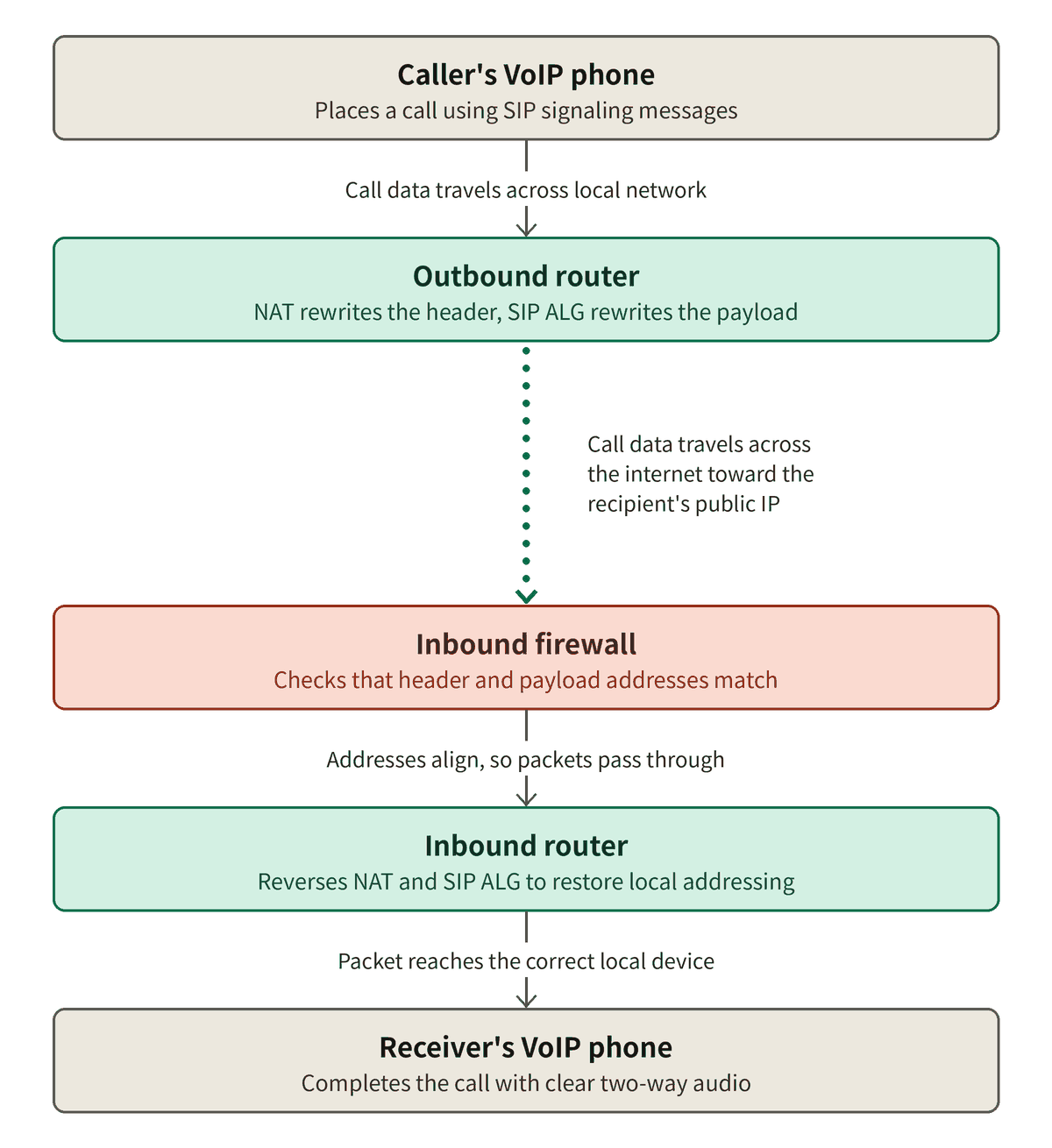
SIP (Session Initiation Protocol) does not fit with NAT because SIP messages carry addressing information both in the header and within the payload, more specifically within the SDP (Session Description Protocol), which contains the private IP address the audio should be sent back to.
NAT rewrites the header as normal, but leaves the embedded IP address and port within the SDP intact, because this is how the call negotiates where its audio (RTP) should actually be sent.
This creates a mismatch, where the header now points to the network’s public address, while the SDP within the payload still points to a private address the other party has no way of reaching, causing calls to fail to connect, or to connect without audio.
How SIP ALG makes SIP work with NAT
SIP ALG was incorporated into routers or firewalls to solve this issue at a time when VoIP systems could not handle this themselves.
It inspects SIP traffic as it passes through the router or firewall, and rewrites the IP addresses and ports embedded inside the SDP to match the network’s NAT-translated public address, keeping them consistent and ensuring the audio reaches the intended device.
This approach worked reasonably well in older, simpler VoIP setups. However, modern VoIP systems now resolve this same NAT problem on their own, in a more reliable way, leaving SIP ALG as a problematic, legacy technology most of the time.
When SIP ALG is still enabled on the router or firewall, it ends up duplicating the fix the VoIP system is already handling, leading to various issues such as mismatched packets, malformed messages, and one-way audio.
What are the signs SIP ALG is affecting VoIP calls?
Issues arise when SIP ALG is enabled in a setup where it actively conflicts with NAT traversal the VoIP system is already handling.
Unfortunately, the issues it causes are particularly inconsistent and hard-to-pin-down:
- One-way or no audio: The call connects, but only one party can hear the other, or neither can. This happens when SIP ALG rewrites the signalling correctly but fails to keep the media path (RTP) in sync, so voice packets end up sent to the wrong address.
- Audio that drops after a set period: Calls start normally, then lose audio in one or both directions after roughly 30 seconds. This is a signature symptom of SIP ALG, caused by it mishandling keep-alive packets or re-negotiating addressing mid-call incorrectly.
- Random connection or disconnection failures: SIP ALG can malform the SIP headers it rewrites, causing the receiving end to reject the message, which shows up as failed call setups or calls that drop without warning.
- Phones failing to register with the VoIP provider: If desk phones or softphones repeatedly lose their registration with the hosted platform, or fail to register at all after a router/firewall replacement or firmware update, SIP ALG rewriting registration messages incorrectly is a common cause.
- Problems that started after a router, firewall or firmware change: Firmware updates or router/firewall replacements tend to come with SIP ALG enabled by default, even if it was previously switched off.
- Issues affecting only some calls or some directions: Because SIP ALG’s rewriting depends on the specific packet structure it encounters, problems are often inconsistent, affecting inbound calls but not outbound, or only calls to certain providers or numbers.
While similar issues can arise due to connectivity issues, it is easy to rule out if SIP ALG is causing the problem before checking other areas.
Should SIP ALG be enabled or disabled?
Most modern hosted VoIP and SIP-based business services recommend disabling SIP ALG because provider-side platforms are typically already NAT-aware.
Business VoIP provider platforms already resolve NAT-related addressing issues on their end, using their own methods such as STUN or Session Border Controllers, so router-side rewriting on top of this is redundant at best and disruptive at worst.
That said, some businesses with an unusual or managed setup should confirm with their VoIP provider or IT support before making changes, rather than assuming this guidance applies universally.
How to troubleshoot SIP ALG
Troubleshooting SIP ALG works best as a systematic, step-by-step process:
1. Confirm the symptoms: Note down exactly what is happening, such as one-way audio, dropped calls, or failed registrations, and when. This gives a baseline to compare against later.
2. Check whether the router or firewall exposes a SIP ALG setting: This is usually listed as SIP ALG, SIP Helper, or SIP Fixup, under NAT, firewall, or advanced settings. Some ISP-managed or fully-managed business devices hide or lock this setting from standard users.
3. Confirm whether the VoIP provider recommends disabling it: Most VoIP providers publish clear guidance on this, since it’s such a common support issue.
4. Disable SIP ALG, if safe and possible: Make this a single, deliberate change, without adjusting anything else at the same time, so its effect can be judged in isolation.
5. Retest the phone system: Check the following:
- Outbound calls
- Inbound calls
- Audio in both directions
- Registration stability, ideally rechecked after some time has passed
6. Document the change and outcome: This gives a reference point for the future, particularly since SIP ALG can be silently re-enabled after a firmware update or router/firewall replacement.
How SIP ALG differs from port forwarding
Port forwarding is a general-purpose networking technique, unrelated to SIP, that lets something outside a network reach a specific device inside it.
It works through a manual rule, such as “traffic arriving on port X always goes to device Y.” Common use cases include hosting a game server, accessing a security camera remotely, or allowing remote desktop access into an office PC.
This makes it fundamentally different to SIP ALG, which works automatically in the background and only solves the NAT issue of SIP applications.
However, port forwarding does have a legacy connection to VoIP. Before SIP ALG and methods such as STUN existed, some older, self-hosted VoIP systems relied on manually forwarding the SIP and RTP ports a phone system used, as a way of getting call traffic through NAT.
This is a niche, largely outdated approach today, and not something modern hosted VoIP setups typically require, so disabling SIP ALG does not automatically mean port forwarding needs to be set up instead.
Port forwarding should only be configured for VoIP if the provider explicitly requires it, which is uncommon outside specific legacy or self-hosted systems.
Who to contact if SIP ALG is affecting VoIP calls
Once SIP ALG has been checked as the likely cause, escalating to the right team saves time. Support responsibilities generally split three ways:
- Company IT team: The first stop if internal or outsourced IT support is available, since they can check router and firewall settings directly and coordinate with the VoIP provider or ISP (internet service provider) if needed.
- VoIP provider: The right contact to confirm whether SIP ALG is the cause of registration failures or call issues, or to confirm their guidance on SIP ALG compatibility.
- Business broadband provider: The right contact when the router is ISP-supplied, since these often lock settings like SIP ALG behind provider access, or have hardware limitations a business can’t resolve directly.
If the router is unsuitable for handling SIP traffic, or the setting can’t be accessed at all, replacing the hardware is often the most practical answer.
Modern NAT traversal methods that replace SIP ALG
Modern VoIP phone systems rely on efficient endpoint or network-edge-level solutions to the NAT-SIP incompatibility. These are the main ones:
SBCs (Session Border Controllers)
An SBC sits at the network edge, terminates the SIP and RTP sessions, and re-originates the call correctly.
This is the standard deployment for most enterprise VoIP systems, including cloud-hosted, self-hosted and SIP trunks. It is built into the architecture of most major providers, such as RingCentral and 8×8.
STUN (Session Traversal Utilities for NAT)
Before a call starts, the endpoint queries a STUN server to determine its public IP address and port, then inserts that correct address directly into the SIP/SDP headers itself.
This is common on smaller, self-hosted platforms like 3CX or FreePBX for remote phones, but as the system scales, it is usually necessary to upgrade to an SBC to handle the added call volume and security requirements reliably.
Symmetric RTP
Instead of relying on the address advertised in the SDP, the endpoint directs its RTP audio stream back to the IP and port it is receiving audio from.
It’s handled entirely by the phone or VoIP system with no extra hardware, making it a good fit for smaller deployments or as baseline NAT traversal alongside STUN.
ICE (Interactive Connectivity Establishment)
ICE tries a direct connection using STUN first, and only falls back to relaying media through a TURN server when that fails, which is typically the case behind enterprise-grade firewalls.
It is mostly seen in WebRTC-based softphones rather than traditional desk phones.
 Back to blog