 Our use of cookies
What is a softphone and how it works for business calls
Softphones are apps installed on mobiles, tablets, laptops, and desktops that allow users to interact with the business VoIP phone system to make and receive calls over the internet.
This guide covers business softphones: Who they are for, how calling on them works, how they interact with the underlying VoIP platform, and what affects their performance.
Contents:
- What is a softphone?
- How do softphones work for business calls?
- How to choose between softphones and desk phones
- How do softphones fit in wider business VoIP systems?
- What does softphone quality and reliability depend on?
What is a softphone?
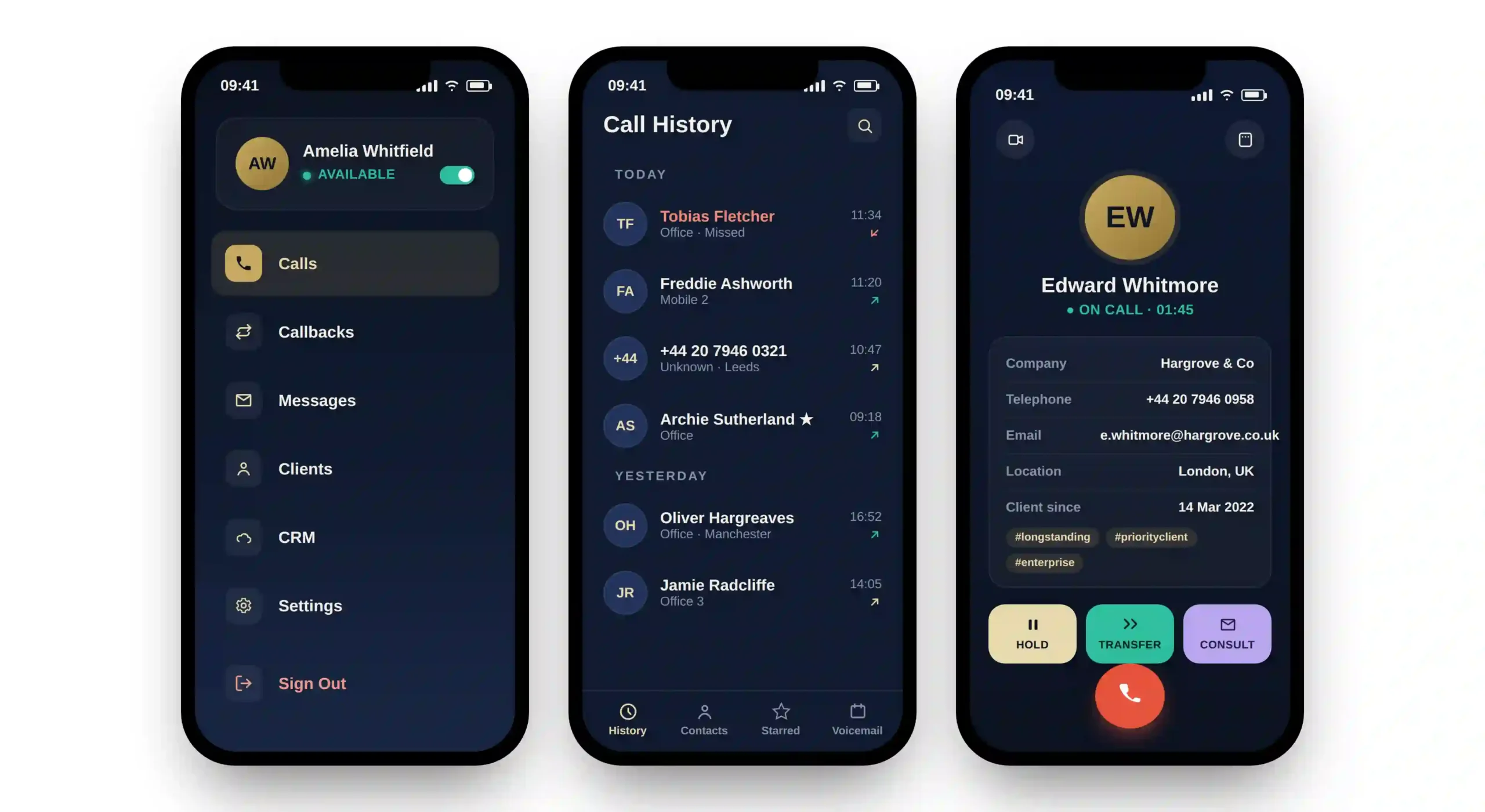
A softphone is a downloadable application that runs on smart devices such as mobiles, tablets, laptops, and desktops to give users access to the business’s VoIP capabilities.
This includes calls using the business’s official numbers and extensions, call management features such as recording, hold, and forwarding, access to contact directories, and sometimes direct integration with CRMs, ERPs, and other key business apps.
The application is identity based so by logging in, a user can access their own particular set of VoIP capabilities.
How do softphones work for business calls?
A softphone app turns the device it’s installed on into a business phone that converts voice into digital audio and back, and gives access to call features the underlying VoIP system can provide.
Here’s a step-by-step of how a softphone and the underlying VoIP system work during a business call:
1. User logs in to the app
The softphone connects to the VoIP system using the user’s account credentials, registering the device as a call endpoint so it’s ready to send and receive calls under the business number and extension.
Because that identity lives in the service rather than on the device, the user can equally log in on a desktop or a mobile and maintain the same profile (same number, extension, features, etc.).
2. The call is placed and connected
When a call starts, the VoIP system handles the signalling that sets it up and directs it to its destination, whether that is another internal extension or a mobile or landline out on the public phone network, just like any normal business call.
3. Voice is converted to data
Once connected, the app digitises and compresses the user’s voice into small data packets using a codec, and does the same in reverse for the audio coming back from the other end. The user simply talks and listens through the device’s microphone, speaker, or headset.
4. Audio travels over the internet
These data packets flow to and from the VoIP engine over the user’s broadband, WiFi, or mobile data, depending on what the device can connect to most conveniently.
This is what lets users make and take calls from anywhere with an internet connection, rather than relying on a traditional PSTN or ISDN phone line on the device.
5. Call ends
When either party hangs up, the softphone signals the VoIP system to end the connection, freeing up the line and logging the call in the system’s history.
How to choose between softphones and desk phones
A softphone app is a significantly more convenient, flexible and powerful way of using VoIP than a fixed, feature-limited desk phone. In most business scenarios, it is the better choice, though certain situations still favour the simplicity and permanence of a desk phone.
When softphones are the better choice
Softphones are the stronger option wherever mobility, growth or integrated working matter:
- Remote working: Staff working from home or while travelling can carry their business number on a laptop or mobile and take calls anywhere with a connection. This suits remote and hybrid employees, field sales, travelling consultants, and distributed teams.
- Scaling its usage: Adding or removing users is simple, requiring only a login change and installation of the softphone app. This makes scaling quick and cost-effective, which is ideal for fast-growing startups and seasonal operations.
- App-based workflows: Calls sit alongside CRM, chat and video on a single screen, keeping activity in one place rather than across separate devices. This suits contact and support centres, sales and telemarketing teams, customer service, and account managers.
When a desk phone is the better choice
Desk phones retain the advantage where a phone needs to be permanent, dependable and simple:
- Shared and fixed locations: Reception desks, warehouse floors, meeting rooms and lifts require a phone that is permanently in place and tied to the location rather than to an individual login. This suits warehouse and factory floors, hotels, and communal meeting spaces.
- Purpose-built reliability: A handset is more robust and dependable than devices that can run out of charge, break, receive an update, etc. It also has a known physical address for emergency-call routing, which is suitable for emergency and helplines, care homes, schools, security and front desks.
- Simple operation: A desk phone requires no logins, account or screen to navigate, making it straightforward for communal use and inclusive for staff who are less technologically competent.
How do softphones fit in wider business VoIP systems?
Softphones and desk phones are both endpoints of the wider business phone system. They draw on the same business numbers, extensions, routing logic, and VoIP features through their own connectivity.
Here is how these three components work together:
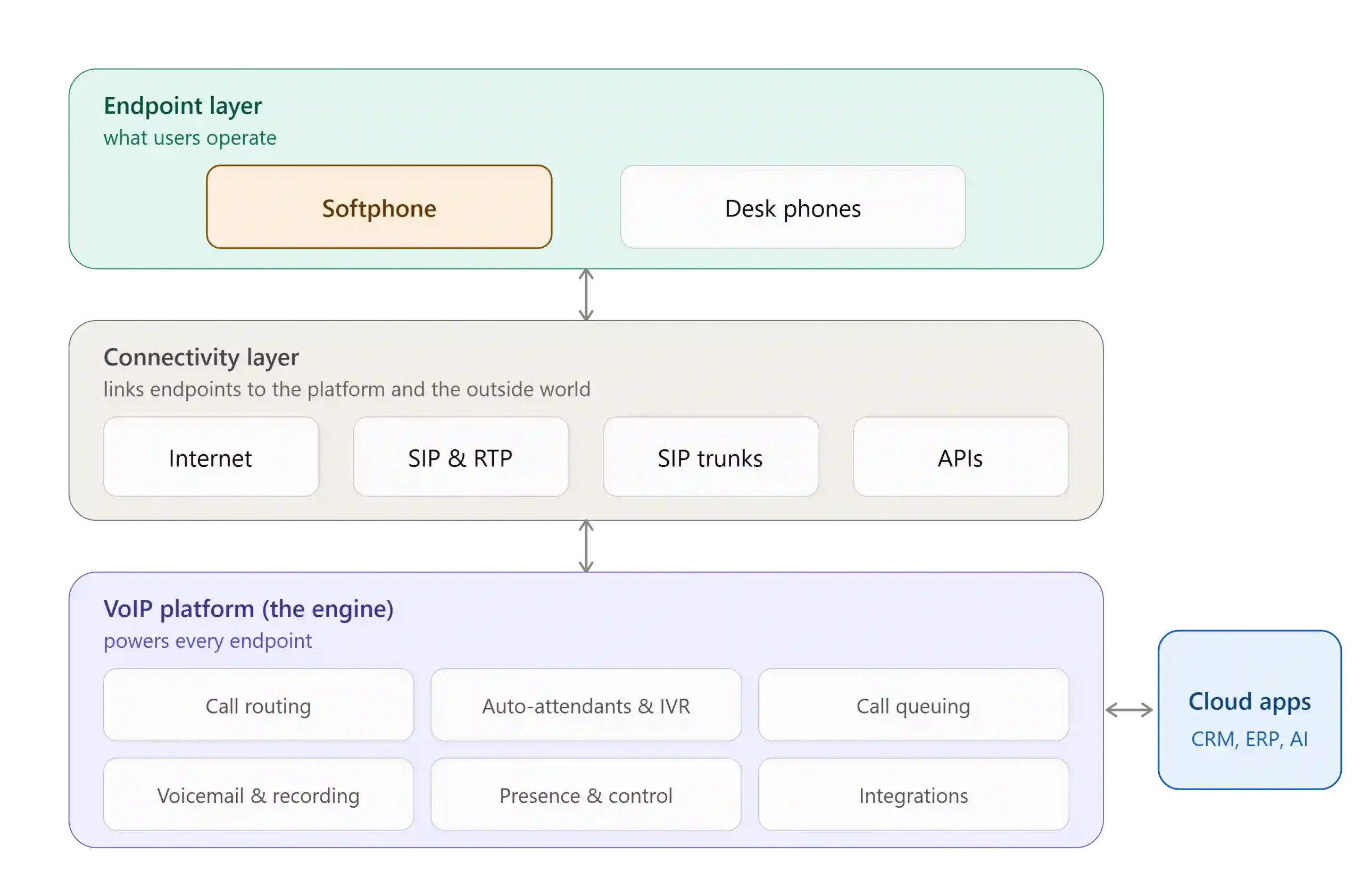
Softphone apps over devices (endpoint layer)
The softphone app is the user interface for the VoIP system, extending its capabilities to whichever device it is installed on.
It is identity-based, so users log in and out across different devices while keeping the same number, extension, and settings. This makes the softphone the most flexible type of VoIP endpoint.
Through its interface, it typically provides:
- Call handling: Hold, transfer, voicemail, and call history for managing live and missed calls.
- Contacts and presence: The company directory alongside real-time availability, so users can see who is free before calling or transferring.
- Call recording: Start or retrieve recordings, where the platform supports it.
- Unified communications (UCaaS): Some softphones bundle messaging, video, and collaboration tools alongside calling.
- Integrations: Access to connected cloud software such as CRMs, ERPs, and helpdesks from within the call.
Links to the VoIP system, cloud integrations, and callers (connectivity layer)
The connectivity layer links the softphone to the VoIP platform, and the platform to the rest of the world. Because every call is data travelling over an internet connection, this layer is also what lets a softphone work from anywhere with a connection.
Each action makes two hops (device to platform, then platform out to the other party) supported by:
- Internet connection: Broadband, ethernet, WiFi, or mobile data, whichever the device reaches most conveniently.
- VoIP protocols: SIP sets up and ends each call, while RTP carries the digitised voice as data packets. See how VoIP works for a deep dive.
- SIP trunks: Connects a traditional PBX to the platform, and the platform to the public phone network, so calls can reach ordinary mobiles and landlines.
- APIs: The connections the platform uses to exchange data with integrated software such as CRMs, helpdesks, and AI models.
VoIP platform (engine layer)
The VoIP platform is the engine behind every endpoint. Both softphones and desk phones connect to it, and it is where the phone system itself lives.
It can be hosted by a business VoIP provider, run on-premises on the business’s own hardware, or combine both in a hybrid setup, depending on requirements.
Wherever it runs, the platform holds the business numbers and extensions and powers everything the endpoints draw on:
- Call routing engine: Decides where each call goes, applying the business’s rules for extensions, departments, and availability.
- Auto-attendants and IVR: The automated menus that greet and direct callers (“press 1 for sales”).
- Call queuing: Holds and distributes inbound calls to the right team when everyone is busy.
- Voicemail and recording: Stores messages and call recordings centrally, so any authorised endpoint can reach them.
- Presence and call control: Tracks who is available and manages live actions such as hold, transfer, and conferencing.
- APIs and integrations: Connect the platform to outside software, including CRMs, ERPs, helpdesks, and directories, so call data flows to and from the tools a business already uses.
What does softphone quality and reliability depend on?
A softphone’s performance depends on several factors external to the application itself. These fall into three areas:
Connectivity
The link between the device and the VoIP platform is the largest influence on call quality. It determines the latency, jitter, and packet loss a call experiences, and breaks down into:
- Connection type: Wired ethernet (LAN) is the most stable and consistent. WiFi is inherently more variable (even the latest WiFi 7) and depends heavily on setup, and mobile data is typically the least consistent, varying with signal strength and coverage.
- Network path: Calls to a cloud-hosted platform or another site travel further and pass through more network hops than local ones, adding potential latency along the way.
- Traffic management: Whether the network prioritises voice over competing traffic, usually through Quality of Service (QoS) rules, so calls stay clear when the connection is busy.
Device factors
The device where the softphone application runs influences both the performance and the user experience:
- Audio hardware: The microphone, speakers, or headset, which shape how clearly the user sounds and hears.
- Device specifications: The processing power and memory of the host device, which affect how smoothly the app runs alongside everything else.
- Battery: On unplugged laptops and mobiles, a low battery can trigger power-saving modes that throttle the processor and network radios, degrading call quality before the device runs out of charge.
- Antenna: The design and supported bands of a device’s antenna affect how well it picks up WiFi or mobile signal, so two devices in the same spot can still get different signal quality based on hardware alone.
Provider and call setup
Softphone VoIP call quality also depends on how the platform handles the call and what it commits to:
- Codec: The standard that compresses voice into data and back. It’s negotiated between the app and the platform per call and depends largely on available bandwidth, so a weaker connection results in a lower-quality codec.
- Provider SLAs: The uptime and support levels the softphone provider commits to, which underpin the platform’s day-to-day reliability over time.
Softphones for businesses FAQs
Our business VoIP experts answer commonly questions businesses ask when considering softphones:
Can I use a softphone with my business number?
Yes. Because the number lives in the VoIP platform rather than on the device, a softphone uses whatever number the platform assigns.
An existing business number can usually be kept too, either by moving to a provider that supports it or by number porting the number across to the new platform, so customers keep calling the same line.
Are softphones reliable enough for business use?
Yes. Softphones are widely used as the primary phone system in businesses of all sizes.
Reliability depends mainly on the connection and the provider’s uptime rather than the app itself, so a stable internet connection and a provider with solid SLAs deliver dependable, business-grade calling.
Do softphones need a phone line?
No. A softphone makes calls over the internet, so it needs only a data connection such as broadband, WiFi, or mobile data. There is no need for a traditional business phone line, which is what allows a softphone to work from anywhere with a signal.
Do staff need headsets for softphones?
No, but they are recommended. A softphone works with a device’s built-in microphone and speakers, though a headset improves audio clarity, reduces background noise, and is more comfortable for staff who take calls frequently, such as sales or support teams.
How much does a softphone cost?
Softphone apps are usually included as part of a business VoIP subscription rather than charged separately, with pricing typically based on a monthly per-user fee.
The app itself is generally free to install, so the business VoIP cost is for the underlying VoIP service that powers it.
 Back to blog