 Our use of cookies
PoE switches: What they are and which ones to choose for your business
A PoE switch delivers both data and electrical power to connected devices over a single Ethernet cable, removing the need for a separate mains connection at each device location.
It is the standard deployment method for WiFi access points, IP cameras, VoIP phones, and door controllers, reducing cabling complexity and mains dependency across a site.
This guide covers how PoE switches work, PoE standards and device requirements, power budget planning, and how to choose between PoE and non-PoE infrastructure.
Contents:
- What is a PoE switch?
- How does a PoE switch deliver power to connected devices?
- Calculating a switch’s PoE budget
- PoE device and their power requirements
- PoE switch alternatives: PoE injectors and splitters
- Features of managed PoE switches
- How to choose between PoE and Non-PoE switches?
What is a PoE switch?
A Power over Ethernet (PoE) switch is a type of network switch that delivers both data and electrical power to connected devices through a single standard Ethernet cable.
This gives local devices such as WiFi access points, IP cameras, and VoIP phones the ability to be installed anywhere, independent of access to wall sockets, eliminating the need for separate power adapters and the cabling clutter that comes with them.
A PoE switch can deliver 15 (PoE) to 90 (PoE++) Watts per port, enabling it to power outdoor cameras, thin clients, small displays, and the latest WiFi 7 access points.
While this capability costs more than non-PoE alternatives, it offers a clean, centralised setup that manages both data and power for multiple devices at once, with no electrical upgrades required.
Otherwise, PoE switches work just like their non-PoE counterparts, managing traffic from LAN devices such as PCs, laptops, and printers.
How does a PoE switch deliver power to connected devices?
A PoE switch delivers power over standard Ethernet cables. How much power is delivered and how it depends on the device’s PoE classification, the switch’s power capacity, cable length, and any pre-configured PoE settings.
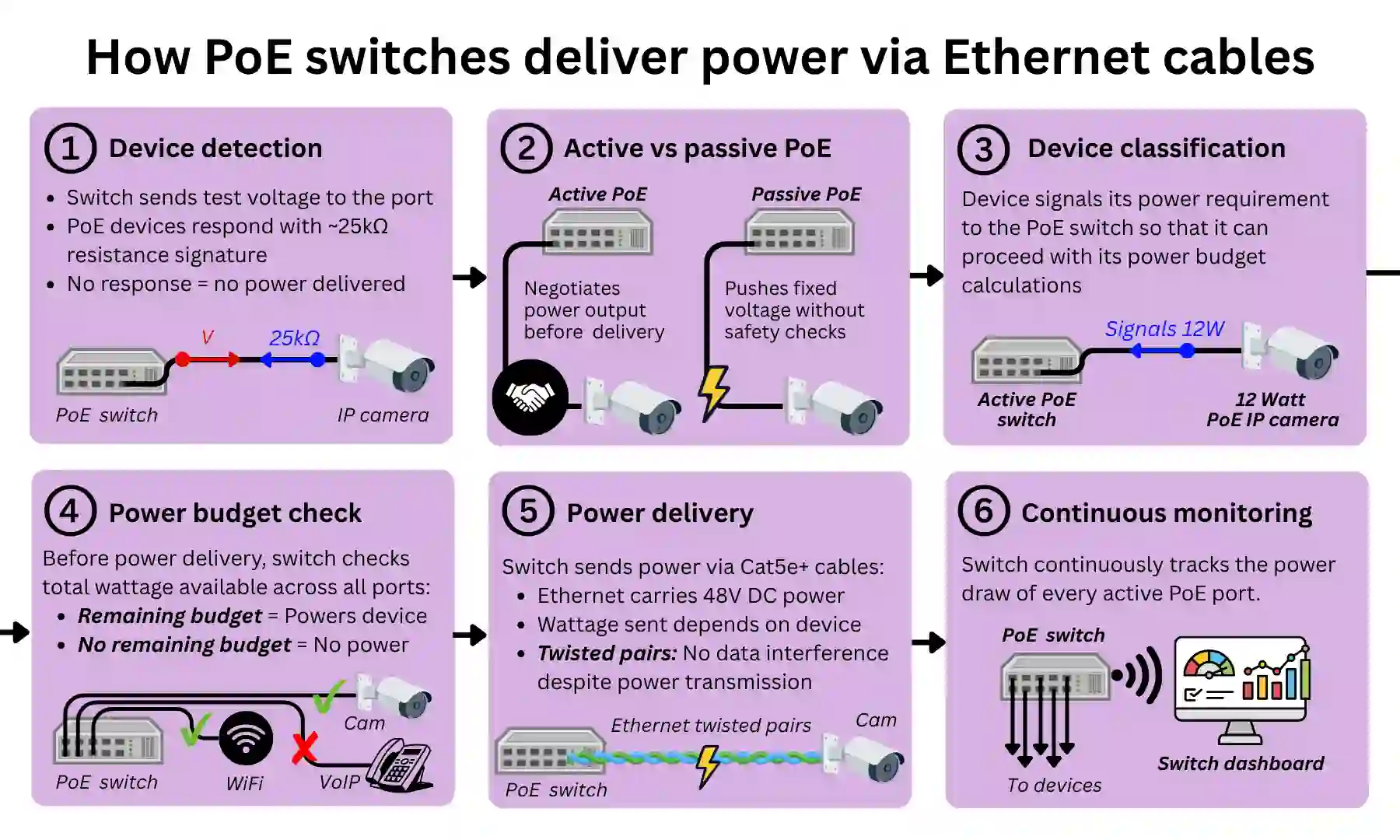
Here is a step-by-step explanation of how a PoE switch delivers power.
1. Device detection (PoE or non-PoE)
When a device is plugged into a PoE switch, the switch sends a small test voltage to the port.
If the device is PoE-compatible, it responds with a specific resistance signature of approximately 25kΩ, confirming to the switch that it is safe to proceed. If the device does not respond in this way, as would be the case with a laptop, printer, or any other non-PoE device, the switch delivers no power.
This is the fundamental safety mechanism that makes it safe to mix PoE and non-PoE devices on the same switch without risk of damaging incompatible equipment.
2. Active or passive power delivery
If the device presents a valid PoE signature, the switch delivers power in one of two ways depending on whether it is active or passive:
- Active PoE: Follows the IEEE 802.3 standards, performing classification and ongoing monitoring before and during power delivery. This is the standard for all business-grade PoE equipment.
- Passive PoE: Delivers a fixed voltage with no compatibility checking, meaning power can be pushed to devices not designed to receive it, potentially causing damage. Found in some cheaper consumer products and worth being aware of when procuring lower-cost equipment.
For all active switches, the next step is classification.
3. Device classification (PoE, PoE+ or PoE++)
Once a valid PoE signature is confirmed, the switch moves to classification, where the device signals exactly how much power it requires. This determines which IEEE standard applies:
- IEEE 802.3af (PoE, 2003): Up to 15.4W at the port, approximately 12.95W at the device after cable loss. Covers fixed IP cameras, VoIP phones, small access points, and basic door controllers.
- IEEE 802.3at (PoE+, 2009): Up to 30W at the port, approximately 25.5W at the device. Covers WiFi 6 access points, Pan-Tilt-Zoom (PTZ) cameras, video conferencing endpoints, and higher-powered door controllers.
- IEEE 802.3bt (PoE++, 2018): Two tiers, Type 3 up to 60W and Type 4 up to 90W, using all four cable pairs. Covers WiFi 6E and 7 access points, small commercial displays, thin clients, and outdoor cameras with integrated heaters for use in cold environments.
For a PoE device to operate, the switch must support the same standard or higher. A PoE++ switch can power PoE and PoE+ devices, but a PoE switch cannot power a device that requires PoE+ or PoE++. PoE+ is the most commonly deployed standard in current UK business environments, in both switches and end devices.
Classification ensures the switch allocates only the power the device actually requires, rather than reserving the maximum possible wattage for every port.
4. Power budget check
With classification complete, the switch checks its available power budget before delivering anything.
The power budget is the total wattage the switch can deliver across all active PoE ports simultaneously, and is almost always lower than the theoretical maximum of (number of ports x max per-port wattage). Typical power budgets by switch size are as follows:
- 8-port PoE+ switches: Typically 65W to 130W
- 16-port PoE+ switches: Typically 130W to 250W
- 24-port PoE+ switches: Typically 185W to 370W
- 48-port PoE+ switches: Typically 370W to 740W
If insufficient budget remains to serve the newly connected device, the switch will not deliver power to it.
On managed PoE switches, administrators can assign a priority level to each port. If a high-priority port needs power and the budget is exhausted, the switch will cut power to the lowest-priority active port to free up capacity.
5. Power delivery
The switch begins delivering power at 48V DC, the standard voltage across all three IEEE PoE standards. The power is delivered with the following characteristics:
- Low voltage: At 48V DC, PoE operates at a fraction of the 230V AC of UK mains electricity, making it significantly safer to handle during installation and maintenance.
- Non-interference with data: Power travels over the twisted copper pairs inside the Ethernet cable. The twisted-pair construction causes any electromagnetic interference generated by the DC current to cancel itself out, meaning power delivery has no effect on the data signal and therefore on network performance.
- 100 metre maximum distance: All three PoE standards operate within the standard 100 metre Ethernet distance limit, measured from the switch port to the device.
- Cat5e or higher cabling required: Most UK office buildings cabled within the last 15 to 20 years will have Cat5e or Cat6, suitable for all three PoE standards. An older Cat5 cable may not reliably support PoE+ or PoE++ and should be tested or replaced before deployment.
- Mains powered: The switch itself always requires a mains connection to operate, as it must maintain sufficient power capacity to supply all active PoE ports simultaneously alongside its own internal electronics. A PoE switch cannot be powered by another PoE switch.
6. Continuous monitoring
Once power is flowing, the switch continuously tracks the power draw of every active PoE port.
If a device is unplugged, powers down, or draws power outside expected parameters, the switch cuts power to that port immediately.
This ongoing monitoring is what keeps a deployment stable across many simultaneous devices, particularly on switches approaching their total power budget.
Calculating a switch’s PoE budget
The PoE power budget is the total wattage a switch can deliver across all its PoE ports simultaneously. It determines how many devices a switch can realistically power at once and is the most important figure to establish before selecting a switch.
Here’s how to determine the PoE budget required for your use case:
- List your PoE devices: Identify every device that will draw PoE power from the switch. Do not include non-PoE devices such as PCs or printers, as these do not contribute to the power budget.
- Find the maximum power draw for each device: Use the manufacturer specifications for each device, not general estimates. The figure to look for is the maximum PoE draw, sometimes listed as “maximum power consumption” or “PoE input power” in the datasheet.
- Add up the total wattage: Sum the maximum power draw across all devices. This is your baseline figure.
- Add 20 to 25% headroom: Headroom accounts for new devices being added over time, as deployments rarely stay static. A switch specified with no room to grow will need replacing sooner than one planned with future capacity in mind.
- Compare against the switch’s stated PoE budget: The switch’s total PoE budget must exceed your calculated total, including headroom. If it does not, select a switch with a higher budget, not simply more ports.
Always use maximum rated device wattage, not average consumption. Planning with lower figures produces a budget that fails exactly when reliable operation matters most.
Here is a worked example:
PoE inventory:
- 8 fixed IP cameras at 12W each: 96W
- 4 WiFi 6 access points at 22W each: 88W
- 10 VoIP desk phones at 5W each: 50W
- 2 door access controllers at 8W each: 16W
Total: 250W. With 25% headroom: 313W minimum budget required.
A 24-port PoE+ switch with a 370W budget covers this. A 24-port PoE+ switch with a 250W budget does not, despite having the same port count and PoE standard.
Port count and power capacity are not the same specification, and selecting a switch on port count alone is the single most common cause of under-specified PoE deployments.
PoE device and their power requirements
Since PoE was introduced nearly twenty years ago, a plethora of LAN devices now rely on drawing both stable tethered connectivity and power over a single Ethernet cable.
Below is a breakdown of the main PoE device categories deployed in businesses today, along with their typical power requirements and the IEEE standard needed to run them.
Wireless access points
WLAN access points are the most commonly PoE-powered devices in business deployments, and the category where PoE standard selection matters most as WiFi generations become increasingly power-hungry.
- Basic or single-band access points (legacy): 5 to 10W, 802.3af (PoE) sufficient.
- WiFi 5 (802.11ac): 10 to 15W, 802.3af (PoE) sufficient.
- WiFi 6 (802.11ax): 15 to 25W, 802.3at (PoE+) recommended. Some lower-power models will operate on 802.3af (PoE) but may disable features to stay within the power limit.
- WiFi 6E and WiFi 7: 25 to 40W, 802.3at (PoE+) for lower-power models, 802.3bt (PoE++) for high-performance units.
802.3at (PoE+) is the safe default for any current WiFi 6 deployment and most WiFi 6E installations.
IP cameras
IP cameras vary significantly in power draw depending on their feature set. Fixed indoor cameras are the lightest load; outdoor and PTZ (Pan-Tilt-Zoom) units require considerably more.
- Fixed indoor, standard resolution: 5 to 8W, 802.3af (PoE) is sufficient.
- Fixed indoor or outdoor with IR night vision: 8 to 15W, 802.3af (PoE) is typically sufficient, though cameras with high-power IR illuminators should be checked against their datasheet.
- PTZ cameras: 15 to 30W, 802.3at (PoE+) required. PTZ cameras use motorised mechanisms to pan, tilt, and zoom remotely, drawing significantly more power than fixed units.
- Outdoor cameras with integrated heaters: 20 to 40W, 802.3at (PoE+) minimum, with some models requiring 802.3bt (PoE++). Heaters activate automatically in cold conditions to protect the lens and sensor.
802.3at (PoE+) should be treated as the minimum standard for any external camera installation.
VoIP phones
Business VoIP phone systems are among the lightest PoE loads, well within 802.3af (PoE) capacity across virtually all models.
- Standard desk phones: 3 to 5W, 802.3af (PoE) more than sufficient.
- Executive phones with colour displays: 5 to 7W, 802.3af (PoE) sufficient.
- Video-capable conference units: 8 to 15W, 802.3af (PoE) typically sufficient, though larger units may require 802.3at (PoE+).
When the switch is supported by an Uninterruptible Power Supply (UPS), PoE-powered multi-line phone systems can continue operating during mains outages, replicating the resilience of traditional analogue business phone lines.
This is particularly relevant for medical practices, legal firms, and any business where phone continuity is operationally critical.
Door access control
Door access controllers are a well-established PoE use case, typically within 802.3af (PoE) capacity. The key consideration is to verify the total system wattage, including the electric lock mechanism, not just the controller, as the two are often specified separately.
- Single or dual door controllers: 5 to 12W, 802.3af (PoE) sufficient.
- Controllers with integrated electric lock power: 10 to 20W, 802.3at (PoE+) may be required depending on the lock mechanism.
Emerging PoE use cases
The following categories are growing in business environments but are not yet mainstream in SME deployments. All require 802.3bt (PoE++) switches, which carry a higher price point and are only justified where these devices are part of the planned deployment.
- Digital signage displays: 30 to 50W, 802.3bt (PoE++ Type 3) required. Brands such as Samsung Smart Signage and LG Commercial Displays are driving adoption in retail, hospitality, and corporate reception environments, where the appeal is centrally managed, remotely updatable content without dedicated power runs to each screen.
- Thin clients: 40 to 60W, 802.3bt (PoE++ Type 3 or Type 4) required. Thin clients are stripped-down desktop devices, such as the HP t-series and Dell Wyse, that connect to a central server to do all their processing rather than running applications locally. Common in call centres, healthcare, and finance environments where centralised IT management and data security are priorities.
- PoE lighting: LED luminaires that are both powered and controlled over Ethernet, enabling granular, centrally managed lighting without separate control wiring. Growing in smart building and office fit-out projects.
- IoT sensors: Environmental sensors monitoring temperature, occupancy, and air quality are increasingly PoE-powered in smart building deployments, where running separate power to dozens of sensor locations is impractical.
- IP intercoms and video doorbells: Growing in multi-tenant and commercial property deployments, where a single Ethernet run replaces both the power cable and the traditional intercom wiring.
PoE switch alternatives: PoE injectors and splitters
Not every deployment justifies a full PoE switch. For situations where only one or two devices need powering, or where replacing an existing switch is impractical, injectors or splitters can be used for targeted workarounds.
PoE injectors
A PoE injector sits between an existing non-PoE switch port and a PoE device, taking the data connection from the switch and adding power to it before it reaches the device.
The injector requires its own mains power supply, and each injector adds PoE capability to a single port, as long as the injector’s PoE standard matches the device requirement.
This makes them a cost-effective solution for small additions, typically priced between £15 and £50 per unit, but they come with limitations at scale:
- Each injector adds a physical device and a mains cable to the installation.
- Multiple injectors create cable clutter and multiple points of failure.
- They offer no power budget management, port priority, or remote power cycling.
Multi-port midspan panels exist as a middle ground but cost nearly as much as a PoE switch, making them difficult to justify.
PoE splitters
A PoE splitter allows a non-PoE device to be powered via a PoE switch by splitting a PoE connection into two separate outputs:
- A standard RJ45 Ethernet connection that plugs into the device’s network port
- A DC barrel jack that plugs into the device’s power input
Splitters are not universal. The output voltage of the splitter must match the power requirement of the device being powered, commonly 5V, 9V, or 12V, depending on the device. Using a mismatched splitter can damage the connected device.
Splitters are less commonly needed than injectors, as most modern PoE-relevant devices support PoE natively. Their primary use case is legacy device compatibility, where an older device that predates PoE adoption needs to be retained in a deployment.
How to decide between a PoE switch or injector
The decision comes down to the number of devices, the lifespan of the deployment, and whether the existing switch is worth retaining. A useful rule of thumb:
- One to two PoE devices: An injector is almost always the more cost-effective choice, assuming an existing non-PoE switch has available ports.
- Three to four devices: This is a judgment call. Factor in the cost of multiple injectors, the cable clutter, and whether the deployment is likely to grow.
- Five or more devices: A PoE switch is simpler to manage, more cost-effective, and avoids the limitations of running multiple injectors in parallel.
If the deployment is temporary or short-term, injectors are the pragmatic choice regardless of device count. If it is permanent and likely to grow, investing in a PoE switch from the outset avoids a more disruptive and costly migration later.
Features of managed PoE switches
Like all network switches, PoE switches are available in unmanaged, smart, and managed variants. In a PoE context specifically, the tier determines how much control administrators have over power delivery:
- Unmanaged PoE switches: Auto-detect and power any compatible PoE device without configuration. There is no scheduling, priority, or monitoring available. If a device stops receiving power, there is no visibility into why. Suitable for simple deployments with a small number of always-on devices where management is unnecessary.
- Smart PoE switches: Add a basic web interface with limited PoE controls, typically basic scheduling, basic power monitoring, and sometimes port priority. Suitable for smaller deployments where some control is needed without the complexity of full management.
- Managed PoE switches: Provide the full PoE feature set, covered in detail below. Standard for larger deployments, multi-VLAN environments, or MSP-managed networks.
PoE scheduling
Managed PoE switches can turn power ON and OFF per port on a timed schedule, with two practical applications:
- Energy saving: Powering off indoor cameras and meeting room WiFi access points overnight and at weekends reduces consumption meaningfully. Ten cameras at 5W running continuously use around 438 kWh per year. Scheduling them off overnight and at weekends cuts that by roughly 60%.
- Policy enforcement: Meeting room access points can be configured to be active only during office hours, reducing unnecessary network exposure to cyberattacks and power draw outside of working hours.
Port priority
When total power demand approaches the switch’s budget, a managed switch can cut power to the lowest-priority ports first. Administrators can assign priority levels to each port:
- High priority: Critical devices such as security cameras, door controllers, and core access points. These remain powered even under budget pressure.
- Low priority: Non-critical devices such as meeting room phones or secondary access points. These are the first to lose power if the budget is exceeded.
Without priority configured, the switch cuts ports arbitrarily or unpredictably, which can result in critical devices losing power while less important ones remain active.
Per-port power monitoring
Managed PoE switches provide real-time and historical power consumption data per port. This serves several purposes:
- Post-installation verification: Confirms each device is drawing the expected wattage after installation, catching mismatched standards or faulty hardware early.
- Anomaly detection: A device drawing abnormally high power may indicate a hardware fault before it fails completely.
- Budget tracking: Provides a live view of total budget usage, allowing administrators to identify when capacity is being approached before devices start losing power.
Remote port cycling (PoE reset)
A managed PoE switch can cut and restore power to any individual port through the management interface, remotely rebooting the connected device without a physical site visit.
This is particularly relevant for devices installed in difficult-to-access locations such as ceiling-mounted access points, external cameras, or door controllers. In these cases, a physical reboot would otherwise require an engineer’s visit or access to the equipment.
A frozen or unresponsive device can instead be power cycled in seconds from the management interface, regardless of location. This can also be used to trigger a Zero Touch Provisioning process, allowing a new device configuration to be pushed and applied remotely.
How to choose between PoE and Non-PoE switches?
PoE switches carry a real price premium over non-PoE equivalents, but whether that premium is justified depends on a cost-benefit analysis across several factors. Here is what to consider.
Device requirements
The starting point is the devices themselves: what needs PoE, how many, and where they are located.
- No PoE devices: If no devices require PoE, a non-PoE switch is the correct choice. There is no benefit in paying the premium for a network of PCs, printers, and servers with their own power supplies.
- One or two PoE devices: A single PoE device can be handled with an injector. Three or more in locations without convenient mains access make a strong case for a dedicated PoE switch.
- Mixed environments: A hybrid deployment is often the most practical outcome: a non-PoE switch for the bulk of wired devices, with a smaller PoE switch added at the access layer where PoE devices are concentrated.
Existing infrastructure
The state of the existing network and building infrastructure has a direct bearing on whether PoE is worth adding.
- Existing non-PoE switch: If a non-PoE switch is already in place and working well, injectors can bridge the gap for a small number of devices without replacing the switch entirely.
- Mains availability: If device locations have convenient mains sockets nearby, the core advantage of PoE is largely neutralised.
- Difficult locations: If devices are going into ceilings, external walls, or corridors where running mains is expensive or impractical, PoE becomes significantly more attractive.
- Cabling: Most UK office buildings cabled in the last 15 to 20 years will have Cat5e or Cat6, suitable for all PoE standards. Older Cat5 cabling should be surveyed before committing to a PoE deployment.
Cost comparison
The comparison is not simply PoE switch vs non-PoE switch. It is a PoE switch vs a non-PoE switch, plus the cost of powering each device another way.
- Switch premium: A PoE+ switch typically costs two to three times more than a comparable non-PoE model at the entry level, with the gap narrowing at higher specifications.
- Electrician costs: A new mains socket installed by a commercial electrician typically costs £100 to £250 or more per socket, depending on cable run complexity, wall construction, and compliance requirements. Across three or more device locations without existing mains, the PoE switch premium is often recovered by avoiding electrician costs alone.
- Hybrid architecture: A non-PoE core switch combined with a smaller PoE switch at the access layer (i.e., a hierarchical network topology) is frequently the most cost-effective architecture, paying for PoE capacity only where it is actually needed.
Manageability
The value of management features depends on the complexity and location of the deployment.
- Simple deployments: If scheduling, monitoring, and remote power cycling are not requirements, an unmanaged non-PoE switch is simpler and cheaper.
- Difficult-to-access locations: Where PoE devices are in difficult-to-access locations, a managed PoE switch justifies its cost through recurring operational savings, particularly remote reboot capability.
- Hybrid management: A managed PoE switch at the access layer combined with an unmanaged or smart non-PoE switch at the core keeps management complexity where it adds value.
Scalability and future-proofing
The access layer of modern business networks is increasingly PoE by default, and specifying non-PoE today may mean a more disruptive migration later.
- PoE as the access layer default: WiFi 6 and 7 access points, IP cameras, door controllers, and VoIP phones all assume PoE infrastructure as standard.
- Total cost of ownership: A PoE switch specified with headroom is often more cost-effective over a three to five year horizon than a cheaper non-PoE switch that requires replacement or supplementing as the network grows.
- Incremental scaling: A common and pragmatic approach is to start with a non-PoE core switch and one or two smaller PoE switches at the access layer, then expand the PoE layer incrementally as device count grows.
 Back to blog