 Our use of cookies
What is call routing and how does it work?
Call routing logic determines an organisation’s phone system flow, linking call reception with auto-attendants, queues, and ultimately the right recipient or service.
This guide covers how it works for businesses in the UK; here’s what we cover:
- What is call routing and why do businesses need it?
- How call routing works
- How businesses use call routing
- How to plan and set up call routing
- Advanced call routing and integrations
- Call routing during outages and failover
What is call routing and why do businesses need it?
Call routing is the intelligence layer behind a business’s phone system, directing incoming calls through auto-attendants, queues, and other handling points, until reaching the intended recipient or automated service.
It works by evaluating a defined set of conditions (e.g., caller inputs, caller identity, business hours, agent availability) at each step of the call journey and applying rules for routing the call.
It is a critical component to achieving high customer and employee satisfaction in call-heavy environments where coherent routing matters.
How call routing works
Call routing dictates how incoming calls are handled end-to-end, from the moment they are received to the caller successfully receiving the requested information or service.
In simple setups, routing is often as linear as routing a call directly to a person, hunt group or voicemail without qualification.
However, more complex routing can have up to four separate components: Call qualification, routing logic, call queueing and call distribution. These work together to narrow down caller intent until it’s resolved:
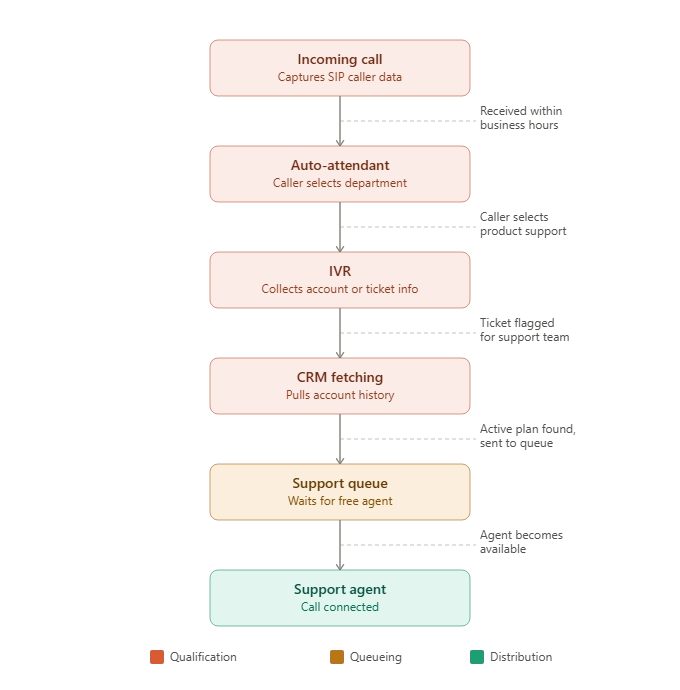
Here is how the four components work:
Call qualification
The more data the call routing engine has, the more granularly it can route the call to the correct receiver. This may be collected at several points, depending on the caller’s available metadata and its capabilities for providing information:
- Incoming call: Some calls come with SIP metadata (e.g., caller number, number dialled, timestamp), which can provide valuable information to guide a call before any interaction takes place.
- Auto-attendant: User inputs from the menu (“Press 2 for Sales”) feed the engine caller intent.
- IVR: Like an auto-attendant but more complete, it can collect more information such as, such as ticket numbers, customer ID, or other details via keypad or voice. This helps locate a caller’s record, but isn’t proof of identity, with authentication requiring a separate step.
- VoIP integrations: Using IVR data, the engine can pull account history, open tickets, or agent availability from a CRM, helpdesk, or workforce management system.
Routing logic
As data becomes available, the engine evaluates it against configured rules to decide the call’s next destination, such as a specific agent, a department queue, another IVR prompt, or a priority fast-track. Rules are typically based on:
- Business logic: Business hours, holidays, overflow conditions.
- Caller identity: Matching to an account, VIP status, or open ticket.
- Intent: The department or skill implied by IVR/auto-attendant input.
- Availability: Whether an agent or queue is free right now.
Qualification and routing logic often loop, so a routing decision can trigger more qualification (e.g. a redirect to another IVR menu), which feeds back into another routing decision. This can happen even after a call has entered a queue, if new data arrives.
Call queueing
During high call volumes, bottlenecks form, and queues manage traffic in order. This typically happens in high-volume departments where callers need to wait until an agent is free or a timeout is reached.
Queues are usually characterised by hold music, wait-time updates, and advice on what info to have ready. See our guide on call queueing for more detail.
Call distribution
Once a call reaches the front of the queue, the engine decides which agent picks it up, based on the configured distribution strategy:
- Skills-based routing: Directed to the best-qualified agent.
- Priority routing: High-value or urgent callers fast-tracked.
- Round-robin routing: Distributed evenly in rotation.
- Sequential routing: Rings agents one at a time in order.
- Simultaneous ring: Rings multiple agents at once; first to answer wins.
- Least idle agent: Routes to whoever’s been waiting longest since their last call.
The right strategy depends on scale. Small teams are usually fine with round-robin or sequential, while large contact centres often need several strategies working together.
If the caller’s intent is simple or a common query, it can be routed to an AI voice agent, which may answer directly or gather details before transferring to a human.
Effectiveness and cost savings vary by use case, so test accuracy, escalation rates, and total cost before deploying it on customer-facing calls.
How businesses use call routing
Every phone system has routing logic, even if this is as simple as going to voicemail when agents are busy.
Some businesses leverage it more deliberately to meet their operational needs and deliver a better customer experience. Below are common business goals and how call routing can be configured to achieve them:
- Ensuring no missed calls: An auto attendant greets the caller and routes by purpose (“Press 1 for sales, press 2 for support”). If the relevant person is unavailable, the call overflows to their mobile. Outside business hours, a time-based rule diverts to a personalised voicemail.
- Ensuring high-value clients receive direct support: CRM-integrated priority routing identifies key accounts by caller ID and routes them directly to a dedicated account manager, bypassing the standard queue entirely.
- Distributing inbound leads fairly across a sales team: Round-robin routing cycles through available agents in rotation, ensuring no single agent receives a disproportionate share of inbound opportunities.
- Maintaining availability across a remote or hybrid team: Simultaneous ring across desk phone, softphone, and mobile ensures calls reach the agent on whichever device they are available on, with no visible difference to the caller.
- Handling out-of-hours enquiries professionally: Time-based routing detects calls outside opening hours and diverts them to a recorded message with hours and next steps, plus a voicemail option.
How to plan and set up call routing
Successful call routing relies on implementing it in three key stages: Mapping call journeys, configuring the system, and testing before going live.
1. Mapping call journeys
Before doing any configuration, all call journeys should be mapped in full to ensure the design makes sense. Key things to define during planning include:
- Business numbers: Make an inventory of all numbers in use and make sure their routing matches what the organisation has advertised.
- Ownership: Define who or what system is the final receiver of various types of calls.
- Overflow destinations: Define a fallback destination for every routing path to ensure there are no loose ends.
- Out-of-hours behaviour: Define what callers should experience outside of business hours and ensure you include all bank holiday exceptions.
- Available data sources: Take stock of all data that can be used to inform routing decisions, including connected CRM, helpdesk, workforce management systems, caller ID, IVR input, and AI-powered voice identification where supported. The richer the data inventory, the more sophisticated the routing logic can be.
Ensure you share this call routing map across the various departments and ask for feedback to ensure it satisfies all workflow requirements and nuances.
2. Configuring the call routing system
Once the routing plan is in place, it is handed to the system administrator to implement. Most hosted VoIP platforms provide an intuitive web-based admin dashboard that requires no technical expertise to navigate.
Here, everything from hunt groups, auto-attendant menus, overflow destinations, and business hours schedules can be configured.
Some key things to know:
- Who configures it: Typically the system administrator, though in smaller businesses this is often handled by an office manager with access to the platform’s self-serve portal.
- Where is it configured: Within the admin dashboard of the VoIP platform, accessible via a web browser without requiring technical expertise.
- How routing rules are built: Using simple if/then logic, defining what happens when a number is dialled, which menu options are presented, and where calls are directed under each condition.
3. Testing the call routing configuration
Before going live, the system administrator typically tests every routing path systematically to verify the configuration matches the routing plan. Here are some key aspects of testing:
- What is being tested: Every routing path defined in the plan, including menu options, overflow destinations, out-of-hours behaviour, bank holiday exceptions, and mobile and softphone routing.
- How testing is conducted: By calling each number and testing every configured routing path and failure condition, such as all agents being busy, calls received outside business hours, and calls received on bank holidays.
- Common errors to look for: Incorrect menu routing, missing overflow destinations, out-of-hours messages not triggering, bank holidays defaulting to standard business hours, and calls failing to reach mobile devices or softphone apps.
Advanced call routing and integrations
As routing logic becomes more sophisticated, businesses can move beyond basic menu-driven routing towards systems that make intelligent decisions based on a wealth of data.
The following represent the most impactful advances available in modern VoIP platforms:
AI-powered routing
AI is increasingly embedded in modern routing systems, shifting routing decisions from reactive to predictive.
- Voice identification: AI-powered IVR systems can verify a caller’s identity through voice alone, removing the need for PIN entry or account number input and accelerating the qualification phase.
- Sentiment analysis: An advanced feature of VoIP analytics, some platforms scrutinise tone and speech patterns in real time, flagging distressed or frustrated callers and routing them to more experienced agents.
- Predictive routing: Using historical interaction data, the system predicts which agent is most likely to achieve a positive outcome for a given caller and routes accordingly. Most impactful in large support centres.
CRM-driven routing
CRM integration moves routing beyond basic caller ID matching, using the full depth of customer data to inform decisions.
- Customer lifetime value: High-value accounts are automatically routed to senior or dedicated agents without any caller input required.
- Churn risk: Customers flagged as at risk of leaving are routed to retention specialists rather than the standard support queue.
- Open opportunities: Callers with active sales opportunities in the pipeline are routed directly to the account owner handling their deal.
Omnichannel routing
Advanced routing systems extend the same logic beyond voice calls to all contact channels available in UCaaS platforms.
- Unified routing engine: The same rules that govern call routing are applied to chat, email, and SMS, ensuring consistency of experience regardless of how a customer makes contact.
- Channel continuity: A customer who started a conversation via chat and follows up by phone can be routed to the same agent, with full context carried across.
API and custom integrations
For businesses with specific or proprietary systems, open APIs allow the routing engine to connect to virtually any data source.
- Custom routing triggers: Internal systems such as billing platforms, booking systems, or order management tools can feed data directly into the routing engine, triggering highly specific routing decisions.
- Webhook-based automation: Routing rules can be updated automatically in response to external events, such as a customer placing an order or a ticket being escalated.
Call routing during outages and failover
Call routing is a key component of the VoIP element of a network disaster recovery plan, which aims to keep business-critical applications, such as phone calls, available during an incident or restore them as quickly as possible.
A network disaster recovery plan relies on multiple elements working together, such as UPS for power continuity, broadband redundancy for connectivity, and platform-level failover for the phone system itself.
Call routing contributes by determining where calls go once these lower layers fail, or once they’ve recovered:
- Redirecting around unavailable endpoints: If desk phones lose connectivity, routing can divert calls to mobile devices or business softphone apps (remote VoIP), keeping agents reachable independent of office infrastructure.
- Rerouting across sites: For multi-site businesses, routing can send calls to a secondary location automatically if the primary site becomes unavailable.
- Falling back to a secondary provider: If the primary PBX becomes unreachable, routing can fall back to a secondary business VoIP phone provider, preventing inbound calls from being dropped entirely.
- Directing to voicemail as a last resort: Where no live answering path is available, routing ensures calls land on a clearly configured voicemail with an informative message, rather than ringing out.
- Signalling the outage to callers: A pre-recorded message can be activated to inform callers of the situation and set expectations, rather than leaving them on standard hold music or menus.
Call routing depends on the underlying network staying up. The broadband connection, powered equipment, and voice platform all have to function for it to work.
Ofcom has warned that broadband-delivered voice can fail during a premises power cut, and sets expectations for how providers maintain emergency-call access in that scenario.
Plan and test backup connectivity, power for equipment that needs it, and a mobile or alternative-site answering route. Confirm with your VoIP provider how 999/112 access and location information work for staff using phones from different sites or remotely.
 Back to blog