Our use of cookies
What is SD-WAN and why are UK businesses adopting it?
Modern business networks are under pressure. The rise of cloud services, remote and hybrid work, and ever-more moving parts is making traditional management methods increasingly unviable.
SD-WAN uses the cloud and APIs to turn that complexity into control. This guide explains how it keeps connections fast, secure, and seamless, and how businesses can deploy it anywhere.
Content highlights:
What is SD-WAN?
SD-WAN (Software Defined Wide Area Network) is a cloud-based approach to manage and optimise business wide area networks.
It monitors, encrypts, and directs traffic across all internet connections in real time. This includes links to branch offices, remote worker devices, cloud applications, data centres and more.
It works like a sat-nav for data, always choosing the fastest, most reliable route while keeping it secure. Administrators set rules from a simple interface, and SD-WAN applies them automatically. For example, reserving bandwidth for calls or keeping a backup connection for failover.
The larger and more complex the network, the more valuable SD-WAN becomes. It enforces policies across every site from a single interface, reducing IT workload while improving performance, security, and flexibility.
How does SD-WAN work?
SD-WAN replaces isolated network management with a single cloud platform that controls every connection across all locations.
From one central interface, it continuously monitors traffic, calculates optimal routes, applies security policies, and encrypts data across all links, 24/7.
This covers everything from branch offices and data centres to remote workers, cloud applications, and IoT devices.
Here’s a step-by-step overview of how SD-WAN achieves this:
1. Gaining control over network devices
Using APIs, network administrators grant the SD-WAN controller secure access to routing hardware across the network, including routers, firewalls and network switches.
This creates an overlay network capable of observing and managing traffic across all connected devices, regardless of their location or connection type.
For devices outside the business’s direct network (e.g. remote staff on public WiFi), SD-WAN can extend control using:
- SD-WAN client software: Installed on devices to route and encrypt traffic directly.
- SD-WAN gateways: Hardware placed between devices and home/trusted routers to implement SD-WAN policies with less latency.
- VPN-SD-WAN integrations: Allow VPN traffic to benefit from SD-WAN optimisation.
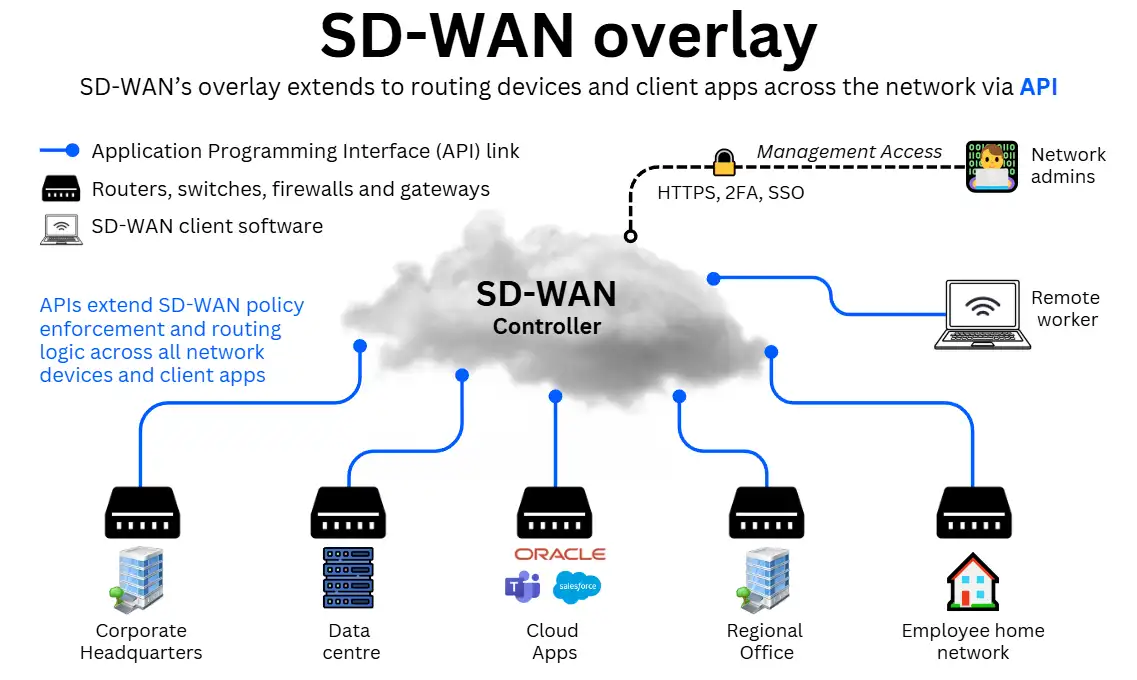
The more devices and clients the SD-WAN API extends to, the more pathways it can monitor and use to optimise traffic, thereby building resilience across the entire network.
2. Defining traffic policies and priorities
Administrators configure how traffic should be handled by securely accessing the SD-WAN management interface.
This is typically browser-based and protected with HTTPS, Single Sign-On (SSO), and Multi-Factor Authentication (MFA) to prevent unauthorised access.
While configurations can be tailored to each organisation’s needs, common examples include:
- Quality of Service: Prioritise real time applications like voice or video conferencing to maintain high VoIP call quality.
- Broadband reliability: Reserving bandwidth for business-critical applications to ensure consistent performance during peak usage.
- Failover: Maintain backup links exclusively for business broadband failover, ensuring availability in case of an outage.
- SD-WAN security: Applying encryption by default across all traffic to protect sensitive data.
- Bandwidth throttling: Restricting non-essential traffic during office hours (e.g. guest WiFi or high-bandwidth streaming).
Once set, these policies are enforced automatically by the SD-WAN controller, guiding every routing decision in line with business priorities.
3. Monitoring performance in real time
SD-WAN continuously collects live performance metrics from all connected routing devices, including:
- Latency: The delay in data transfer
- Jitter: Variation in packet delivery times
- Packet loss: Dropped data packets
- Bandwidth usage: Current utilisation of each link
This always-on visibility allows SD-WAN to detect congestion, outages, or quality degradation before end users are even aware of an issue.
4. Optimising routes and distributing traffic
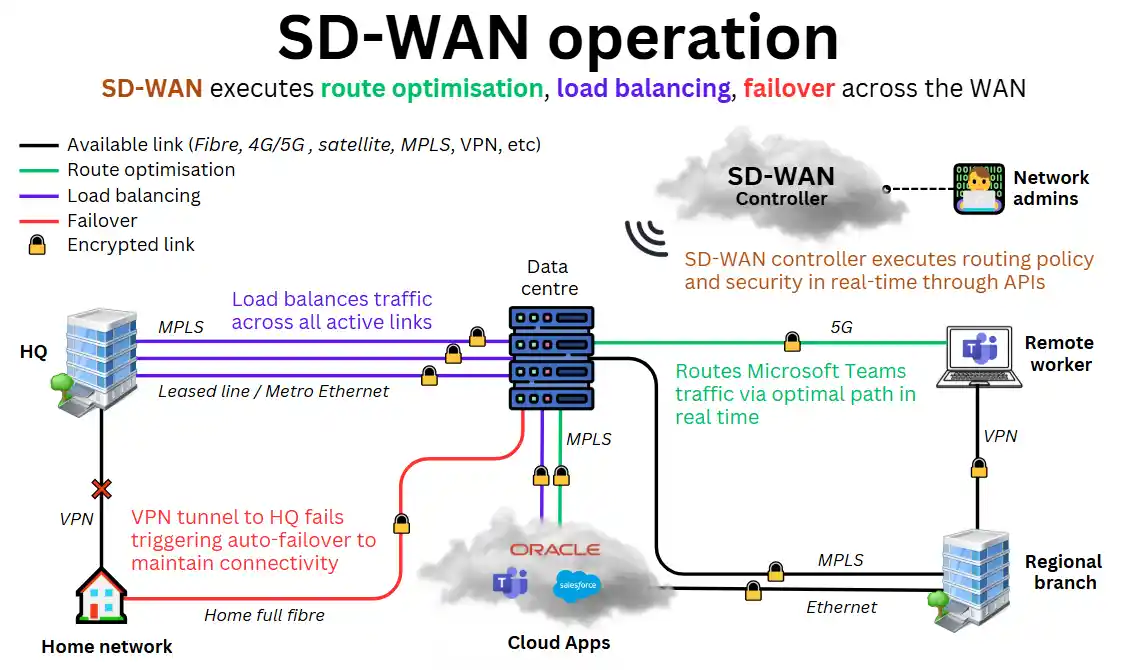
Based on the real-time data it receives and its pre-defined policies, SD-WAN performs:
- Load balancing: Spreading traffic evenly across available connections to maximise throughput.
- Auto-failover: Switching traffic to an alternative link the moment a connection drops or performance dips below acceptable thresholds.
- Traffic encryption: Ensuring every packet is protected, regardless of which path it takes.
The result is a network that dynamically chooses the most efficient and secure route for all traffic, whether it’s between offices, to the cloud, or remote workers. See the illustration below for examples:
However, its effectiveness still depends on the quality of the underlying infrastructure. Reliable broadband, adequate capacity, and well-configured hardware remain essential for peak performance.
If a remote worker is working from an overloaded, highly contended public network, SD-WAN cannot over come the bottleneck and do little else than encrypt the data.
5. Optional security and performance enhancements
Because SD-WAN is cloud-native and API-driven, it integrates seamlessly with a wide range of cybersecurity software services, including:
Firewall-as-a-Service (FWaaS)
Adds enterprise-grade firewall protection to SD-WAN without relying on physical appliances. FWaaS offers features like content filtering, intrusion detection, and malware protection, all centrally managed through the SD-WAN interface.
Secure Access Service Edge (SASE)
Combines SD-WAN with identity-based security to implement a Zero Trust approach across the network. SASE enforces access policies based on user, device, and context, which is ideal for securing remote workers and cloud applications at scale.
Cloud-based WANs
Bundled solutions from third-party providers that combine SD-WAN, FWaaS, SASE, and cybersecurity compliance tools for sectors like healthcare and finance into one solution.
Cloud-based WANs also include access to private backbone networks for enhanced global performance and reduced latency.
SD-WAN vs traditional network management
Traditional network management is often fragmented, inefficient, and hardware-intensive. It is static, relying on fixed traffic configurations for routers, switches, and firewalls, which require on-site expertise to set up and modify.
Tasks like connecting new sites or modifying a firewall require substantial time and resources. It struggles to optimise cloud services and cannot adjust to unexpected congestion or outages outside its configured failover and load balancing.
Despite this, many businesses continue with traditional methods. In most cases, this is due to limited familiarity with SD-WAN or because current setups meet present needs. However, SD-WAN is rapidly establishing itself as the go-to solution.
The following table summarises the main differences between a traditional system and SD-WAN:
| Feature | SD-WAN | Traditional WAN management |
|---|---|---|
| Setup | Single interface for all network administration and routing devices. Highly automated after initial deployment. | Requires detailed, site-by-site hardware configuration. Each site may use multiple systems from different vendors, making coordination complex. |
| Performance & Reliability | Dynamically selects the best path for traffic (like Google Maps) with built-in failover. | Relies on fixed routes with limited failover and load balancing. Can deliver high performance but lacks flexibility. |
| Security & Adaptability | Deploys security policies, encryption, firewalls, and updates network-wide at any time. | Uses separate appliances and static settings, making updates and audits more cumbersome. |
| Scalability | Adapts routing decisions instantly based on available routes and devices. | Often tied to costly MPLS circuits or VPNs, making expansion slower and more expensive. |
SD-WAN use cases
As a modern approach to network management, SD-WAN can improve the performance, security, and resilience of almost any business wide area network, regardless of size or sector.
The greater the complexity of a network, the more valuable having a centralised, persistent, 24/7 solution like SD-WAN becomes.
This means the more devices, sites and links relinquished to its optimisation and security engine, the more effective it becomes.
Here are the key scenarios when SD-WAN is particularly useful:
Multi-site businesses
SD-WAN is ideal for retailers, banks, logistics companies, and other distributed organisations as it ensures consistent performance and centralised policy control across all locations, regardless of local connectivity type or provider.
This includes managing failover, load balancing and disaster recovery across the wide area network.
It enables businesses to allocate local IT resources to strategic objectives, rather than spending time on local device configurations or troubleshooting the network.
Cloud-centric operations
Businesses migrating workloads to SaaS platforms or public cloud services benefit from application-aware routing, direct cloud access, and optimised performance for platforms like Microsoft 365, Salesforce, AWS and RingCentral.
This also benefits remote workers greatly, who can be optimally routed to the nearest branch office or cloud access point for connectivity, meaning super-fast access to their tooling from anywhere in the world.
Remote and hybrid workforces
SD-WAN improves reliability and security for distributed teams, regardless of how they connect to the SD-WAN overlay. Since they don’t control the public or third-party networks they connect from, SD-WAN can only reach their devices via client apps, gateways or VPN integrations.
This enables devices to have more options to reach their desired destination, be it the headquarters network or a cloud app. SD-WAN will find the best path to connect your device, while giving it end-to-end encryption to its destination.
Note that ultimately, their connection will only be as good as the last-mile link to their device, be it fibre broadband, 5G, or business satellite services like Starlink.
Cybersecurity compliance
Sectors with strict regulations, such as healthcare, finance, and government, use SD-WAN to enforce security policies consistently across all sites, support Zero Trust models, and maintain compliance with standards like GDPR, PCI DSS, and HIPAA.
Products built on top of SD-WAN, like cloud-native WANs, also provide tooling specifically tailored to ensure adherence to changing regulations.
SD-WAN architecture
While cloud-hosted SD-WAN is the most common deployment, some organisations require alternative models to meet specific business or compliance needs.
In general, there are three main SD-WAN architectures:
Cloud-based SD-WAN
Best for: Organisations heavily reliant on cloud applications (e.g., remote VoIP, SaaS platforms) that value simplicity and provider-managed operations.
The SD-WAN service is hosted in the provider’s cloud. The vendor manages hosting, troubleshooting, and updates, while the business focuses on implementation and policy configuration.
On-premise SD-WAN
Best for: Businesses with strict regulatory/compliance requirements, or those needing ultra-low-latency access to internal applications. Offers maximum control and customisation.
The SD-WAN controller is deployed within the organisation’s own facilities. It requires specialised IT resources.
Hybrid SD-WAN
Best for: Organisations seeking flexibility, keeping sensitive workloads in-house while leveraging the cloud for distributed access and scalability.
This hybrid model combines on-premise and cloud-based elements. Typically, local SD-WAN handles local/internal traffic, while the cloud component supports SaaS, remote, and hybrid workforce connectivity.
SD-WAN deployment
Deploying SD-WAN is similar to other network solutions in that it involves a structured process. While every business has its own systems and requirements, the core steps are broadly the same.
Deployment process
Here is a generalised overview of the SD-WAN deployment process:
1. Plan
Audit your current WAN connections and infrastructure, then define your business and technical objectives. Choose a suitable SD-WAN provider, and decide how SD-WAN will coexist with or replace parts of your legacy network.
Remember that SD-WAN is only as good as the business Ethernet and broadband connections it relies on. Compare business broadband services at each of your sites and get a line that supports your operations accordingly. Then compound their performance with SD-WAN.
2. Design
Map out the network architecture, defining traffic priorities and security policies. Plan integration with existing MPLS, cloud services, and data centres. Anticipate how routing and security will operate across both old and new systems.
3. Pilot
Deploy SD-WAN at a small number of sites. Test performance, validate integration with existing services, and fine-tune settings based on metrics such as latency, jitter, and bandwidth usage.
4. Rollout
Expand deployment gradually, monitoring performance and user experience as each site comes online. Adjust policies to maintain optimal traffic flow and minimal disruption.
5. Optimisation
Use centralised orchestration to update, scale, and refine the network. Continuously monitor key metrics, adapt QoS and security policies, and evolve configurations to match changing business needs.
Deployment challenges
SD-WAN deployment and integration often present unique challenges, especially for self-managed setups. Here are the most common hurdles:
Integrating with existing links
Connecting SD-WAN to MPLS or other legacy networks can be complex, especially in large organisations or during mergers where multiple vendors are involved.
Bridging skill gaps
SD-WAN requires expertise in cloud, virtualisation, orchestration, and cybersecurity threats. SMEs without in-house specialists will likely struggle to manage advanced deployments.
Managed vs self-managed SD-WAN
Beyond choosing the right SD-WAN architecture, businesses also need to decide how the solution is operated day-to-day. This comes down to whether running it internally or handing operations to a specialist third party.
What is Managed SD-WAN?
Best for: Organisations that want a hands-off experience. Managed SD-WAN places deployment, configuration, monitoring, and troubleshooting in the hands of a dedicated provider.
Managed SD-WAN services are typically supported by 24/7 monitoring and robust Service Level Agreements (SLAs), ensuring consistent performance without placing additional strain on internal IT teams.
While this model comes at a premium and offers less direct control, it can prove cost-effective when considering reduced IT overheads.
Also, SD-WAN can be bundled together at a discount if your organisation is already using other managed services, such as business VoIP phone systems or a managed business leased line broadband connection.
What is Self-managed SD-WAN?
Best for: Organisations with a capable in-house network team that prefers full control over its SD-WAN environment.
Self-managed SD-WAN allows the organisation to oversee deployment, configuration, monitoring, and troubleshooting directly.
By managing the solution internally, businesses can customise policies, performance settings, and integrations to meet specific operational needs. This approach can reduce direct service costs and avoid vendor lock-in, offering greater flexibility in technology choices.
However, self-managed SD-WAN demands significant internal expertise and the resources to handle day-to-day performance, updates, and incident response. While the service itself may reduce SD-WAN costs, the operational expenses of retaining and training skilled staff should be carefully considered.
Business SD-WAN – FAQs
Our business networking experts answer commonly asked questions about SD-WAN:
How does SD-WAN benefit hybrid work?
SD-WAN delivers secure, high-performance connectivity for both remote and on-site employees.
It automatically optimises routes and encrypts traffic, ensuring hybrid workers have the same (theoretical) quality of access to business applications as those in the office, even over temporary or public connections.
However, SD-WAN can only optimise the connections it has to work with. If a remote connection is poor and has no broadband redundancy, its ability to improve performance will be limited.
How does SD-WAN benefit IoT?
SD-WAN simplifies IoT management by providing a single platform to connect, monitor, and secure all devices. IT teams can add or remove devices remotely, while traffic from sensors, cameras, and other endpoints is automatically routed for performance and encrypted for security.
How is SD-WAN different from VPN?
A VPN creates a secure tunnel between two points for safe network access. SD-WAN does this and more: it manages and optimises the entire network (spanning multiple sites, cloud services, and remote users) while applying consistent security policies across all connections.
The two are not mutually exclusive. VPN endpoints can be integrated into an SD-WAN, allowing VPN traffic to benefit from optimised routing and, if required, a secondary layer of encryption.
 Back to blog