Our use of cookies
Attribute-based access control (ABAC) for businesses
Attribute-based access control (ABAC) is a modern access control model that grants permissions based on real-time context rather than fixed roles.
Evaluating attributes such as user identity, device, location, and behaviour, it enables more precise and adaptive access decisions.
This guide explains how ABAC works, how it relates to RBAC, where it fits in the identity security stack, and how businesses implement it.
Contents:
- What is attribute-based access control (ABAC)?
- How does ABAC work?
- Core attribute types in ABAC
- Where is ABAC used in business environments?
What is attribute-based access control (ABAC)?
ABAC is a next-generation access control model that grants user permissions contextually, based on attributes such as time of day, location, or IP address.
ABAC can evaluate these attributes at the point of access and continuously during a session. For example, if authorised access is only permitted until 18:00, ABAC will revoke permissions at that time.
This contrasts with the more traditional model, RBAC (role-based access control), which assigns users fixed permissions based solely on their designated role, such as “Admin” or “Account Manager”.
In practice, most modern Identity and Access Management (IAM) systems combine both approaches. Roles define baseline access, while ABAC-style policies introduce contextual controls that determine whether access should be allowed under current conditions.
This hybrid approach makes role-based access more adaptable to dynamic environments, where:
- Remote workers access systems from untrusted networks
- Cloud systems and integrations operate across multiple environments
- Non-human identities, such as APIs, automation, or AI agents, require conditional access
By continuously evaluating context, ABAC supports modern Zero Trust security, where access is not assumed based on identity alone but verified dynamically throughout each session.
How does ABAC work?
ABAC works by evaluating multiple attributes at the moment an access request is made, using policy rules to determine whether access should be allowed, denied, or restricted.
Here is how this process works step by step:
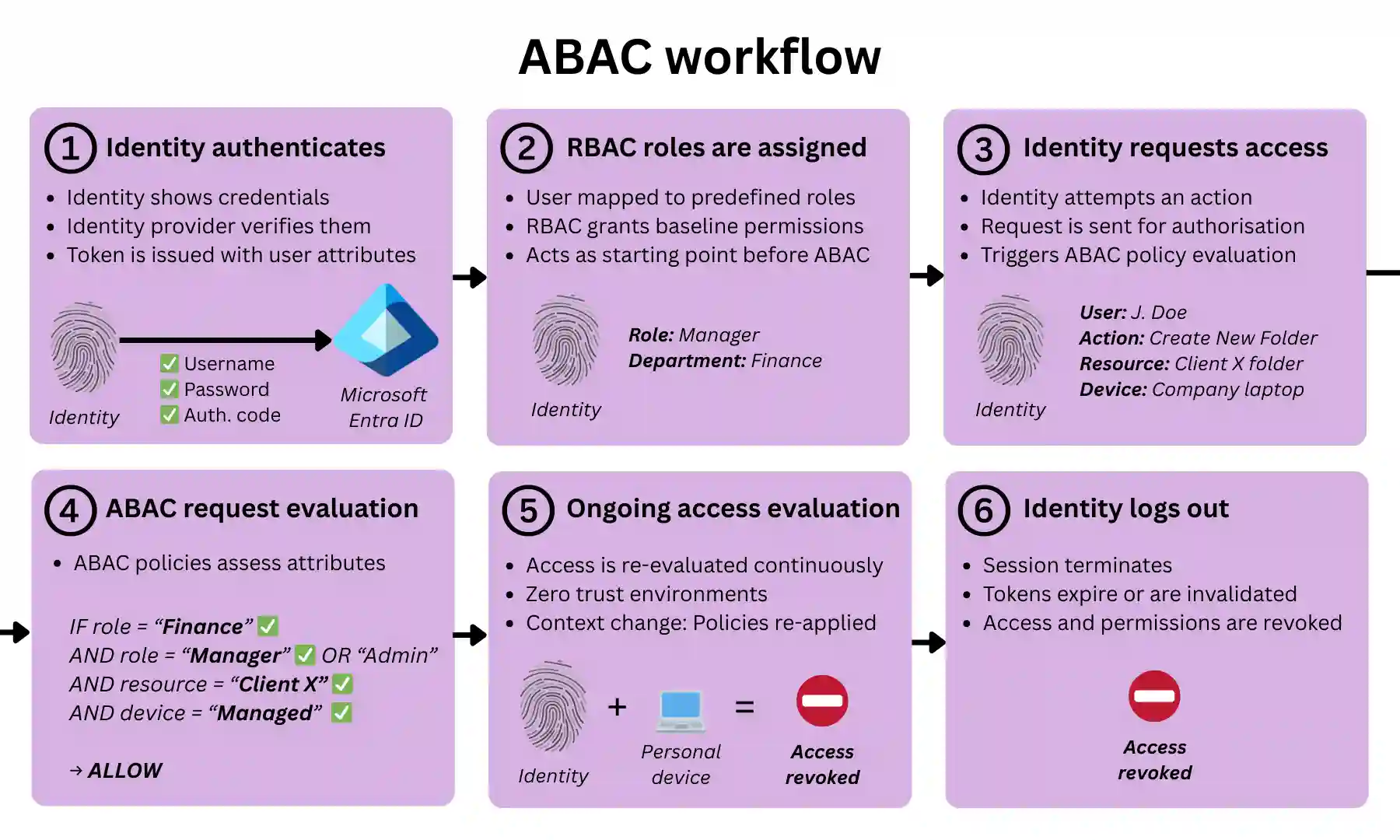
1. A user or system authenticates into an organisation’s system
A human user (e.g. employee) or a non-human identity (e.g. API, service account, or AI agent) first authenticates with an identity provider.
For example, this could involve:
- Username + password + MFA
- Single Sign-On (SSO)
- API keys, OAuth tokens, or certificates (for non-human identities)
Upon authentication, a session is established, and a token is typically issued (e.g. a SAML assertion or an OAuth/JWT token).
This token contains identity claims (the authentication method it passed, previously assigned group roles) that can later be used as ABAC attributes.
2. Baseline permissions are assigned (RBAC layer)
In most real-world systems, RBAC defines role-based baseline permissions for all identities.
- Each user is mapped to one or more roles
- Each role has predefined access rights
Example:
- “Finance Manager” → access to payroll system
- “Developer” → access to staging environment
3. The user requests access to a resource
The user (or non-human identity) attempts an action, such as:
- Opening a file
- Querying a database
- Accessing an admin panel
- Calling an API
This triggers an authorisation request.
4. ABAC evaluates request attributes against policy and makes an access decision
The ABAC system evaluates multiple attributes against policy rules using logical (boolean) conditions (AND/OR/NOT). These policies determine not only whether access is allowed, but also what level of permission is granted.
For example:
IF role = Finance Manager
AND device = compliant
AND location = corporate network
AND time between 08:00–18:00 UTC
→ PERMIT (read, write)

ELSE IF role = Finance Manager
AND MFA = verified
→ PERMIT (read-only)

ELSE
→ DENY
A policy engine (decision point) evaluates the request. Attribute data may be retrieved from multiple sources, such as directories, device management systems, risk engines, authentication tokens, and RBAC systems.
Based on the evaluation, access can be:
- Granted: The user proceeds with permissions defined by the policy. Permission restrictions may apply (e.g. view-only access, download restrictions, session monitoring, or watermarking).
- Denied: The request is blocked. The user may be prompted for additional verification, such as step-up MFA.
The enforcement point (e.g. application, API gateway, or reverse proxy) receives the access decision and implements it.
5. Access is continuously re-evaluated during the session
Many ABAC implementations continuously re-evaluate authorisation and permissions based on changes in context, such as:
- A change in IP address or location
- The device is becoming non-compliant
- Unusual or risky behaviour detected
- Elapsed session time or inactivity
If conditions change, the ABAC system re-applies policies and updates the access decision. For example, it may:
- Downgrade permissions (e.g. from edit to read-only)
- Require step-up authentication (e.g. MFA)
- Terminate access entirely
This continuous evaluation aligns ABAC with Zero Trust security, where trust is verified throughout the session, not just at login.
6. The session expires or is terminated
Access authorisation is not indefinite. Sessions end when:
- The user logs out
- The authentication token expires
- inactivity thresholds are reached
- Risk conditions trigger forced termination
In the background, this is enforced through mechanisms such as:
- tokens (e.g. SAML, OAuth, JWT) expiring or are invalidated
- session state is cleared
- temporary or context-based permissions being revoked
Core attribute types in ABAC
ABAC evaluates attributes across four core categories, each representing a different dimension of an access request: who wants access, to what resource, to do what, and under what context.
This categorisation helps structure access policies clearly and consistently, and is reflected in the access control configuration panels of IAM platforms such as Microsoft Entra ID and Google Workspace.
User (subject) attributes
These are attributes relating to the identity requesting access, whether a human user (employee, contractor) or a non-human identity (service account, API, AI agent).
They can include job role, business unit, completion of cybersecurity awareness training, or employment status as defined in HR systems.
Resource attributes
These attributes describe the resource being accessed (application, system, or data) and help differentiate access based on how that resource is classified or managed.
Examples include regulatory scope (e.g. GDPR for personal data or HIPAA for healthcare), environment (e.g. production, staging, development), and metadata labels (e.g. “sensitive”, “export-controlled”).
Action attributes
These attributes define what the identity is attempting to do with the resource.
ABAC evaluates this alongside user, resource, and environmental attributes to determine whether the action is allowed, restricted, or denied.
Typical actions include viewing, modifying, deleting, exporting, or administering a resource.
Environmental attributes
These attributes represent the real-time context of the access request and are a key differentiator of ABAC compared to RBAC (which assigns identities to roles using fixed attributes).
They include dynamic signals observed at the time of access, such as:
- Time of day or day of week
- User’s IP address
- Geolocation (country, region, city)
- Network type (corporate local area network, VPN, guest WiFi)
- Device type (desktop, mobile, tablet) and compliance status (managed, patched, secure)
- Operating system, browser type or client application
- Session duration or inactivity time
- Behavioural signals (e.g. unusual login patterns)
- Connection method (e.g. API call, browser session)
- Security anomalies across systems (e.g. identified via a SIEM)
Where does ABAC sit in the identity security stack?
Within the identity security stack, ABAC sits in the authorisation layer, where access decisions are made after a user or system has been authenticated.
It adds contextual decision-making to access control, working alongside:
- RBAC: Assigns baseline, role-based access at scale
- PAM (Privileged Access Management): Applies additional controls to privileged or high-risk access
These models are typically implemented together within IAM platforms such as Microsoft Entra ID and Google Workspace.
ABAC also depends on:
- Identity providers: Supply user and system attributes used in policy evaluation
- Enforcement points: Applications, APIs, or gateways where access is allowed or denied
Where is ABAC used in business environments?
ABAC is applied across multiple layers of an organisation’s IT environment, wherever access decisions need to be evaluated based on context.
In most organisations, ABAC is primarily implemented through centralised identity platforms, but it can also be enforced at the application, infrastructure, network, and data layers.
Identity and access management (IAM) platforms
The most common place businesses use ABAC is within IAM platforms such as Microsoft Entra ID, Google Workspace, and Okta.
These platforms act as a central control point, applying ABAC-style policies (e.g. conditional access) across multiple systems via Single Sign-On (SSO).
This allows them to extend these across multiple applications, including third-party SaaS tools such as Salesforce, Slack, and Microsoft 365.
Applications and business systems
ABAC can also be enforced directly within applications, rather than through a central IAM platform.
While IAM systems control whether a user can access an application, application-level controls determine what the user can do once inside it (often referred to as coarse-grained vs fine-grained access control).
This is common in SaaS tools such as Salesforce or a cloud-based business VoIP phone system, where ABAC-style logic governs actions such as viewing, editing, or exporting data based on context.
Typical use cases can include:
- Restricting downloads on unmanaged devices
- Applying read-only access outside trusted environments
- Limiting access to sensitive records
Infrastructure environments (cloud and on-premise)
In cloud platforms such as AWS, Azure, and Google Cloud, ABAC is widely used to control access to infrastructure and environments.
Policies can restrict access to resources such as virtual machines, storage systems, business data backups, and development environments.
These controls rely on attributes such as resource tags, environment type, or ownership to determine whether access should be granted under specific conditions.
ABAC can also be enforced at the network edge, where identity-aware access controls sit between users and applications.
Platforms such as Zero Trust Network Access (ZTNA) and Secure Access Service Edge (SASE) act as access brokers, evaluating user and device context before allowing a connection.
These platforms integrate with identity providers to assess attributes such as user role, device posture, and login risk, and apply ABAC-style policies before granting access .
This provides two key advantages:
- Pre-access enforcement: Requests are evaluated before reaching the application, reducing exposure to unauthorised or risky traffic.
- Centralised control: A single policy layer can be applied consistently across applications, cloud services, and locations via a wide area network.
Data and information security controls
To protect databases and data storage, ABAC is used to control access and handling, regardless of where it is stored.
This is typically enforced through:
- Data loss prevention (DLP) tools
- File systems and document platforms
- Database access controls
For example, tools such as Microsoft Purview sensitivity labels, Google Drive sharing controls, or database row-level security can enforce policies that restrict actions such as downloading, copying, or sharing data.
These controls evaluate attributes such as data classification, user role, device security, and access context to determine not only whether access is allowed but also what actions are permitted.
In practice, this means a user may be able to view a file but not download it, or access a database but see only specific records, depending on the policies in place.
How to implement ABAC in a business environment
Implementing ABAC does not require a full system overhaul. Most businesses introduce it by layering contextual access policies onto existing identity platforms and applications. The goal is to move from static permissions to dynamic, policy-driven access decisions.
The key stages are:
- Define access requirements and risks: Identify which systems and data require tighter control, and where context (e.g. device, location, user role) should influence access decisions.
- Centralise identity management: Use an IAM platform (e.g. Microsoft Entra ID, Google Workspace, Okta) to manage users, roles, and authentication across applications.
- Identify and structure attributes: Determine which attributes will be used in policies, such as user role, device compliance, data sensitivity, and access context.
- Create and apply policies: Implement ABAC-style rules (e.g. conditional access policies) that evaluate these attributes to grant, restrict, or deny access.
- Start with high-impact use cases: Apply policies first to sensitive systems (e.g. finance, admin access, customer data) before expanding more broadly.
- Monitor and refine: Continuously review access decisions, user behaviour, and security signals to adjust policies and reduce risk without impacting usability.
Attribute-based access control (ABAC) – FAQs
Our business cybersecurity experts answer the following frequently asked questions regarding ABAC for businesses:
Is attribute-based access control better than role-based access control?
Not necessarily. ABAC is more flexible and context-aware, while RBAC is simpler and easier to manage.
In practice, most organisations use a combination of both, with RBAC defining baseline permissions and ABAC adding contextual controls based on factors such as device, location, or risk.
What are the risks of attribute-based access control?
ABAC can become complex to manage, particularly as the number of attributes and policies increases.
Poorly designed policies may lead to misconfigurations, access gaps, or unintended permissions. However, these risks can be mitigated through clear policy design, regular testing, and ongoing monitoring.
Is attribute-based access control suitable for small businesses?
Yes. ABAC is increasingly accessible to small businesses through IAM platforms such as Microsoft 365 and Google Workspace.
Many SMEs implement ABAC using built-in conditional access policies to control access based on device security, location, or user context, without needing complex infrastructure.
How does attribute-based access control improve compliance?
ABAC enforces context-aware access policies, helping organisations protect sensitive data and meet regulatory requirements such as GDPR, as well as security frameworks like ISO 27001 and Cyber Essentials Plus.
By applying least-privilege access based on user, device, and context, ABAC supports key control areas such as access control, data protection, and risk management, which are central to these standards.
What is the NIST definition of attribute-based access control?
NIST defines ABAC as an access control model that evaluates attributes of the user, resource, action, and environment against policy rules to make access decisions.
In simple terms, this means access is not based on roles alone, but on a combination of who the user is, what they are accessing, what they are trying to do, and the context of the request.
How do you test attribute-based access control policies?
ABAC policies are tested by simulating different access scenarios to ensure the correct decisions are made.
This typically involves testing combinations of users, devices, locations, and actions to confirm that access is correctly granted, restricted, or denied. In practice, many IAM platforms provide built-in tools or logs to help validate and refine these policies.
How do I know if attribute-based access control is right for my organisation?
ABAC is a good fit for organisations that need more flexible, context-aware access control than traditional role-based models can provide.
It is particularly useful for businesses that use cloud platforms (e.g. Microsoft 365 or Google Workspace), support remote or hybrid working, or handle sensitive data such as customer or financial information.
 Back to blog