Our use of cookies
Business VoIP integrations: CRMs, ERPs and productivity tools
VoIP integrations enable business phone systems to work in harmony with enterprise platforms such as Salesforce, Shopify, Zendesk, and Microsoft Teams.
This unlocks a range of productivity hacks, including automatic call transcription logging across integrated systems, instant lead creation in sales pipelines, and real-time updates to support tickets.
This guide covers the most useful VoIP integrations, their benefits, and how to integrate them seamlessly into your existing business workflows.
Contents
- What are VoIP integrations?
- Key VoIP integrations and their use case
- Best VoIP systems for integration
What are VoIP integrations?
VoIP call integrations are one of the biggest advantages of switching to an internet-based phone system. Instead of keeping calls siloed, voice and video call data, including transcripts, phone numbers, recordings, and call statistics, can be securely shared across business systems such as Salesforce, Google Cloud, and even cybersecurity platforms.
This enables tailored, fully automated workflows that deliver significant productivity improvements for call-heavy teams. Actions can be triggered automatically when calls start, end, or are missed, removing the need for manual data entry. Common examples include:
- Call notes, transcriptions, and summaries are automatically logged in CRMs, ensuring all customer interactions are recorded and auditable.
- Follow-up emails are sent automatically, and calendar events are created after calls, ensuring next steps are captured without manual scheduling.
- Support tickets are updated in real time with call details such as phone number, call duration, and caller information, and linked directly with CRM or ERP workflows.
These integrations rely on APIs and webhooks to connect platforms in a controlled, permissioned manner, whereas native integrations do so seamlessly through a dashboard.
Why are VoIP integrations used in businesses?
The impact of VoIP integrations on internal and client-facing workflows can be significant. Businesses that deploy successful integrations often see a marked improvement in customer experience and internal workflows, particularly in call-heavy environments.
Here are the main additions a well-built VoIP integration brings:
Eliminates manual call logging
Manually entering call details into CRMs and other systems is time-consuming and error-prone. VoIP integrations automatically capture phone numbers, timestamps, recordings, transcripts, and outcomes, and sync them across all connected platforms, removing hours of admin work.
Ensure full context for every conversation
Missed context leads to fragmented conversations and an inconsistent customer experience. VoIP integrations surface relevant information, such as previous calls, emails, notes, and support interactions, before a call even begins.
With full visibility into recent activity, teams can respond more effectively, personalise conversations, and avoid asking customers to repeat themselves.
Connect disjointed systems and workflows
Calls, emails, chats, calendars, and tickets often live in separate tools, creating friction across teams. VoIP integrations unify these channels by automatically triggering actions across business systems when call events occur.
This creates seamless workflows where calls can update tickets, send emails, schedule meetings, or notify internal teams without manual intervention.
Combine calls, chat, and email into a single experience
VoIP integrations help centralise communication by linking voice calls with chat tools, email platforms, and calendars within a dedicated business VoIP phone system. Instead of switching between apps, teams can manage conversations and follow-ups from a connected workflow.
This simplifies interactions, reduces tool fatigue, and ensures no messages or actions fall through the cracks.
Streamline follow-ups and next steps
Forgetting to follow up after calls can lead to missed opportunities and frustrated customers. VoIP integrations automate post-call actions such as sending follow-up emails, scheduling meetings, or creating reminders based on call outcomes.
This ensures timely responses while allowing teams to focus on higher-value work.
Improve availability and after-hours responsiveness
VoIP integrations extend availability beyond business hours through interactive voice response systems, assistants, and intelligent call routing. Calls can be answered, queries logged, or callbacks scheduled even when teams are offline, maintaining continuity and responsiveness without requiring additional staffing.
Enable flexible training and knowledge sharing
Live attendance is not always practical for training or internal updates. VoIP integrations allow calls and meetings to be recorded, transcribed, and shared across collaboration platforms. Teams can access recorded calls and training material with flexibility, supporting ongoing learning and knowledge retention.
Gain real-time visibility into call performance
VoIP integrations feed call metrics into analytics dashboards, providing real-time visibility into volumes, response times, outcomes, and team performance and enable data-driven decisions and continuous optimisation of communication workflows.
Key VoIP integrations and their use case
VoIP phone systems can integrate with hundreds of cloud apps and platforms, supporting use cases ranging from everyday call logging to security monitoring and compliance auditing.
While the possibilities are broad, a small group of integrations consistently stand out across industries due to the popularity of the platforms involved and their widespread use in customer support, client communications, and internal productivity.
Here are the most popular VoIP integrations currently in use by SMEs and enterprises:
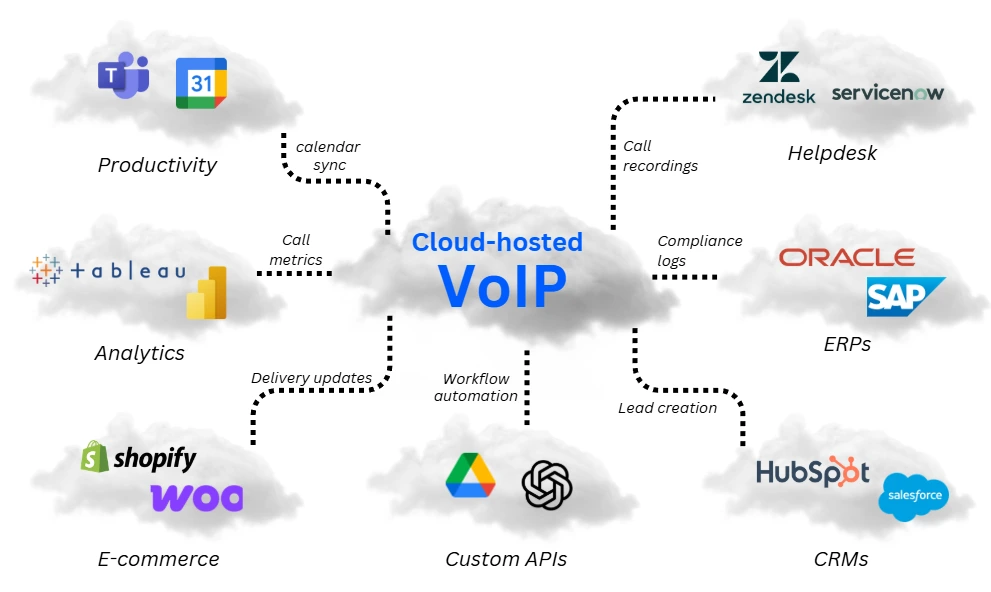
CRM integration
CRMs with native VoIP integrations: Salesforce, HubSpot, Zoho, Pipedrive
VoIP–CRM (Customer Relationship Management) integration connects voice calls directly with customer records. When a call is made or received, the CRM surfaces relevant contact details, previous interactions, and activity history in real time, allowing staff to handle conversations with full context.
The integration can also automatically log calls, record and transcribe conversations, and enable calls to be initiated directly from the CRM interface.
Example use: A sales representative receives a call from a former lead. With VoIP–CRM integration, past interactions are immediately visible, allowing the conversation to continue seamlessly without searching for information.
ERP Integration
Typical ERPs: SAP, Oracle NetSuite, Microsoft Dynamics
VoIP–ERP integration allows users to place and receive calls directly within enterprise resource planning systems. This is particularly useful for procurement, finance, and logistics teams that frequently communicate with suppliers, vendors, or partners.
Calls can be recorded or transcribed and stored alongside related transactions, supporting documentation, auditing, or compliance requirements.
Example use: A warehouse manager calls a supplier from within NetSuite to confirm a shipment delay. The call is logged and attached to the vendor record for future reference.
Helpdesk integration
Typical helpdesk platforms: Zendesk, Freshdesk, ServiceNow
Integrating VoIP with helpdesk software links phone calls directly to support tickets. Calls can automatically create new tickets or update existing ones with details such as call time, duration, recordings, and notes.
This improves issue tracking, reduces manual updates, and ensures agents have access to complete customer histories during interactions.
Example use: A customer calls about an ongoing technical issue. The system locates the relevant ticket and automatically attaches the call data, allowing the agent to continue where the previous conversation left off.
Email & calendar integration
Typical platforms: Outlook, Google Calendar
Integrating VoIP with email and calendar tools aligns calling activity with scheduling and follow-ups. Calls can trigger calendar events, send reminders, or automatically generate follow-up emails based on outcomes.
This helps prevent missed appointments and ensures important interactions are documented and acted upon.
Example use: A private clinic automates follow-up emails after patient calls and schedules appointments directly in clinicians’ calendars, reducing manual administrative work.
Click-to-call integration
Typical environments: Web browsers, Salesforce, Shopify
Click-to-call enables users to initiate calls by clicking phone numbers on websites or within business applications. When connected to VoIP, calls are logged automatically, with metadata linked to CRMs or analytics tools. This streamlines outbound calling and captures lead or interaction data without additional steps.
Example use: A visitor clicks a phone number on a car dealership’s website. The call is routed through the VoIP system to the sales team and logged as a website-originated lead in the CRM.
Unified communications (UCaaS) integration
Typical UCaaS platforms: Microsoft Teams, Slack, Gmail
UCaaS platforms centralise internal communication such as chat, email, and video meetings, but often rely on additional services for full PSTN calling capabilities. Integrating VoIP adds enterprise-grade voice functionality, allowing users to make and receive external calls within familiar collaboration tools.
This reduces app switching and enables real-time collaboration during live calls.
Example use: During a VoIP call, a user shares files and messages colleagues in Teams without leaving the interface.
Analytics and reporting integration
Typical tools: Power BI, Tableau, Google Data Studio
VoIP systems can be connected to analytics platforms to provide advanced reporting on call activity. This includes metrics like call volume, agent performance, and call resolution times, which are often not available in basic VoIP dashboards.
The integration supports data-driven decision-making and performance monitoring. Find out more in our complete guide to business VoIP analytics.
Typical use: A contact centre tracks call trends in Power BI and identifies peak hours, helping management optimise staffing levels.
E-commerce integrations
Typical platforms: Shopify, WooCommerce, Magento
When VoIP integrates with e-commerce systems, agents can access order details and customer data during calls. This reduces system switching and enables faster, more informed support.
It can also help identify behavioural patterns such as frequent returns or repeated support requests.
Example use: A customer calls to check the status of an order. The agent views the customer’s Shopify order history during the call and provides an immediate update.
Best VoIP systems for integration
No single UK VoIP provider integrates with every CRM, ERP or helpdesk platform out of the box. However, some are geared towards specific market segments or functions.
Here are five of the top VoIP providers in the UK for integrations, and what they are best at:
RingCentral
Best for: Enterprise-grade integrations
RingCentral is one of the most integration-rich VoIP platforms on the market. It supports native integrations with 300+ apps, including major CRMs such as Salesforce, HubSpot, and Zoho, as well as ERPs such as Microsoft Dynamics 365. Its open API also enables custom integrations, making it ideal for businesses with more complex tech stacks.
8×8
Best for: Unified communications and CRM sync
8×8 offers solid integrations with Salesforce, Microsoft Teams, Google Workspace, and popular contact centre platforms. Their robust analytics and call logging tools integrate seamlessly with CRM workflows, and the platform offers flexible API access for custom development.
Dialpad
Best for: AI features and Google ecosystem users
Dialpad’s strength lies in its AI-driven transcriptions and Google Workspace integration. It also offers native support for Salesforce, HubSpot, and Zendesk, making it a strong choice for sales and support teams. While ERP integration is more limited, its API can help bridge the gap for custom solutions.
BT Cloud Voice
Best for: Businesses already using BT Business Broadband
BT Cloud Voice integrates seamlessly with Microsoft 365 and offers plug-and-play features to meet basic CRM needs. However, it may require additional setup or third-party tools to connect with a broader range of platforms. Best suited for companies already embedded in the BT ecosystem.
VoIPstudio
Best for: Budget-friendly custom integration
While VoIPstudio offers fewer out-of-the-box integrations compared to enterprise players, it provides a powerful API and webhook support. That makes it a good option for tech-savvy teams or businesses with unique CRM or ERP platforms who can build or customise their own integrations.
How to plan and implement VoIP integrations successfully
As businesses move toward cloud-based tools, integrating hosted VoIP with systems like CRMs, ERPs, and helpdesks has become a standard part of digital transformation, especially ahead of the PSTN Switch Off scheduled in 2027.
Replacing legacy business phone lines with VoIP is only the first step. The real value comes from how well the VoIP system integrates with existing business software to streamline workflows, automate routine tasks, and improve responsiveness across teams.
A successful VoIP integration typically involves the following steps:
1. Audit existing systems and workflows
Before planning any integration, it is essential to gain a clear understanding of the current technology stack and how communication flows through the business.
Key areas to review include:
- System compatibility: Assess whether existing CRMs, ERPs, helpdesks, and collaboration tools support native VoIP integrations or require API-based connections.
- Current workflows: Identify manual processes that could be automated, such as call logging, ticket updates, or follow-up emails.
- Network readiness: Review bandwidth availability, VoIP call quality, latency, and overall network stability, as VoIP performance depends heavily on connectivity.
- Custom platforms: If bespoke systems or niche tools are in use, determine whether custom integrations will be required.
This audit helps surface quick wins as well as technical constraints early in the process.
2. Identify integration priorities
Not every system needs to be integrated at once. Prioritising integrations based on business impact helps reduce complexity and accelerates value.
Common priorities include:
- Sales and CRM integrations to improve lead handling and follow-ups
- Helpdesk integrations to streamline ticket management
- Email and calendar integrations to reduce missed actions and appointments
- Analytics integrations to gain visibility into call performance
Focusing on high-impact use cases first ensures integrations deliver measurable benefits without overwhelming teams.
3. Check compatibility, data ownership, and security early
VoIP integrations involve exchanging call data across systems, making compatibility and governance critical considerations.
Areas to clarify early include:
- Data ownership: Understand where VoIP call recordings, transcripts, and metadata are stored, and who controls access to them.
- Security and compliance: Ensure integrations align with internal security policies and regulatory requirements, particularly for call recording and data retention. Web Application Firewalls are typically included in integrations to protect APIs and webhooks.
- Permissions and access controls: Confirm that APIs and integrations support role-based access and auditing.
Addressing these points upfront avoids rework and reduces risk later in the rollout.
4. Engage with VoIP integration experts early
VoIP integrations are rarely plug-and-play at scale. Working with experienced business VoIP providers or integration specialists early helps translate business requirements into practical solutions. Request a callback from our VoIP experts and get this scheduled as soon as possible.
Make sure to enquire about the following:
- Relevant experience: Previous integrations with your CRM, ERP, or helpdesk platforms
- Required features: Click-to-call, call logging, voicemail-to-email, AI transcription, and analytics
- Scalability: Whether the solution can support future growth and additional integrations
- Commercial structure: Bundled offerings such as VoIP with leased line broadband, or SD-WAN solutions
- Total cost: How integrations and advanced VoIP features affect the total business VoIP costs.
Early engagement ensures technical feasibility aligns with long-term business goals.
5. Prepare and upgrade network infrastructure
VoIP integrations place additional demands on the network, particularly when deploying a multi-line business phone system in a call-heavy environment. Typical considerations include:
- Broadband connections: Business broadband providers offering sufficient speed, low latency, built-in redundancy and strong service level agreements
- Routers and firewalls: Support for QoS, VLANs, and traffic prioritisation
- Network switches: Required for segmentation and secure VoIP device management
- Resilience: Load balancing and broadband failover to maintain uptime
Where upgrades are needed, comparing business broadband options early can help control costs and avoid deployment delays.
6. Test, roll out, and train users
Before full deployment, integrations should be tested with a small group to validate workflows, permissions, and data accuracy. Once live, user adoption becomes the key success factor. Training should cover:
- VoIP features: For example, using call history in the CRM, voicemail access, or call transfers.
- Security awareness: VoIP-specific cybersecurity training, including cybersecurity awareness training.
- Ongoing support: Ensure new hires also receive training, and there are clear escalation paths
If internal training resources are limited, a managed VoIP provider can support onboarding and ongoing user education.
 Back to blog