Our use of cookies
SIP trunking for businesses
SIP trunking is a way for businesses to upgrade landline-based phone systems to internet-based calling without a complete system overhaul.
This allows call centres and corporate offices to continue operating multi-line phone systems without the cost, complexity or operational disruption of replacing hundreds of desk phones at once, in anticipation of the UK’s 2027 landline switch-off.
This guide explains what SIP trunking is, how it works, and how businesses can set it up if they decide to take this migration route.
Contents:
- How does SIP trunking work?
- When to choose SIP trunking over cloud-hosted VoIP
- How to set up SIP trunking for businesses
- SIP trunking security considerations
What is SIP trunking?
SIP Trunking is a technology that adapts traditional on-premises phone systems to route calls over broadband rather than traditional landline networks.
It allows organisations such as call centres and corporate offices to upgrade, scale and extend the life of their trusted phone systems, often made up of hundreds of devices, without immediately switching to a fully hosted VoIP system.
SIP trunking is offered as-a-service by VoIP providers, who connect the organisation’s existing phone system to their network and offer different tier levels and features.
They do this by replacing the traditional landline “trunk” link between the on-premises phone system and the previous provider with a new connection delivered over broadband.
Call traffic is routed to the VoIP provider’s servers over the internet, allowing flexible call volumes, call cost savings, and readiness of the UK PSTN switch-off in 2027.
Organisations get to keep their trusted call infrastructure largely as-is, while choosing if and when to add modern features such as analytics, AI-assisted tools, or video integrations.
Over time, it is expected that organisations will move fully towards cloud-hosted VoIP systems to unify phone calls with cloud platforms like CRMs and ERPs. However, SIP Trunking gives businesses control over how and when they make that transition.
How does SIP trunking work?
SIP trunking replaces traditional landline call routing with an internet-based connection between a business phone system and a VoIP provider.
Voice communication is transmitted digitally over an internet connection using Session Initiation Protocol (SIP), which manages how calls are established, maintained, and terminated.
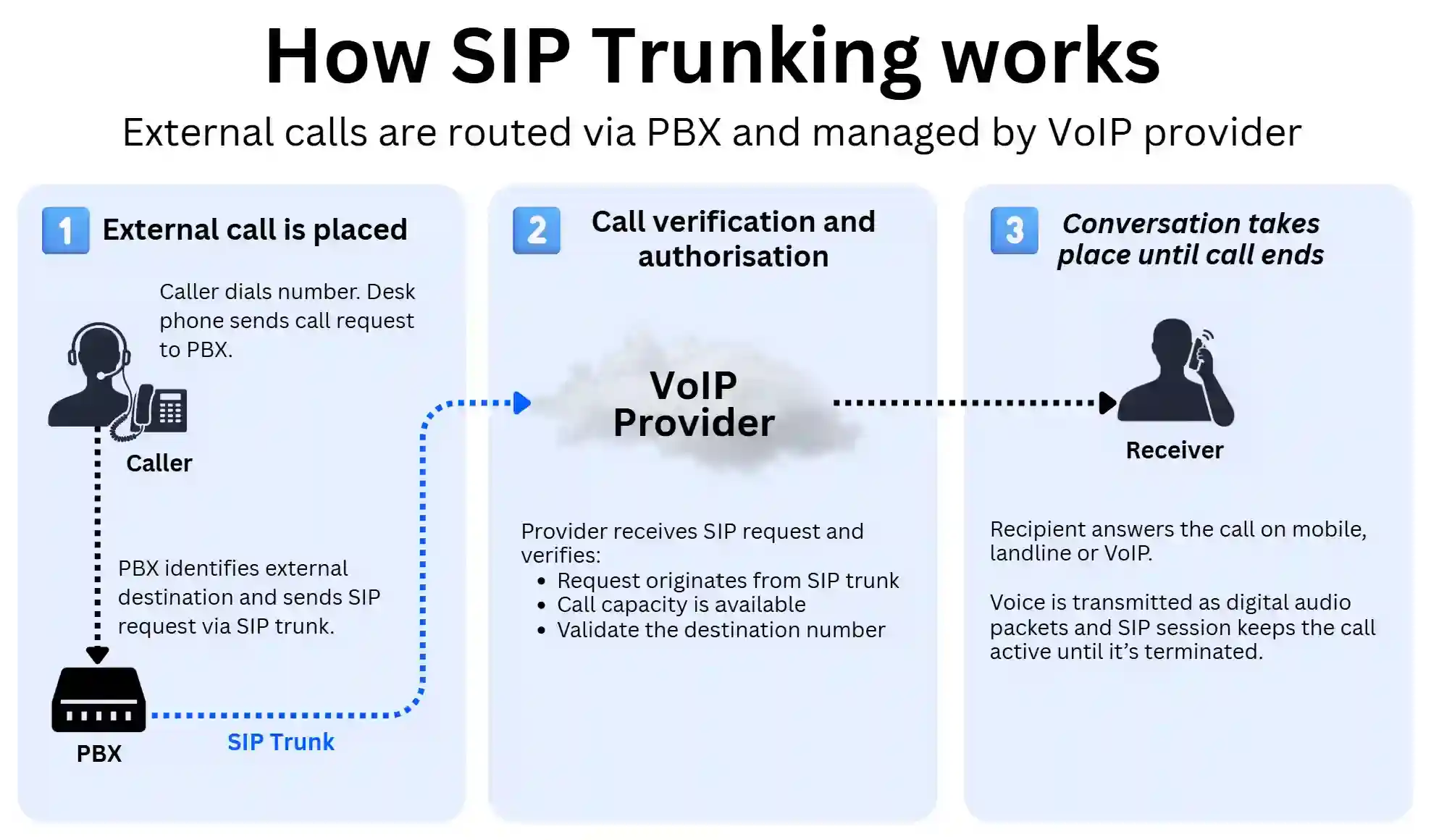
Below is how a SIP trunk call works, step-by-step, using the example of an employee placing an external call from a desk phone and later receiving a call back.
1. An employee makes a call
An employee dials a number using a desk phone connected to the business’s PBX (Private Branch Exchange), which is the on-site hardware and software that manages calls between internal extensions and external networks.
The phone signals the PBX to place a call. The PBX then determines whether the call is internal (between two employees) or external.
If the call is internal, the PBX connects the two extensions directly without involving the VoIP provider.
If the call is external, the PBX generates a SIP signalling request (known as a SIP INVITE) and sends it over the organisation’s dedicated connection to the VoIP provider, otherwise known as the SIP Trunk.
Note: Some older PBX hardware may not support SIP natively. In these cases, a VoIP gateway device may be required to convert traditional analogue or ISDN signals into IP-based voice data packets.
2. The VoIP provider verifies and routes the call
When the SIP request reaches the VoIP provider, their platform performs several checks before the call can proceed.
These checks typically include verifying that the request originates from an authorised SIP trunk connection, confirming that the business has available call capacity (the number of simultaneous call sessions included in the service), and validating that the destination number is reachable.
Once the request is approved, the provider routes the call to the appropriate destination network. This could be a UK landline network, a mobile operator, or another VoIP system, depending on the number being dialled.
In this process, the PBX continues to handle internal calls, while the VoIP provider manages the wider national and international connectivity.
3. The call connects and the conversation takes place
Once the call reaches the recipient and they answer, the call session is established and two-way voice communication begins.
The PBX converts the caller’s voice into digital audio using a voice codec, which compresses the audio into small data packets. These packets are transmitted across the SIP trunk as a real-time media stream using RTP (Real-time Transport Protocol) between the PBX and the VoIP provider’s network.
The provider then delivers the audio stream to the recipient’s network, allowing both parties to hear each other in real time.
Because voice is transmitted as small data packets over the internet, VoIP call quality is influenced by factors such as network latency, packet loss, and available bandwidth.
Throughout the call, the SIP signalling session remains active in the background to maintain and manage the connection.
When either party hangs up, the SIP session closes automatically, and the provider records the call details for billing, reporting, analytics or call recording services, depending on the service configuration.
Receiving a call via SIP trunking
Receiving calls through SIP trunking works in the same way, but in reverse.
When someone dials the organisation’s business number (such as a UK geographic number like 020 or a non-geographic number like 0800), the call first reaches the VoIP provider’s network.
The provider identifies which business the number is assigned to and sends a SIP signalling request over the existing SIP trunk connection to the organisation’s PBX.
Once the PBX receives the request, it routes the call internally according to the organisation’s call handling rules. This could involve directing the call to a specific employee extension, a hunt group, a call queue, or an automated system such as an IVR.
From the caller’s and employee’s perspective, the experience feels the same as a traditional landline call. The key difference is that the physical telephone trunk has been replaced by a broadband-based SIP connection that can support multiple simultaneous calls over a single internet link.
When to choose SIP trunking over cloud-hosted VoIP
Organisations operating older on-site, multi-line phone systems using a landline will need to switch to internet-based calls before 2027, as landlines will no longer be supported by Openreach.
There are two alternatives to transition: either implement a SIP trunk to continue using the existing system or switch to a full business VoIP phone system.
SIP trunking is the best alternative for:
- Businesses that have already invested heavily in an on-site PBX
- Organisations with stable office-based teams using desk phones
- Call centres that want to retain their current call handling infrastructure and workflows
- Multi-site businesses linking several PBX systems together
- IT-led organisations that prefer to manage their own telephony environment
- Businesses are not yet ready to move to a fully cloud-based phone system
- Businesses that want to avoid the cost of overhauling their system.
SIP trunking is usually not the preferred solution for hybrid/remote businesses who require the flexibility to place VoIP calls from anywhere, or those with heavy use of cloud applications which can be integrated with the VoIP system.
What’s the difference between SIP trunking and VoIP phone systems?
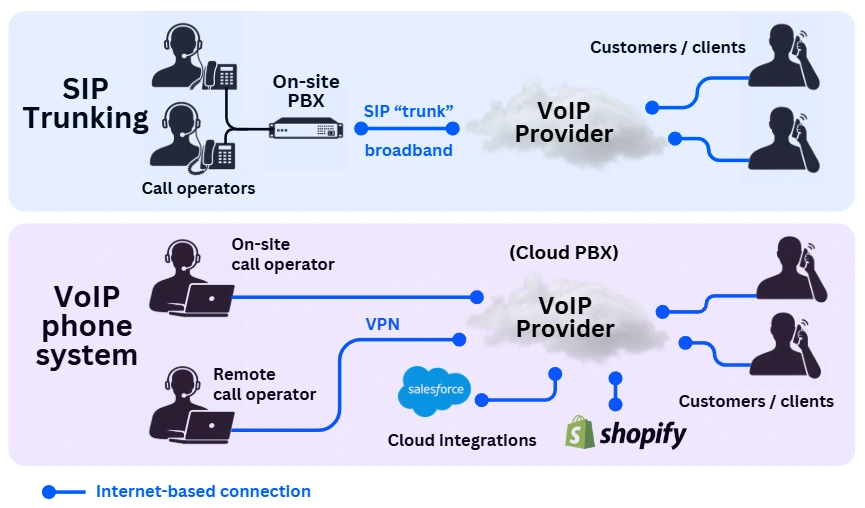
SIP trunking and VoIP phone systems both use internet-based calling, but they solve different problems:
- SIP trunking upgrades an on-site phone system by switching from traditional landlines to internet-based calls, while allowing the organisation to retain its existing PBX and internal setup.
- A hosted VoIP phone system replaces the existing phone system entirely with a cloud-based call management platform, softphone apps, and cloud integrations. The system is managed and hosted by a VoIP provider.
Here is a more detailed comparison:
| Component | SIP Trunking | Hosted VoIP Phone System |
|---|---|---|
| Architecture | Keeps the existing on-site PBX. Replaces the traditional landline connection with a broadband-based trunk. | Replaces the PBX entirely with a cloud-based call management platform. |
| Hardware | Existing desk phones and internal setup remain in place. | New IP desk phones and/or softphone apps on mobiles, tablets or laptops. |
| Use case | Ideal for organisations wanting to retain their current phone system while moving away from landlines. | Suited to businesses looking to modernise communications, support remote work, and integrate with cloud platforms. |
| Features | Supports simple features such as hunt groups, virtual assistants and call forwarding. Advanced integrations depend on the PBX. | Typically includes integrations, VoIP analytics, remote access, and AI-driven features. |
| Migration approach | Gradual transition away from landlines without full system replacement. | Full system overhaul and long-term modernisation. |
How to set up SIP trunking for businesses
A SIP trunk deployment typically takes a few days to a few weeks and involves coordination with a chosen business VoIP provider, particularly where number porting is required.
The process starts with an infrastructure assessment, followed by network preparation, provisioning and testing. The steps below outline the typical setup workflow.
Here is what the process looks like step-by-step:
1. Connectivity and system readiness assessment
Before a SIP trunk can be provisioned, the organisation’s existing infrastructure must be assessed for compatibility and stability.
This stage confirms whether the current phone system and data connection can reliably support internet-based calling.
Broadband stability
Because SIP trunking routes calls over a data connection, stability and low latency are critical.
Voice calls require relatively little bandwidth per line, but they are sensitive to packet loss, latency spikes and brief outages.
Business-grade connectivity is strongly recommended. In practice these types of connectivity are are most used by British businesses:
- Business leased line broadband is preferred for high call volumes or business-critical telephony.
- Full fibre business broadband is sufficient for many SMEs.
The focus at this stage is not on maximum speed but on consistency and reliability.
Static IP and authentication
Most UK SIP trunk deployments use IP-based authentication, which requires a static IP address.
If a static IP is not available, alternative authentication methods (such as SIP registration or dynamic DNS) may be used, depending on the provider.
This must be confirmed before provisioning begins.
PBX compatibility
The existing PBX must support SIP trunk connectivity.
Most systems installed after the mid-2000s include native SIP support. Older systems may require a SIP gateway to convert legacy signalling.
The assessment typically confirms:
- SIP trunk licensing availability
- Firmware version
- Maximum concurrent call capacity
If the system cannot support SIP and no upgrade path exists, replacement is required.
Call capacity planning
SIP trunks are provisioned based on the number of simultaneous calls required, not the number of desk phones.
As a rule of thumb, organisations typically size capacity based on:
- Peak concurrent usage
- Expected growth
- Seasonal or campaign-based spikes
Accurate sizing at this stage prevents under-provisioning or unnecessary costs.
2. Prepare the network for SIP traffic
Once connectivity and PBX readiness are confirmed, the local network must be configured to handle voice traffic reliably.
Because SIP calls share the same internet connection as other business applications, the network should prioritise voice traffic and restrict unnecessary external access.
This stage typically involves several basic configuration steps.
Quality of Service (QoS)
QoS allows network devices such as routers, switches or SD-WAN solutions to prioritise voice traffic over other data such as file downloads or video conferencing.
This helps prevent call quality issues such as jitter, latency spikes or dropped calls during periods of heavy network usage.
VLAN separation
Where supported, voice traffic may be placed on a dedicated VLAN.
Separating voice and general business data improves stability and simplifies traffic management on larger office networks.
Firewall configuration
The firewall must allow authorised SIP traffic between the PBX and the VoIP provider while blocking unauthorised requests.
This ensures the SIP trunk can communicate with the provider without exposing the system to unnecessary risk.
SIP ALG review
Many routers include a feature called SIP Application Layer Gateway (SIP ALG), designed to assist SIP traffic.
In practice, SIP ALG often interferes with modern SIP trunking and may need to be disabled depending on the network equipment and provider guidance.
Session Border Controllers (optional)
In larger or multi-site deployments, organisations may deploy a Session Border Controller (SBC).
An SBC acts as a specialised SIP firewall, helping protect against call fraud, manage signalling sessions and improve interoperability between systems.
3. Provision the SIP trunk
Once the network and PBX are ready, the VoIP provider can provision the SIP trunk and configure the connection between their network and the organisation’s PBX.
This stage establishes the internet-based link that replaces the traditional ISDN or PSTN landline trunk.
The provider will typically configure several core elements.
SIP trunk authentication
The provider configures how the PBX will authenticate with their network.
Most UK deployments use IP-based authentication, where the provider allows calls from a registered static IP address.
Some providers alternatively use SIP registration, where the PBX authenticates using credentials such as a username and password.
SIP channel allocation
SIP trunks support multiple simultaneous calls through channels.
Each channel represents one concurrent call, meaning the required number of channels depends on peak call activity rather than the total number of desk phones.
Capacity can usually be adjusted later as usage grows.
Number assignment and porting
Business phone numbers are either:
- Assigned by the new provider, or
- Ported from an existing telecom provider.
Number porting allows organisations to retain their existing geographic or non-geographic numbers while migrating away from legacy landline services.
Porting timelines can vary depending on the current provider and the number range.
Call routing configuration
Routing rules determine how inbound and outbound calls are handled.
The provider configures the destination for incoming calls and ensures outbound calls are correctly routed to the wider telephone network.
This ensures the PBX can reach external numbers via the SIP trunk.
4. Test the system and migrate call traffic
Once the SIP trunk has been provisioned, the connection is tested before production call traffic is moved from legacy landline circuits.
This stage confirms that calls can be made and received correctly through the new internet-based connection.
Testing typically includes:
- Call testing: Verifying outbound and inbound calls can be placed to and from external numbers.
- Caller ID verification: Ensuring the correct business number is presented to recipients.
- Call quality checks: Confirming stable audio without latency, jitter or dropped calls.
- Failover validation (if configured): Ensuring calls re-route correctly during connectivity interruptions.
Once testing is complete, inbound and outbound routing can be switched from the legacy landline circuits to the SIP trunk.
In some deployments, this happens gradually, with certain numbers or call routes migrated first before the full system is cut over.
SIP trunking security considerations
Although SIP trunking uses IP networks to carry calls, its security model differs from typical internet-based VoIP or cloud applications.
In most deployments, SIP trunks connect a business phone system directly to a provider’s managed network using a dedicated or restricted connection. This means call traffic usually travels through controlled carrier infrastructure rather than the open internet.
Because of this architecture, the primary security risks are usually related to PBX access control and local network configuration, rather than attacks on the SIP trunk itself.
In practice, most security incidents occur when phone systems are misconfigured or exposed to the wider internet.
These are the main security risks and protections organisations should be aware of:
Toll fraud
The most common SIP security risk is toll fraud, where attackers gain remote access to a phone system and place expensive outbound calls, usually to international premium-rate numbers.
These numbers are often controlled by fraud networks, allowing attackers to profit from the call charges.
In practice, attackers typically attempt this by remotely scanning the internet for exposed SIP endpoints or PBX login portals, then guessing credentials or exploiting weak authentication settings.
This risk mainly arises when a PBX allows unrestricted outbound calling or when administrative accounts are poorly secured.
Typical protections include:
- IP whitelisting: Restricts SIP traffic so that only calls originating from approved IP addresses can access the SIP trunk. This is commonly configured by the provider when the trunk is provisioned.
- SIP authentication: Requires the PBX to authenticate with the provider using credentials before calls are accepted. It is usually included in the trunk configuration.
- Firewall restrictions: Blocks unknown external systems from sending SIP traffic to the PBX. This is configured on the organisation’s router or firewall during deployment.
- Provider-level spending limits or network monitoring: Detects unusual call patterns and automatically blocks suspicious activity. Most reputable providers offer this protection by default.
- Strong identity security: Protects administrative access to the PBX using strong passwords, multi-factor authentication and conditional access policies where supported.
Network misconfiguration
A significant proportion of SIP security issues are caused by a misconfigured local network, rather than problems with the SIP trunk provider itself.
In most deployments, providers already restrict access to their infrastructure. The risk usually arises when the organisation’s firewall, router or PBX configuration accidentally exposes SIP services to the wider internet.
This can happen when SIP trunking is added to an existing network without a proper firewall review, or later when IT changes (such as router upgrades, new VPN access, or remote PBX management) alter the original security settings.
Typical protections include:
- Restricting SIP access to authorised IP ranges: Ensures only the VoIP provider’s infrastructure can communicate with the PBX over SIP.
- Firewall and port controls: Limits inbound SIP traffic to the provider’s networks and blocks unknown systems from initiating calls.
- SIP ALG review: Many routers enable SIP ALG by default, which can interfere with signalling or unintentionally expose SIP services. Engineers often turn it off in SIP deployments.
- Network monitoring and logging: Helps identify repeated connection attempts, failed registrations or abnormal call behaviour that may indicate scanning or misconfiguration.
Caller ID spoofing
Another potential risk is caller ID spoofing, in which attackers impersonate an organisation using their own phone systems.
This is possible because SIP signalling allows the caller identity field to be set by the originating system, meaning attackers can place calls from their own phones while displaying the organisation’s phone number.
This does not involve access to the organisation’s SIP trunk or PBX, but rather takes advantage of weaknesses in how caller identity is verified across telecom networks.
VoIP providers already implement various validation and authentication checks, but these protections are not completely foolproof.
For this reason, organisations should ensure staff and customers understand that sensitive requests (such as payment changes or password resets) should not rely solely on caller ID, helping reduce the risk of impersonation scams.
SIP trunking FAQs
Our business VoIP experts answer commonly asked questions regarding SIP trunking for UK organisations.
What is the difference between SIP trunking and PRI trunking?
PRI (Primary Rate Interface) trunking is a legacy telecom technology used to connect PBX phone systems to the public telephone network over dedicated digital circuits.
The main difference is that a PRI line typically supports 30 simultaneous call channels delivered over physical ISDN infrastructure, while SIP trunking has no physical channel limits because it uses broadband.
Because the UK’s PSTN and ISDN networks are being retired, SIP trunking has largely replaced PRI as the standard method for connecting on-premise phone systems.
How many SIP trunks or channels does a business need?
SIP trunk capacity is measured in channels, where each channel represents one simultaneous call.
The number required depends on the organisation’s peak concurrent call volume, not the total number of employees. Small offices may require only 5 concurrent channels to work 99.9% of the time, while large call centres may need to provision hundreds of channels to handle high call volumes.
Most providers allow channel capacity to be scaled easily, so businesses can increase or decrease capacity as call demand changes.
What equipment is needed for SIP trunking?
To implement SIP trunking, organisations need:
- A SIP-compatible PBX system
- Deskphones and internal wiring
- An internet connection with fast enough business broadband speed
- A router, firewall and VLAN-enabled switch
This is sufficient to implement a SIP trunk service from a VoIP provider, which can provide part of this equipment if needed.
Note that while most modern PBX systems support SIP natively, older PBX platforms require a VoIP gateway to convert traditional telephony signalling into SIP.
Does SIP trunking require a dedicated internet connection?
SIP trunking can operate over a standard business broadband connection, provided the network is stable and properly configured for voice traffic.
However, organisations with high call volumes or strict uptime requirements often deploy dedicated connections and implement traffic prioritisation using Quality of Service (QoS).
This ensures call quality remains stable even when other internet traffic is present on the network.
 Back to blog