Our use of cookies
Business firewall solutions: Protecting small and medium businesses
A firewall is a business’s first line of defence. It acts as a security checkpoint between your apps, devices and the wider internet, filtering traffic to stop hackers, malware and data theft.
This guide explains how each type of business firewall works, how to choose the right one, and how SMEs can deploy them effectively.
Content highlights:
- What is a business firewall?
- Types of firewalls for businesses
- How to choose the best business firewalls
- Best firewall solutions for small businesses
What is a business firewall?
A business firewall is a combination of technologies and rules that act as ‘traffic inspectors’ for apps, devices, cloud services and corporate networks.
They examine data traffic and enforce security rules to allow safe connections while blocking malicious activity, unauthorised access, or policy violations.
Businesses use multiple firewalls at once, each positioned at a strategic location.
Typically, a site will have one embedded in the router, one as a standalone physical device, and several delivered from the cloud to protect them against all kinds of cybersecurity threats.
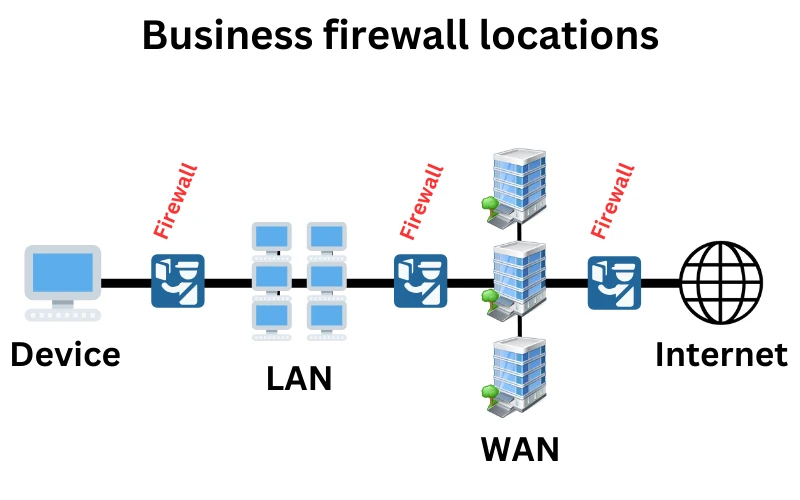
Some firewalls perform basic checks, such as filtering traffic by its source or destination. Others use advanced capabilities to inspect the content of data packets in real time to detect malware, phishing websites, and stop suspicious activity before it causes harm.
Firewalls continue to evolve to address new threats. The growth of remote work and cloud applications has driven increased adoption of cloud-delivered options such as Firewall-as-a-Service, alongside traditional on-site protection.
Key functions of business firewalls
Despite the growing variety of firewalls used by businesses, their core functions revolve around the same key principle: to inspect incoming and outgoing traffic to identify and block malicious or unauthorised activity.
Here are the core functions, and the types of firewalls that perform them:
Basic traffic monitoring
All firewalls.
All firewalls, whether hardware, software, or cloud-based, start by monitoring network activity. At a minimum, this includes observing source and destination IP addresses, ports, and protocols, building a baseline of who is communicating and how.
More advanced firewalls may also monitor application data, user identity, or encrypted sessions. The focus and depth of monitoring depend on the firewall type and its deployment context.
Access control
All firewalls
Firewalls enforce strict rules that determine which traffic is allowed or denied, based on factors such as IP address, port number, protocol, or URL. This prevents unauthorised users, devices, or applications from connecting to protected resources.
Logging and alerting
All firewalls.
Every traffic decision, whether allowed or blocked, can be logged for auditing and security investigations. Alerts can be triggered when suspicious events occur, enabling rapid response by security teams.
Deep Packet Inspection (DPI)
Modern, enterprise-grade firewalls.
Beyond basic traffic monitoring, more powerful firewalls can examine the actual data inside packets to identify malware, exploits, or prohibited content.
This process, known as deep packet inspection (DPI), allows more accurate detection of threats hidden within otherwise legitimate-looking traffic.
Stateful connection tracking
Stateful firewalls and Next Generation Firewalls (NGFW).
Rather than treating each packet in isolation, stateful firewalls keep track of ongoing sessions and only allow packets that match an established, legitimate connection. This prevents spoofed or out-of-context packets from slipping through.
Threat intelligence blocking
Modern, enterprise-grade firewalls
Modern firewalls that integrate with global threat intelligence feeds to instantly block static and dynamic IP addresses, domains, or URLs known to be associated with malware, phishing, or botnet activity. These lists update in real time to stop emerging threats.
Intrusion prevention
Modern, enterprise-grade firewalls.
Intrusion prevention actively scans traffic for known attack patterns, such as SQL injection, buffer overflow attempts, or exploitation of unpatched vulnerabilities, and block them before they reach the target application or server.
Deep Packet Inspection (DPI) is often used here to identify these threats even when they are hidden deep in complex data flows.
Rate limiting and DoS/DDoS protection
Cloud-delivered firewalls.
To defend against denial-of-service (DoS) and distributed denial-of-service (DDoS) attacks, firewalls can limit the number of requests an IP address can send in a given period.
While this rate limiting can block smaller DoS attempts, large-scale DDoS attacks often require cloud-based mitigation services to filter traffic before it reaches the firewall.
Geo-blocking
Cloud-delivered firewalls.
Using IP geolocation data, firewalls can block or allow traffic from specific countries or regions. This is often used to reduce attack surfaces or comply with data access restrictions.
Outbound traffic control
Enterprise and compliance-focused firewalls.
Most firewalls are designed to stop malicious inbound traffic, but many organisations also need to focus on outbound traffic control to address the opposite problem.
Outbound traffic control is key to preventing sensitive data leaks, blocking connections to known malicious destinations, and enforcing company internet usage policies. This is particularly important for stopping insider threats, malware “calling home”, or accidental data exposure.
Types of firewalls for businesses
Modern firewalls vary greatly in deployment, location and function, making categorisation tricky. Even security experts disagree on how to sort them.
To keep things clear, this section focuses on the types of firewalls most commonly used by UK businesses, presented in order of practical relevance, each outlining its main strengths and limitations.
Cloud Firewall (Firewall-as-a-Service / FWaaS)
A cloud firewall, also known as Firewall-as-a-Service (FWaaS), is any firewall delivered entirely from the cloud and operated by a third-party provider. It applies security policies remotely and consistently across all connected users and networks.
A FWaaS deployment is particularly suited to organisations that:
- It is necessary to protect remote workers, branch offices, or multiple business locations.
- Prefer to outsource firewall operation and maintenance.
- Want to centralise security management for devices, networks, and cloud applications.
All protected traffic is routed through the provider’s cloud infrastructure. Businesses choose the level of inspection and filtering features depending on their needs. These are applied before the traffic reaches the business network.
For example, a nationwide retailer could use FWaaS to secure traffic for all branch stores and remote staff, while retaining an on-premises firewall at headquarters to protect internal systems and apply site-specific controls.
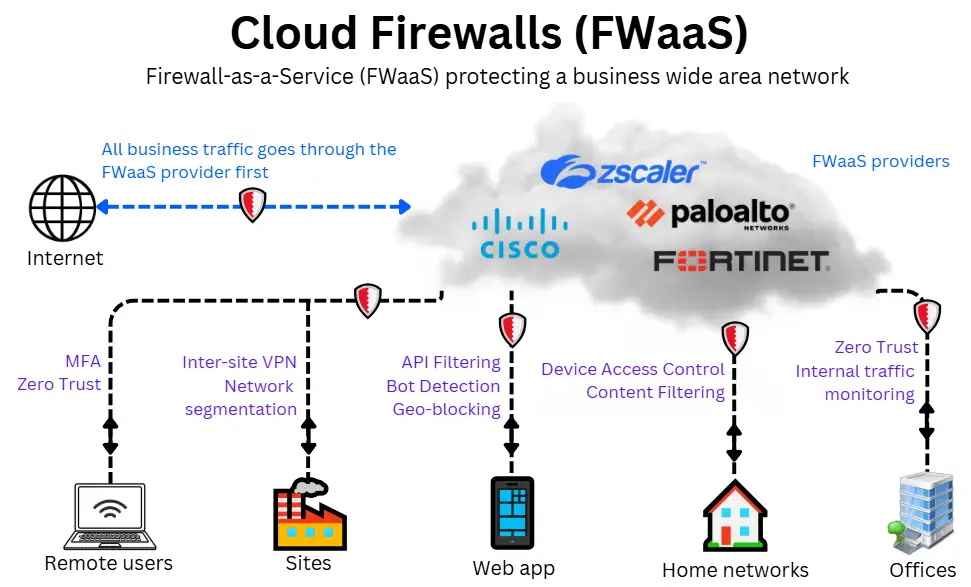
FWaaS has its own strengths and limitations to consider:
Advantages
- Centralised policy management across all locations and devices.
- Scalable, pay-as-you-go deployment model.
- Always updated against emerging threats.
- Service Level Agreements (SLAs) back performance and availability.
- Integrates with Secure Access Service Edge (SASE) for combined networking and security.
Disadvantages
- It may introduce latency on slower connections.
- Less customisable than many Next-Generation Firewalls (NGFWs).
- Requires trust in a third party for data handling and sovereignty.
- Potential migration complexity and risk of vendor lock-in.
Next-Generation Firewall (NGFW)
A next-generation firewall (NGFW) enhances traditional firewall functions with advanced features, including deep packet inspection (DPI), intrusion prevention systems (IPS), and application-aware controls.
This allows it to block sophisticated threats, including application-layer attacks and zero-day exploits.
NGFWs are usually hardware devices installed at the network perimeter (e.g. at headquarters or branch office) to inspect all incoming and outgoing traffic for that local area network.
They suit environments with dedicated IT teams, high-bandwidth connections (e.g. leased line broadband, dark fibre and Metro WAN), and a need for granular on-site security.
Operating locally means they can enforce policies with minimal latency, eliminating the need for a cloud connection.
For example, a university might deploy an NGFW at its main campus to protect internal systems, while using a cloud firewall to secure remote learning platforms.
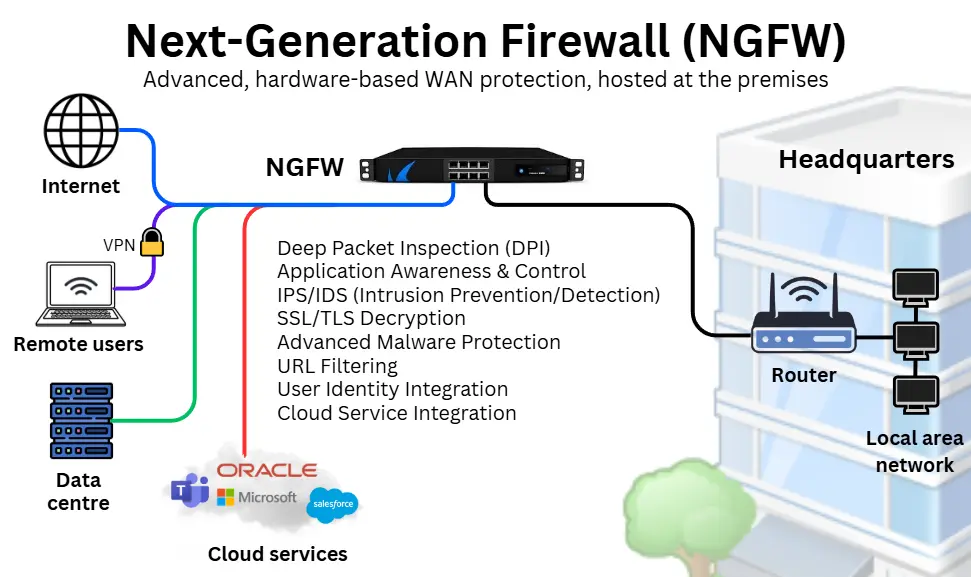
NGFWs also have their own pros and cons to consider:
Advantages
- Advanced threat detection through DPI, IPS, and application-layer control.
- Highly customisable to specific security requirements.
- Real-time on-site data inspection with minimal latency.
- Reduces reliance on external providers by operating locally.
- Can manage both on-site and hybrid environments.
Disadvantages
- High upfront costs for hardware and software.
- Requires in-house IT resources for maintenance and updates.
- Limited scalability for growing or distributed businesses.
- Prone to misconfigurations without proper management.
- Updates are slower than those provided by FWaaS, as they rely on in-house teams.
Web Application Firewall (WAF)
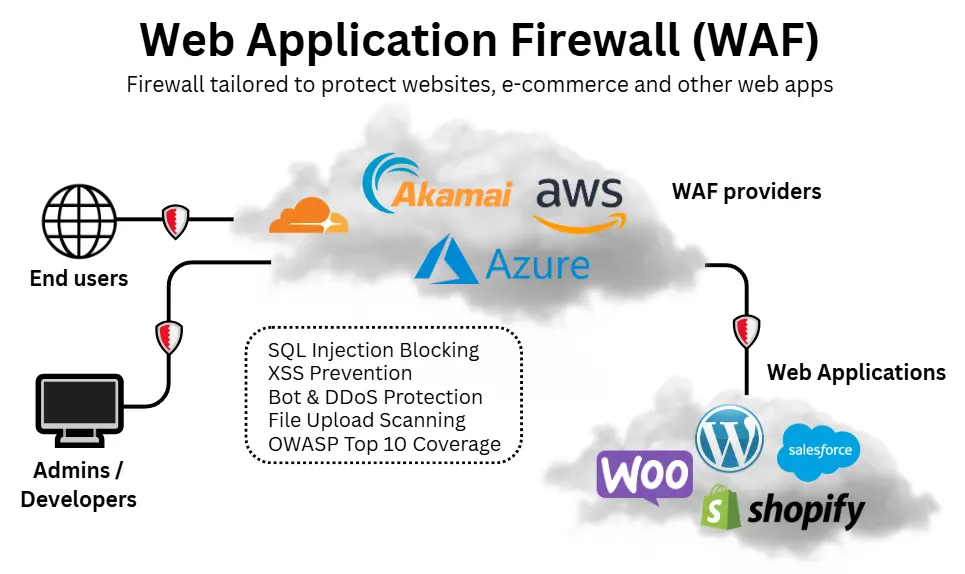
A web application firewall (WAF) is designed specifically to protect websites and web applications by filtering and monitoring HTTP/HTTPS traffic.
Unlike NGFWs, which protect entire networks, WAFs focus on the application layer, blocking threats such as SQL injection, cross-site scripting (XSS), and malicious file uploads.
WAFs are usually delivered as cloud-based services but can also be deployed as hardware or software.
They are particularly suited to organisations that operate customer-facing websites, e-commerce platforms, or online portals where application security is critical.
Because they sit between the user and the web server, WAFs inspect and filter traffic before it reaches the application.
For example, an online retailer could use a WAF to protect its e-commerce site from automated bot attacks, while relying on an NGFW to secure its internal corporate network.
💡 See our guide on business web hosting if your business is planning to launch a website or web app.
Advantages
- Protects against application-layer attacks.
- It can be deployed quickly as a cloud service from an intuitive interface.
- Blocks malicious bots and prevents data breaches.
- Often includes DDoS mitigation features.
Disadvantages
- Limited protection for non-web-based traffic.
- It can require fine-tuning to avoid blocking legitimate requests.
- Cloud WAFs may add latency for some users.
- Relies on regular rule updates to stay effective.
Proxy firewall
A proxy firewall sits between a business network and the internet, acting as a proxy or dummy for online requests. Instead of devices connecting directly to a website or service, the proxy firewall connects first, checks the data for threats, and only passes on safe content.
It works as an add-on to existing firewalls, adding an extra layer of protection at the application level, hiding internal network details and filtering potentially harmful content before it reaches users.
Proxy firewalls can run as software on a server or be delivered as a standalone or bundled cloud service, and they’re usually positioned at the edge of a business network.
For example, a company might use a next-generation firewall (NGFW) to protect the overall network, while adding a proxy firewall to thoroughly inspect traffic for a specific business application before it reaches staff devices.

Advantages
- Hides internal network details from outsiders.
- Filters and inspects content before it reaches devices.
- Allows control over what online services can be accessed.
Disadvantages
- It can slow down traffic due to extra processing.
- It may be difficult to configure for high-traffic environments.
- Limited support for some non-web traffic types.
Other firewalls
The following firewalls remain important and widely used by both SMEs and enterprises, yet are less talked about:
Software firewalls
Installed on individual devices (e.g. user devices like laptops and tablets, on-site servers and data centre servers), these act as an additional checkpoint within the network to block insider threats or malware.
Examples include Windows Defender Firewall, pfSense, and AWS Security Groups.
Router-integrated firewalls
Built into many small business broadband routers, these provide basic perimeter protection by blocking unauthorised traffic. Ideal for small offices, shops, and cafes, this setup is simple.
UTM firewalls (Unified Threat Management)
All-in-one devices combining firewall protection with antivirus solutions for business, intrusion prevention, VPN, and web filtering. Popular with SMEs seeking a single, easy-to-manage security solution.
Host-based cloud firewalls
Firewalls provided by cloud platforms protect virtual servers and services. Common in SMEs hosting applications or data in AWS, Azure, or Google Cloud.
How to set up a firewall for a small business
Firewalls are an integral part of network design and implementation, even for small businesses.
Even without an in-house IT team, a network service provider (including some business broadband providers) can effectively make sure firewalls are appropriately configured and managed for your specific context.
Here is an overview of setting up a firewall:
1. Network design
Experts will ideate your network and create a diagram that shows all devices and connections, including firewalls, routers, network switches, business VoIP phone systems, and other hardware and software components.
They will also implement additional security measures, including guest WiFi, VLANs, and broadband redundancy, to ensure 100% connectivity even in the event of a successful cyberattack.
2. Deploy the firewalls
The firewalls will be implemented according to your network setup. The deployment depends on the type of firewall being implemented:
- Cloud-based FWaaS require signing up with a provider, configuring devices and setting security policies.
- Hardware Next-Gen Firewalls (NGFWs) require physical installation of the hardware at your network’s perimeter and configuration of the rules.
- Web App Firewalls (WAF) are usually cloud-delivered and integrated with features such as website hosting interfaces.
- Software firewalls need to be installed on individual devices,
- Basic router firewalls are enabled and customised by your broadband provider or on the business broadband router admin interface.
3. Test, monitor, and maintain
All firewalls must be regularly tested to ensure they are working as expected. They can be a recurring IT issue in businesses because they can sometimes be over-secure and reduce necessary access to online resources.
IT teams (or firewall providers) must regularly review logs, update software, and adapt rules as the business evolves.
How to choose the best business firewalls
Selecting the right type of firewall depends on your business needs, network complexity, and security goals. Here are key factors to consider:
Network size and distribution
Assess the size of your network and whether it spans multiple locations. NGFWs are ideal for centralised, on-premises networks, while FWaaS offers cloud-based security for distributed or remote teams.
Management and expertise
Evaluate your resources and expertise. NGFWs and software firewalls require in-house management and expertise, whereas FWaaS and managed router firewalls can offload this burden to third-party providers.
Scalability requirements
Understand your scalability needs. If your network is growing rapidly, FWaaS offers flexible, pay-as-you-go pricing and seamless scaling, while NGFWs might need significant hardware upgrades.
Level of protection
Consider the level of threat protection you need. NGFWs provide deep packet inspection and advanced threat prevention for high-security environments, while software and router firewalls are suitable for basic or complementary protection.
You can ensure comprehensive and cost-effective protection by aligning your firewall choice with your infrastructure and security priorities.
Business firewalls compared
See the table below to compare firewalls head-to-head and choose the most appropriate for your needs:
| Firewall Solution | FWaaS (Firewall-as-a-Service) | NGFW (Next-Generation Firewall) | WAF (Web Application Firewall) | Proxy Firewall |
|---|---|---|---|---|
| Best for | Remote-first, multi-site, or cloud-native businesses | Offices, campuses, and high-security on-site environments | E-commerce, SaaS, and businesses with public-facing websites/apps | Businesses needing strong content filtering and outbound traffic control |
| Deployment | Cloud-based, no hardware | On-premises hardware or virtual appliance | Cloud-based or integrated with hosting | Cloud-based or local server proxy |
| Scope of Protection | Whole organisation, regardless of location | Local networks and VPN-connected users | Web traffic only (HTTP/HTTPS) | Application-level inspection, hides internal network |
| Security Features | Advanced: DPI, Zero Trust, threat intelligence, user behaviour analytics | DPI, IPS, malware blocking, application-level controls | Protects against XSS, SQL injection, bot attacks, DDoS mitigation | Filters and controls web requests, inspects content, hides IP addresses |
| Management | Managed via provider cloud platform | Managed by internal IT or MSP | Managed via provider interface or web host | Requires setup and tuning by IT or MSP |
| Scalability | Highly scalable, adds new users/sites easily | Scalable, but hardware-dependent | Scalable via cloud deployment | Moderate scalability |
| Cost | Subscription-based (flexible) | Upfront cost + ongoing maintenance | Subscription-based or bundled | Low to moderate, varies by setup |
Best firewall solutions for small businesses
Small businesses need firewalls that are effective, affordable, and manageable without a large IT team.
The best choice often depends on whether you want hardware appliances, virtualised solutions, or cloud-delivered services. Here are some strong options across different budgets and deployment styles:
SonicWall
Known for affordable, all-in-one firewalls that don’t compromise on enterprise features.
What’s offered
Primarily Next-Generation Firewalls (NGFWs) and UTM (Unified Threat Management) appliances, combining intrusion prevention, anti-malware, content filtering, and VPN in one device.
Why it’s good for SMEs
Strong value for money, straightforward to manage, and available in both hardware and virtual formats. Ideal for those who want a physical appliance in their office but still require enterprise-grade features.
Best fit
Small businesses that prefer an on-premises UTM/NGFW solution without the ongoing subscription costs of FWaaS.
Fortinet (FortiGate)
High-performance firewalls that balance advanced protection with excellent speed.
What’s offered
NGFWs with integrated VPN, IPS, web filtering, and sandboxing. Fortinet also provides cloud-delivered security services and FortiWeb (WAF) for web app protection.
Why it’s good for SMEs
Delivers fast yet comprehensive security, scaling down effectively for smaller businesses while retaining enterprise-grade functions.
Best fit
Companies that require a multi-function NGFW/UTM appliance and may also need web application firewalling or a business SD-WAN solution in the future.
pfSense
A flexible, low-cost open-source option for technically confident SMEs.
What’s offered
An open-source NGFW/UTM platform that runs on standard hardware or as a virtual appliance. Provides VPN, IDS/IPS, network load balancing, and optional add-ons.
Why it’s good for SMEs
Exceptionally affordable compared with commercial solutions and highly customisable, but requires in-house technical expertise.
Best fit
Tech-savvy businesses are seeking a bespoke NGFW/UTM that can be tailored to their needs without incurring licensing costs.
Zscaler
A cloud-first firewall service built for remote and distributed workforces.
What’s offered
Firewall-as-a-Service (FWaaS) and secure web gateway (SWG) from the cloud. Includes proxy firewall features, SSL inspection, DNS filtering, and CASB integration.
Why it’s good for SMEs
No hardware to manage, always up to date, and ideal for companies with staff working remotely or across multiple sites.
Best fit
Businesses seeking cloud-delivered FWaaS/proxy protection with centralised security and automatic updates.
Cisco Meraki MX
User-friendly, cloud-managed appliances that unify networking and security.
What’s offered
Cloud-managed NGFW/UTM appliances, integrating routing, VPN, intrusion prevention, and content filtering. They’re also a business SD-WAN provider. Connects neatly with other Cisco Meraki cloud services.
Why it’s good for SMEs
Extremely easy to deploy and manage through the Meraki cloud dashboard, with minimal IT overhead.
Best fit
Small businesses want all-in-one security and networking appliances that can be centrally managed from the cloud.
Firewalls as part of your cybersecurity strategy
Firewalls are the foundation of any business’s cybersecurity, but are not a silver bullet. To address all threats, businesses must pair firewalls with complementary solutions.
Examples (to name a few) include segmentation, robust employee training and frequent updates to both software and hardware to mitigate risks effectively.
This section covers how it all ties in:
Firewall as a network perimeter defence
Firewalls are to networks what fortified walls with border checkpoints or mobile defence units are to a military defence strategy:
- Perimeter defence: Just as military walls keep enemies out, firewalls block unauthorised traffic and malicious actors from entering the network.
- Inspection points: Like checkpoints that inspect incoming goods or people, firewalls scrutinise data packets, ensuring only legitimate traffic passes through.
- Adaptive defences: Advanced firewalls are akin to intelligent surveillance systems that adapt to evolving threats, such as monitoring activity patterns and responding in real-time.
Threats that firewalls protect against
Advanced firewalls protect against various threats by controlling and inspecting traffic. These include:
- Malware and viruses: Blocking malicious payloads through inspecting incoming traffic.
- Unauthorised Access: Preventing attackers from infiltrating the network.
- Vulnerabilities: Identifying and blocking attempts to exploit software vulnerabilities or weak configurations.
- Phishing and fraudulent sites: Filtering URLs and detecting malicious domains to protect against phishing attacks.
- DDoS Attacks: Mitigating distributed denial-of-service (DDoS) attacks by identifying and throttling suspicious traffic.
- Application-Layer Attacks: Inspecting application traffic to block attacks targeting web services, APIs, or email systems.
Threats firewalls don’t protect against
Firewalls have limitations. They cannot protect you from malicious insiders or social manipulation of your employees. Threats that firewalls alone cannot handle include:
- Insider threats: Employees or contractors misusing their access or leaking sensitive data.
- Phishing: Phishing or scams that trick employees into sharing credentials or sensitive information.
- Zero-day exploits: Advanced attacks exploiting unknown vulnerabilities (unless the firewall integrates with real-time threat intelligence).
- Post-breach activity: Internal network monitoring and response systems are needed once an attacker has bypassed the firewall.
Best practices for firewall management
To maximise the effectiveness of all types of firewalls, follow these general best practices:
- Keep firmware and software updated to protect against the latest vulnerabilities.
- Conduct routine audits of firewall rules, configurations, and logs to identify gaps or misconfigurations.
- Apply strong access controls by limiting access to settings and monitoring user activity for suspicious changes.
- Ensure proper configuration to avoid open ports or unnecessary permissions.
- Use firewalls together strategically, such as router firewalls for basic filtering and NGFW or FWaaS for advanced threat detection.
Firewalls for businesses – FAQs
Our business broadband experts answer commonly asked questions on firewalls in UK businesses.
What is application layer filtering?
Application-layer filtering inspects data packets at the application level, allowing firewalls to block specific types of traffic or threats based on their content, not just their source or destination.
Can a firewall prevent ransomware?
While firewalls can block suspicious traffic, they are not a standalone solution against ransomware. Combining them with staff training to prevent phishing, antivirus software to detect device malware, and regular data backups provides significantly stronger protection.
What is NAT?
NAT (Network Address Translation) is a service provided by advanced firewalls that lets multiple devices within your network share a single public static IP address to communicate with the Internet.
It translates each device’s private IP address into the common public address, keeping internal network details hidden from the outside world, including malicious actors.
How much traffic can my router’s firewall secure?
Firewalls built into standard routers are basic but sufficient to secure the traffic volumes of typical broadband connections, including full fibre business broadband and part-fibre, part-fibre optic business broadband.
Providers provide business routers with firewalls that are designed to match the performance of the connection. SoGEA broadband and business satellite broadband connections are typically secured solely by the router’s firewall.
However, for securing web apps, access to cloud services, and multi-site setups, there will be a need for additional firewalls.
Compare business broadband deals with the best firewall protection today.
 Back to blog