Our use of cookies
Privileged Access Management (PAM): Securing high-risk environments
Privileged Access Management (PAM) is a cybersecurity control that specifically protects accounts with elevated access to critical systems.
It prevents attackers from gaining unauthorised access that could cause severe damage, from sabotaging key infrastructure to stealing sensitive information.
This guide explains what PAM is, why privileged access presents significant security risks, and how PAM platforms help protect organisations from compromise.
Contents:
- What is Privileged Access Management (PAM)?
- Why privileged access is a major cybersecurity risk
- How does PAM work?
- PAM and compliance requirements
What is Privileged Access Management (PAM)?
Privileged Access Management (PAM) is a security control layer specifically for accounts that have elevated access to critical systems.
It applies to high-risk human identities, such as system administrators, root users, and database administrators, as well as non-human identities, such as integrations, APIs, automation systems, and AI agents, that operate within sensitive environments.
PAM applies additional security controls to reduce the likelihood of compromise and limit the potential impact if one occurs. These include:
- Additional authentication: To prevent unauthorised access if credentials are compromised.
- Access time limits: To prevent persistent privileged access that could be exploited later.
- Action restrictions: To ensure only planned admin tasks take place.
- Active monitoring: To surveil admin actions during high-risk access.
- Command logging: To support forensic investigations and cybersecurity compliance.
PAM operates as a specialised tool within an organisation’s broader identity security architecture, working in parallel with other access controls such as role-based access control (RBAC) and attribute-based access control (ABAC).
Why privileged access is a major cybersecurity risk
Privileged accounts are a primary target for attackers because they allow changes to the core systems that control an organisation’s IT environment. This level of authority can make a single compromised account extremely powerful.
Once inside, five main attack vectors expose the principal risks:
- Privilege escalation and identity control: Administrative accounts can create new users, assign permissions, or modify existing identities within the identity platform. An attacker who gains access to these privileges can grant themselves additional permissions or create hidden administrator accounts.
- Credential theft and secret exposure: Privileged accounts may access configuration files, credential stores, service accounts, or system memory that stores authentication secrets. Attackers can use these to rapidly expand their access to other systems.
- Disabling or bypassing security controls: Administrative privileges can allow changes to security settings such as logging, network monitoring systems, or firewall rules. Attackers can weaken these protections to avoid detection for longer while carrying out malicious activity.
- Lateral movement across infrastructure: Some privileged accounts are trusted across multiple environments (servers, local and wide-area networks, and cloud platforms), increasing their attack surface.
- Persistence within the environment: With powerful administrative access, attackers can use various mechanisms, often hard to trace, to retain persistent access. Examples include creating hidden system identities, scheduling tasks, or setting up obfuscated services or startup processes.
How does PAM work?
PAM controls the full lifecycle of privileged identities, from identifying their accounts to monitoring how those permissions are used and ensuring they are removed when no longer required.
Here is how PAM works, step-by-step:
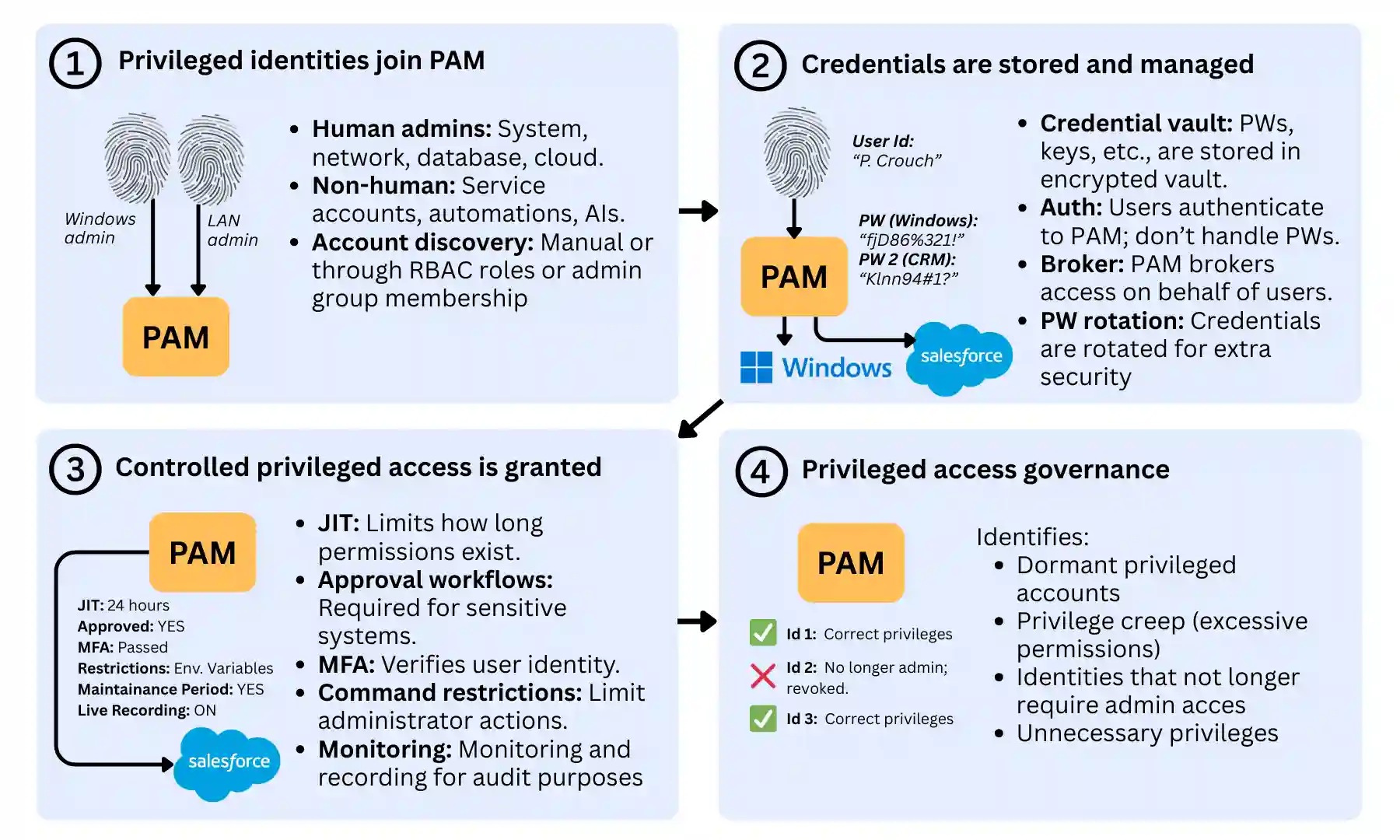
1. Privileged identities join PAM
When a new admin user or system integration requires high-risk access to critical systems, it must first be integrated into the organisation’s PAM platform.
This includes human administrators and network engineers, as well as automation, AIs, and non-human service accounts that require root access.
These collective identities can be integrated in different ways, often as part of a structured Joiner-Mover-Leaver process, depending on the organisation’s IT environment:
- Manually: In small organisations or teams, integrating an identity into PAM is often done via the identity platform’s dashboard.
- Automatically: Dedicated PAM platforms can identify privileged identities by scanning systems and directories for elevated access. These may include identities assigned to high-privilege roles in IAM systems with RBAC, membership in administrative directory groups, or system-level accounts, such as root or service accounts, in operating systems and applications.
2. Credentials are stored and managed
Once privilege identities are set up, their access credentials need to be managed securely.
Privileged identities on a PAM system do not directly control their credentials (e.g., passwords, keys, tokens, certificates).
Instead, the PAM platform acts as a centralised credential vault, securely storing credentials required to access critical systems, much like a secure password manager.
When access to a system is requested, the user authenticates to the PAM platform, typically via a secure multi-factor authentication process.
The PAM system then retrieves the required credential from the vault and brokers access on the user’s behalf, allowing access without exposing the credential to the user.
Many PAM platforms also automatically rotate privileged passwords after use, further reducing the risk of credential theft or reuse.
The key protection derived from this secure credentials vault includes:
- Preventing privileged passwords from being shared between administrators
- Reducing the risk of credentials being stolen or reused
- Enabling automatic password rotation and lifecycle control
- Centralising management of sensitive system credentials
3. Controlled privileged access is granted
PAM also introduces several high-security controls that make each session significantly more secure than a regular user’s. These include:
- Just-in-Time (JIT) access: Permissions can be granted for a limited period when required. Once the time window expires, access is automatically revoked, ensuring it is not accidentally left active.
- Approval workflows: Access to highly sensitive systems may require approval from a manager or security team before a privileged session can begin, ensuring the identity accessing the system is legitimate. This is usually only applied to the most critical systems.
- Multi-factor authentication (MFA): Before accessing privileged systems, users may be required to complete additional authentication steps to verify their identity, in addition to the MFA already used to access PAM.
- Command or activity restrictions: Some PAM systems can restrict specific commands or administrative actions during a privileged session, thereby severely limiting an attacker’s scope.
- Session monitoring and recording: Privileged sessions can be monitored in real time and recorded, allowing security teams to audit or investigate administrator activity. This can include logging all commands executed for forensic or compliance purposes.
4. Privileged access governance
In the long term, PAM systems also support the ongoing governance of privileged identities and permissions.
This includes reminders and tools to undertake access reviews or internal audits to ensure that elevated access remains appropriate over time.
Typical issues that arise during this governance process include:
- Dormant privileged accounts that are no longer actively used
- Excessive permissions that have accumulated over time (privilege creep)
- Identities that no longer require administrative access
- Service or automation accounts with unnecessary privileges
PAM and compliance requirements
Many cybersecurity frameworks require organisations to apply stronger protections to privileged accounts. PAM helps meet these expectations by securing administrative credentials, limiting when elevated access can be used, and monitoring privileged activity.
Here are the main regulations and standards PAM supports, and how:
- ISO 27001: Requires organisations to control and monitor privileged access tightly. PAM supports this by enforcing least-privilege access, protecting administrative credentials in secure vaults, and monitoring privileged sessions.
- Cyber Essentials: Requires organisations to restrict the use of administrative accounts and minimise unnecessary privileges. PAM helps achieve this by limiting when privileged access can be used and ensuring administrative activity is controlled and monitored.
- GDPR Article 32: Requires appropriate technical measures to prevent unauthorised access to personal data. PAM helps protect sensitive systems by securing administrative credentials and ensuring privileged access is authenticated, controlled, and logged.
- NIS2 Directive: Requires organisations operating critical infrastructure to implement strong identity and access security controls. PAM helps protect critical systems by limiting administrative access and providing monitoring and auditing of privileged activity.
- SOC 2: Requires organisations to demonstrate strong internal controls around system access and security monitoring. PAM supports these requirements by controlling privileged access and maintaining detailed audit records of administrative actions.
- PCI DSS: Requires strict management of administrative access to systems handling payment data. PAM helps meet these requirements by protecting privileged credentials and monitoring administrative sessions that interact with payment infrastructure.
Privileged Access Management (PAM) FAQs
Our business identity security experts answer commonly asked questions about Privileged Access Management (PAM) in businesses:
How are PAM controls implemented in practice?
PAM controls are implemented differently depending on organisational size and complexity.
Smaller businesses or SaaS-led organisations manage privileged access through identity platforms such as Microsoft Entra ID or Google Cloud Identity, through features like temporary role activation and approval workflows.
Larger organisations, or those operating in regulated or high-risk environments, typically deploy dedicated PAM platforms such as CyberArk, Delinea, or BeyondTrust, which provide more advanced controls such as credential vaulting and session monitoring.
Is PAM only for large enterprises?
No. Any business, regardless of size, can benefit from controlling administrative access. Any organisation that relies on cloud platforms, servers, or business applications can reduce risk by protecting privileged accounts, even if this is not yet common practice among competitors.
Does PAM replace multi-factor authentication (MFA)?
No. MFA is an authentication control, while PAM is an access governance and control layer. PAM typically integrates MFA into its workflows rather than replacing it. MFA may be used to verify a user’s identity when logging in to their account, when accessing the PAM platform, or as an additional authentication step before granting privileged access.
Is PAM required for cloud environments?
Not always. Cloud platforms such as Amazon Web Services, Microsoft Azure, and Google Cloud Platform already include strong identity and access controls for administrative roles.
These platforms can secure privileged access using built-in features such as multi-factor authentication, conditional access policies, and temporary role activation through identity platforms like Microsoft Entra ID or Okta.
However, dedicated PAM platforms may still be used in larger or regulated organisations to add deeper protections.
How does PAM support Zero Trust?
Zero Trust security relies heavily on identity-based security rather than traditional perimeter-based access. PAM supports this model by enforcing least-privilege access, limiting the duration of administrative permissions, and monitoring privileged activity during high-risk sessions.
How does PAM help protect against ransomware?
Attackers attempting to spread ransomware across a system will often seek to gain administrative privileges to maximise damage. PAM reduces this risk by restricting privileged access, protecting administrative credentials, and monitoring high-risk activity.
How does PAM limit the blast radius of ransomware attacks?
If attackers compromise an account, PAM helps limit the damage by preventing the permanent acquisition of administrative privileges and restricting how widely privileged access can be used. This reduces attackers’ ability to deploy ransomware across multiple systems or further escalate privileges.
 Back to blog