 Our use of cookies
What is packet loss, and how to fix it
Packet loss measures data loss across a targeted segment of a network, with high rates manifesting as dropped calls, lowered video quality, and sluggish downloads.
This guide explains what packet loss is, where and how it occurs, why it needs to be measured, and how to diagnose and minimise it.
Contents:
- What is packet loss?
- Why does packet loss matter for business networks?
- Where does packet loss occur in business networks?
- How business applications deal with packet loss
- Tools to test packet loss
- How to measure packet loss across the network
What is packet loss?
Packet loss quantifies the failure of data packets to reach their destination, expressed as the percentage of IP packets that are lost over a given interval (e.g., 1% of packets lost over a 10-second window).
It arises during data transport, mainly due to congestion at routers, switches, and firewalls, but also due to wireless interference, physical faults, and provider issues.
Packet loss is one of the four core metrics of network quality, alongside latency, jitter, and throughput, and is regularly used in network monitoring.
Why does packet loss matter for business networks?
High packet loss slows business-critical applications, frustrates employees, and damages customer experience. Tolerance varies significantly by application type:
| Application | Data loss tolerance | Effect when exceeded |
|---|---|---|
| Real-time voice and video | <1% | Dropped audio, frozen video, and robotic voices across business VoIP phone systems, Microsoft Teams, Zoom, and Google Meet. Rates above 3% render calls unusable. |
| Virtual desktops and remote access | <1% | Perceptible input lag, screen tearing, and intermittent disconnects on Citrix, VMware Horizon, and Windows Remote Desktop sessions. |
| VPNs | <1-2% | Amplified degradation across every application running over IPsec or TLS-based tunnels, compounded by retransmission and re-keying overhead. |
| Business cloud applications | <2% | Slow page loads, persistent save indicators, and timeouts that erode productivity on Salesforce, Microsoft 365, Google Workspace, and similar platforms. |
| Web browsing | <2-3% | Slower page loads over HTTP/2 and HTTP/3, with greater impact on pages carrying many third-party resources. |
| File transfers and backups | <2-3% | Throughput collapses well before transfers fail; business data backups, cloud storage uploads, and data replication windows extending from one hour to several. |
Where does packet loss occur in business networks?
Perfect, lossless transmission does not exist. Congestion, wireless interference, hardware faults, and overloaded devices all introduce varying degrees of data loss.
The main sources of packet loss across business networks are set out below.
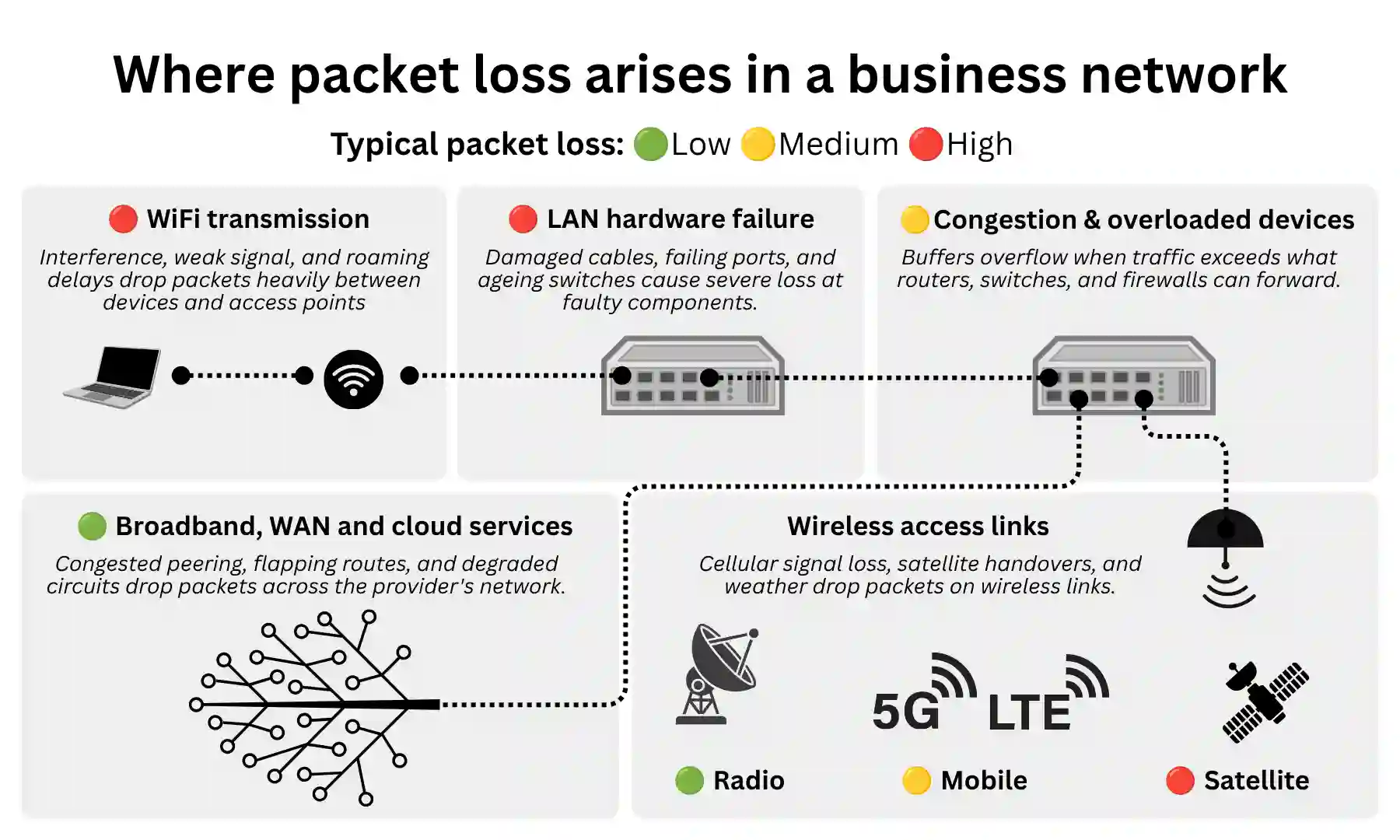
WiFi transmission
WiFi is the most common source of user-reported packet loss in offices. Signal attenuation, co-channel interference, noise from Bluetooth peripherals, client contention, and roaming delays between access points all degrade performance, producing intermittent, location-dependent symptoms.
WiFi packet loss can be minimised through:
- Access point (AP) selection and placement: Use APs supporting the required generation (WiFi 6, 6E, or WiFi 7 for high-density environments), position for even coverage, and use non-overlapping channels on 5GHz or 6GHz where possible.
- Backbone and power: Use network switches with sufficient aggregate bandwidth, and PoE switches to power APs at their optimal location.
- Wired connections: Use Ethernet for desk phones and conference systems.
Network congestion
Congestion is the most common cause of predictable, time-of-day packet loss. It occurs at routers, switches, and firewalls when more traffic arrives than the device can forward, causing queues to overflow.
The upload link of a business broadband router and the firewall are the usual pinch points, with backups, all-hands calls, and large file syncs the most common triggers.
It can be minimised by:
- Traffic prioritisation: Apply QoS (Quality of Service) policies to protect voice and video traffic under load.
- Load scheduling and shaping: Move bulk traffic outside working hours and shape non-critical traffic to leave headroom for business-critical applications.
- Capacity and redundancy: Upgrade to business leased line broadband with high upload bandwidth, or split traffic across multiple links with SD-WAN solutions for load balancing and failover.
Overloaded edge devices
Firewalls and routers have throughput ratings that assume basic forwarding. Once deep packet inspection, TLS decryption, or VPN termination are enabled, real throughput drops sharply, and CPU exhaustion causes packets to drop site-wide.
Edge device packet loss can be minimised through:
- Monitoring and inspection tuning: Track CPU, memory, and session-table utilisation, and trim inspection rules or exclude trusted high-volume traffic where the device is the bottleneck.
- Offloading specialist functions: Move heavy workloads to dedicated appliances such as SD-WAN and WAN optimisation.
- Right-sizing the hardware: Specify based on real throughput with all features enabled, not headline figures, and refresh as traffic volumes grow.
Mobile, radio and satellite transmission
Wireless internet services produce packet loss at varying ranges depending on the technology:
- Wireless leased lines: Often sold with strict SLAs (under 0.1% data loss guarantees) and can perform comparably to fibre when correctly engineered, but actual packet loss targets vary by provider, radio design and operating conditions.
- 4G and 5G: Around 0.5% with good signal, rising to several percent indoors, at cell edges, or during peak congestion.
- Business satellite broadband: Starlink sits at roughly 1-2% from frequent satellite handovers, with weather and obstructions causing packet loss.
Wireless packet loss can be minimised through:
- Signal and line of sight: Position antennas favourably (externally where possible), ensure satellite dishes have a clear sky view, and keep wireless leased line paths unobstructed.
- Multi-path resilience: Use dual-SIM routers with carrier failover, or pair wireless with a terrestrial circuit via SD-WAN so loss-sensitive traffic prefers the more stable path.
- Bonding and aggregation: Combine multiple wireless links via SD-WAN or bonding appliances to smooth out spikes.
LAN and hardware faults
Damaged cables, failing switch ports, loose connectors, faulty (Network Interface Controllers) NICs, and ageing switches all cause baseload loss, typically confined to the faulty component.
Hardware faults can be minimised through:
- Interface monitoring: Check switch port error counters regularly for CRC errors and other early signs of physical faults.
- Cable and port hygiene: Replace cables showing errors, use the correct category for the link speed, and move devices between ports to isolate faults.
- Lifecycle management: Keep switch firmware current and replace hardware out of vendor support rather than working around it.
WAN issues
External issues are less common but do occur, either across the networks of business broadband providers (congested peering, flapping routes, degraded tail circuits) or as destination-specific issues affecting a single service, typically cloud platforms.
External packet loss can be minimised through:
- Comparative testing: Test several external destinations in parallel to distinguish a site-wide upstream issue from one isolated to a single service.
- Evidence gathering: Collect timestamps, traceroute output, and proof that internal links are clean before raising a ticket, and check provider status pages for acknowledged incidents.
- Circuit resilience: Add a second circuit from a different business broadband provider with automatic failover via SD-WAN where uptime is business-critical.
How business applications deal with packet loss
The way packet loss manifests depends on the application. Real-time applications compensate by interpolating lost data, while applications requiring complete files retransmit them. Each behaves differently under loss.
TCP traffic retransmission and slowdown
Affects: File downloads, backups, web browsing
Business traffic that must be delivered intact uses TCP (Transmission Control Protocol), which guarantees delivery. When a packet goes missing, the receiving device detects the gap and requests retransmission from the sender.
This preserves correctness (files arrive intact, web pages load fully, emails are not corrupted) but each re-transmission adds delay and consumes capacity on a link that may already be under pressure.
Effective throughput therefore drops well before the connection actually fails. A large file transfer on a lossy link will crawl rather than break, completing eventually but taking far longer than it should.
Real-time traffic needs to fill in the gaps
Affects: Voice calls, video meetings, live streaming
Real-time communication prioritises timeliness over completeness, discarding late packets because delayed audio or video on a live feed has no value. VoIP and UCaaS applications reduce video stream quality and reconstruct missing pixels and audio samples using smoothing algorithms, with results depending on both the level of loss and its pattern.
Two patterns of packet loss affect real-time traffic differently:
- Random loss: Packets dropped evenly across a link. Far less damaging, as applications can smooth over isolated missing packets.
- Burst loss: Packets dropped in concentrated clusters. More damaging, as the gaps exceed what interpolation algorithms can reconstruct.
A steady 1% random loss is barely perceptible on a voice call. The same 1% concentrated into a half-second burst produces an audible gap that no algorithm can conceal.
Tools to test packet loss
Testing packet loss across various network segments can be done using tools that come pre-installed on most operating systems and are accessible from the command line:
- Ping: Sends small ICMP packets to a target and reports how many return and how long they take. The basic test for reachability and loss to a single destination.
- Traceroute: Maps the path packets take between source and destination, listing each hop and its latency. Useful for identifying how far traffic is reaching.
- MTR (My Traceroute): Combines ping and traceroute into a continuous test, reporting per-hop loss and latency over time. The most useful single tool for locating loss on a multi-hop path.
How to measure packet loss across the network
Diagnosing packet loss is a matter of isolating where on the path it occurs, which requires both the right tools and the right testing sequence:
Start local, then widen
Test progressively outwards with ping. First, the local router, then a stable public target, then the affected application. This sequence is useful for narrowing the fault domain, but results still need careful interpretation because apparent loss at a single hop or router can reflect ICMP de-prioritisation rather than true forwarding loss.
Test over time, not just once
Packet loss is often intermittent or peak-time driven, so single tests are unreliable. Run continuous ping or MTR against multiple targets over hours or days, with timestamped output, to expose time-of-day patterns and correlate them with traffic peaks or specific applications.
Identify the loss point on the path
Traceroute and MTR report per-hop loss between source and destination, but interpret with care: many routers de-prioritise ICMP, so apparent loss at a single hop is less reliable than loss that persists at every hop beyond it. Interface error counters on local switches and firewalls confirm whether the loss originates inside the network.
Packet loss FAQs
Our business networking experts answer various commonly asked questions regarding packet loss in business networks:
How does packet loss differ from latency and jitter?
Packet loss is the loss of data in transit, latency is the traffic delay across the network, and jitter is the variation of that delay over time. All three are core network quality metrics and often correlate, but they are independent.
For example, a link can exhibit low latency alongside high loss, or high jitter despite low packet loss.
Does a clean speed test rule out packet loss?
No. Broadband speed tests measure throughput to a single target at a single moment, and most do not report loss in a way that catches intermittent or burst patterns. A clean speed test is consistent with significant real-world packet loss.
Can WiFi packet loss affect only one area of an office?
Yes, and it usually does. WiFi loss is location-dependent because it depends on signal strength, interference, and which access point a device is connected to.
A dead zone or a congested access point due to a poor mesh network design can produce severe loss in one room while the next room is unaffected.
 Back to blog