Our use of cookies
Endpoint Detection and Response (EDR) for businesses
Endpoint Detection and Response (EDR) is a security system that monitors business devices across the office and the internet to detect and respond to suspicious behaviour or threat patterns before they become successful attacks.
Alongside antivirus and other security tools, EDR forms a core part of endpoint security and is implemented through enterprise products such as Microsoft Defender.
In this article, we break down how EDR works, its benefits and limitations, how it fits alongside other endpoint security tools, and how organisations can deploy it effectively.
Contents:
- How does EDR work?
- Why do businesses need EDR?
- How to implement EDR at a business
- Managed Detection and Response (MDR)
What is Endpoint Detection and Response (EDR)?
Endpoint Detection and Response (EDR) is a core component of enterprise endpoint security, which focuses on protecting individual business devices (endpoints) such as laptops, desktops, and servers from malware and other cyber threats.
Its primary role is to detect and respond to potential threats as they emerge on these devices. EDR collects real-time telemetry from all endpoints, analyses behaviour to identify anomalies, and proactively responds before suspicious activity develops into a successful attack.
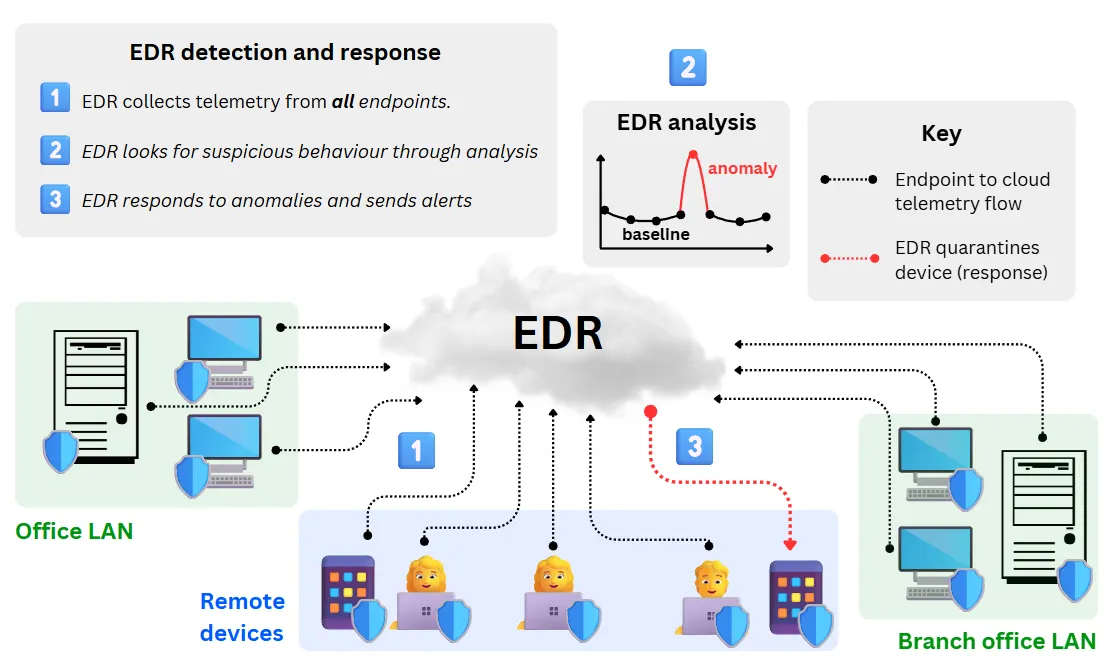
EDR collects this data through software agents installed on each device, giving security teams continuous visibility across all endpoints, regardless of where they are located or how widely they are distributed across the internet.
This ability to rapidly detect and respond using global endpoint visibility is the defining feature of EDR, and why it is a core component of enterprise security products such as Microsoft Defender and CrowdStrike Falcon.
In enterprise environments, EDR is often used alongside a Security Information and Event Management (SIEM) platform, which stores and correlates the large volumes of telemetry and alert data EDR generates, alongside logs from networks, servers, and applications.
EDR is a core requirement for Cyber Essentials Plus, strongly supports ISO 27001 certification, and is increasingly required by cyber-insurance providers due to its ability to reduce breach impact and improve incident response readiness.
How does EDR work?
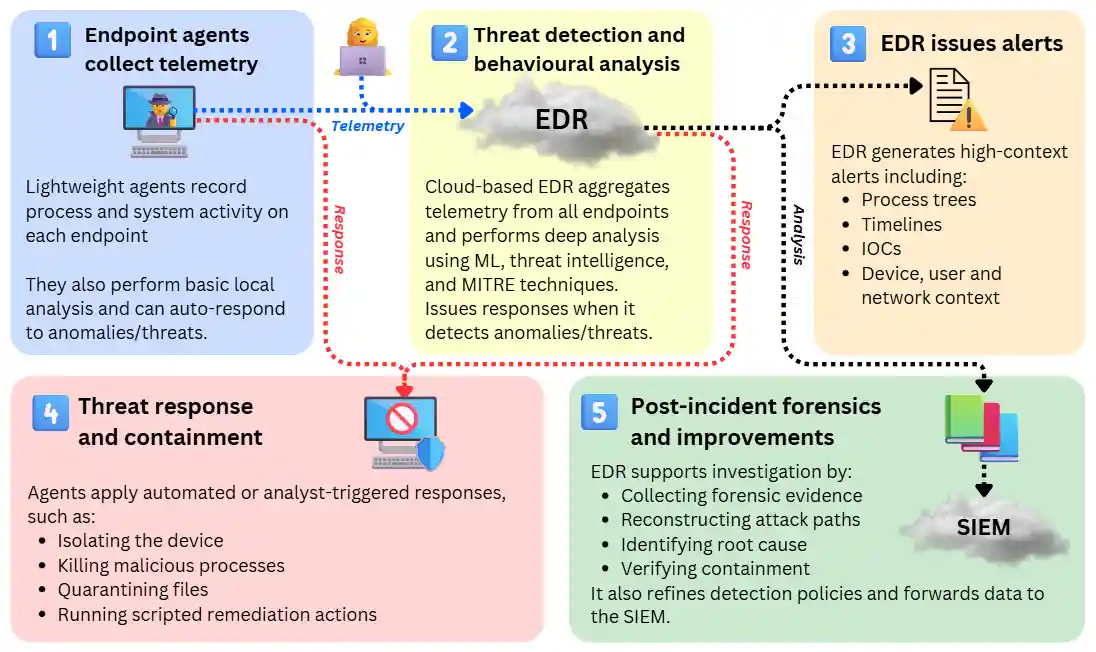
EDR operates through a sequential workflow: it collects detailed telemetry from endpoints, analyses behaviour in real time to detect threats, and initiates rapid containment when malicious activity is identified.
The steps below outline the core process used by modern EDR platforms:
1. Data collection and local analytics
EDR begins with a lightweight agent on each endpoint continuously gathering behavioural telemetry and sending it to the centralised EDR platform. Telemetry commonly includes:
- Process and command execution
- File and registry modifications
- Script usage (PowerShell, Python, Bash)
- Network connections and authentication events
- User behaviour patterns
In addition to collection, agents perform local analytics such as evaluating activity against cached rules, preprocessing data, and blocking high-risk behaviour immediately. When offline, the agent continues enforcing these policies and stores telemetry until it reconnects.
Most agents consume minimal CPU/RAM (depending on vendor/product), allowing deployment even on legacy or low-power devices, though resource usage varies by vendor and telemetry volume.
2. Threat detection and behavioural analysis
As telemetry from all endpoints is streamed to the EDR platform, it performs organisation-wide behavioural analysis, not just individual device scanning for threat signatures. EDR evaluates activity using:
- Cross-endpoint behavioural rules: Detecting patterns that span multiple devices, such as coordinated PowerShell execution, repeated failed authentications across machines, or lateral movement attempts.
- Machine learning and anomaly models: Identifying deviations from normal behaviour at both endpoint and network levels, enabling detection of fileless attacks, credential misuse, and early-stage ransomware activity.
- Threat intelligence: Matching telemetry with known malicious indicators (file hashes, IP addresses, domains) across the entire environment.
- MITRE ATT&CK mapping: A framework that categorises attacker tactics and techniques, helping analysts understand exactly how the attack works (e.g., lateral movement, credential dumping) and what stage of the kill chain they’re dealing with.
Unlike other endpoint security solutions that evaluate threats per device, EDR’s strength lies in its ability to correlate large volumes of telemetry across many endpoints, exposing multi-stage attacks that unfold over time and across systems.
3. Alerting, reporting and contextual correlation
When suspicious behaviour is detected, the EDR system generates a data-rich, report-like alerts that allows response teams to quickly understand the threat and the stage that it is at.
It is a fully automated, investigative report that includes all suspicious events across all endpoints and makes a coherent timeline of what is happening. Here’s what it typically includes:
Process trees and execution flow
A visual breakdown of how a process started, what it spawned, and how it behaved, helping analysts spot abnormal or malicious chains of activity. For example:
- powershell.exe launched by outlook.exe
→ downloaded script.ps1
→ spawned cmd.exe
→ attempted to add a scheduled task.
Timelines and event sequences
A chronological view of actions leading up to and following the detection, allowing responders to understand the full context and progression of the incident. For example:
- 14:03 Suspicious PowerShell command executed
- 14:04 New local admin account created
- 14:06 Credential dumping tool attempted
- 14:07 Lateral authentication attempt to SERVER-02
Indicators of compromise (IOCs)
Known malicious file hashes, domains, IPs, or behaviours associated with real-world attacks, such as:
- File hash associated with a known ransomware family
- Suspicious outbound connection to 185.234.xx.xx
- Domain flagged in threat intelligence feeds
Device, user, and network context
Additional information, such as who was logged in, what the device was doing, and where it was connected from, supports faster, more accurate decision-making. For example:
- User: j.smith@company
- Device: WIN-LAPTOP-22
- Network: Remote VPN connection from France
- Privilege level: Standard user
Historical context
EDR checks older telemetry to see whether similar activity has occurred before, enabling analysts to trace how long an attacker was active and whether similar behaviour occurred previously. Longer retention (up to 365 days) increases visibility but typically raises licensing costs.
4. Threat response and containment
Once an alert is raised, the EDR platform enables responders to take immediate action to contain the threat and prevent further compromise. Depending on policy and confidence level, these actions may be executed automatically by the agent or performed manually by analysts.
- Device isolation (automated or manual): Disconnects the endpoint from the network while maintaining communication with the EDR platform for continued monitoring and remediation.
- Process termination (automated or manual): Stops malicious or suspicious processes to halt harmful activity mid-execution.
- File quarantine (automated or manual): Moves harmful files into a secure, restricted location to prevent execution or further spread.
- Scripted response actions (automated): Execute predefined remediation playbooks, such as removing persistence mechanisms, cleaning malicious artefacts, or resetting configuration changes.
- Rollback (vendor-dependent, manual or automated): Restores altered or encrypted files to a clean state using protected backups or system snapshots.
In real life, most organisations apply a mix of automation to high-confidence detections while requiring analyst approval for actions that carry higher operational risk. Excessive automation can lead to an over-reactive EDR that reduces productivity.
5. Post-incident forensics and continuous improvement
After a threat has been contained, the EDR platform supports deeper investigation to understand the incident and strengthen future defences. This stage focuses on uncovering how the attack occurred, assessing its impact, and improving security controls to prevent recurrence.
- Forensic evidence collection: Retrieves artefacts such as process data, file details, registry changes, and network activity to support root-cause analysis and formal reporting adhering to cybersecurity compliance requirements.
- Full attack-chain reconstruction: Rebuilds the whole sequence of attacker actions, from initial access through subsequent steps, highlighting the techniques, tools, and behaviours used.
- Root-cause ID: Determines how the attacker gained access, what weaknesses or misconfigurations were exploited, and which identities, credentials, or systems were impacted.
- Containment verification: Confirms that malicious activity has fully ceased, no persistence mechanisms remain, and no lateral movement or related activity continues elsewhere in the environment.
- Cross-platform correlation via SIEM: Endpoint telemetry and detection data are forwarded to the organisation’s SIEM or SOAR platform, enabling broader correlation with identity logs, network events, cloud activity, and other security sources. This supports wider scoping, compliance reporting, and organisation-level threat hunting.
- Detection and policy refinement: Improves rules, playbooks, exclusions, and automated response settings based on lessons learned, reducing false positives and enhancing future detection accuracy.
- Long-term visibility and trend analysis: Uses historical telemetry to identify recurring patterns, assess broader security posture, and support proactive threat hunting.
Why do businesses need EDR?
There are four core reasons why businesses benefit from adding EDR to their existing security stacks:
Protecting remote users and devices
EDR protects all endpoints regardless of device type, location or security posture. It works the same whether the device (such as a laptop) is connected to the office WLAN or via public WiFi in another country.
It also goes beyond Endpoint Protection Platforms (EPPs) and Next Generation Antivirus (NGAVs), as it receives telemetry from all endpoints to respond to very sophisticated and coordinated attacks, regardless of endpoint location.
Proactive defence against modern threats
EDR uses both signature and behavioural evidence to identify suspicious behaviour early and stop attacks before they escalate, such as detecting ransomware activity before large-scale encryption begins. Continuous telemetry from a fleet of endpoints, real-time analytics, and full audit trails support fast investigation, compliance, and incident response.
Compliance and alignment with security frameworks
EDR aligns closely with major UK security frameworks because it provides continuous monitoring, behavioural detection, and rapid response.
Cyber Essentials Plus assessors increasingly expect EDR as part of demonstrating effective malware protection, while ISO 27001 benefits from the visibility and logging EDR provides across several Annex A controls. NCSC guidance also recommends behaviour-based endpoint protection. Overall, EDR makes it easier for organisations to evidence security maturity and meet modern compliance expectations.
Meeting cyber insurance requirements
UK cyber insurers now view EDR as a minimum control due to its ability to detect early-stage attacks that antivirus may miss. Most policies expect Multi-Factor Authentication + EDR + immutable backups as baseline requirements, with some also calling for 24/7 monitoring or Managed Detection and Response (MDR) support.
Organisations with EDR in place typically see improved eligibility, fewer exclusions, and more favourable premiums because EDR reduces both the likelihood and impact of claims.
How does EDR compare to other endpoint security tools?
Technically, EDR is the component of endpoint security that focuses on detecting, investigating, and responding to threats across all business devices.
In practice, EDR is rarely used as a standalone product. Modern endpoint security platforms combine EDR with threat prevention (NGAV), endpoint protection (EPP), cross-domain correlation (XDR), and compliance and visibility features (SIEM) to protect distributed workforces.
Platforms such as Microsoft Defender deliver these capabilities as layered features within a single solution.
How EDR combines with other endpoint security tools
In modern endpoint security platforms, EDR typically sits at the centre of the endpoint security stack. It builds on prevention and protection, while relying on integration with cloud services, identity systems, and organisation-wide visibility tools to deliver full protection, as per the diagram below:
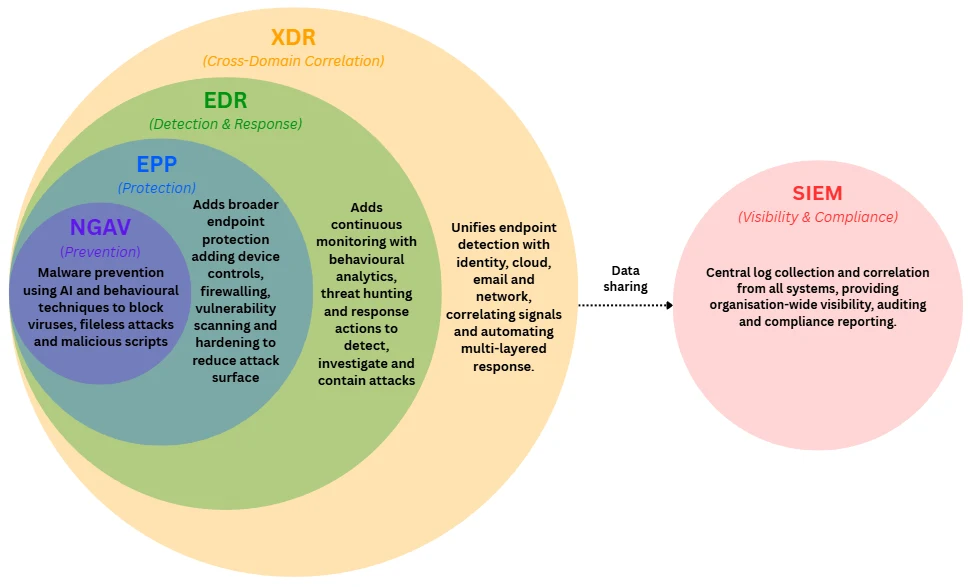
Rather than being separate products, these tools represent expanding layers of capability. Each layer builds on the one below it, with increasing visibility and response coverage.
Endpoint security components explained
Below are the key endpoint security components, their roles, and where they sit as part of endpoint security products:
Next Generation Antivirus (NGAV)
Role: Prevention
NGAV focuses on prevention rather than investigation or response. It uses behavioural analysis, machine learning, and AI-driven techniques to block malware, ransomware, fileless attacks, and malicious scripts that evade traditional signature-based antivirus.
Endpoint Protection Platforms (EPP)
Role: Protection
EPP builds on NGAV by combining multiple prevention technologies into a single agent. This typically includes signature-based detection, behavioural analysis, exploit prevention, device control, and vulnerability management. EPP is designed to stop known and common threats but offers limited investigation and response capabilities compared to EDR.
Endpoint Detection and Response (EDR)
Role: Detection, investigation and response
EDR extends EPP by adding continuous behavioural monitoring, real-time endpoint visibility, and tools to investigate, contain, and remediate threats. It is designed to detect suspicious activity that bypasses preventive controls. However, EDR visibility is largely limited to endpoint activity and does not natively correlate events across email, identity, cloud, or network systems. Retention and long-term analysis capabilities are also typically limited.
Extended Detection and Response (XDR)
Role: Cross-domain detection and response
Expands EDR by correlating telemetry across multiple domains such as endpoint, identity, email, cloud, and network. This wider visibility helps detect sophisticated, multi-stage attacks that would be invisible from endpoint data alone. While XDR provides powerful cross-domain analytics, it does not store logs indefinitely and lacks full auditing and governance capabilities.
Security Information and Event Management (SIEM)
Role: Centralised visibility, logging, and compliance
SIEM is separate from the endpoint security stack. It collects, aggregates and correlates logs from across the entire organisation, including servers, applications, cloud services, firewalls, identity providers and security tools like EDR and XDR.
Endpoint security feature comparison
The table below highlights where endpoint security capabilities overlap and where each tool becomes necessary depending on organisational size and requirements:
| Feature | NGAV | EPP | EDR | XDR | SIEM |
|---|---|---|---|---|---|
| Platform example | Microsoft Defender Antivirus | CrowdStrike Falcon | SentinelOne Control | Palo Alto Cortex XDR | Microsoft Sentinel |
| Blocks known malware | ✔️ | ✔️ | ✔️ | ✔️ | ❌ |
| Blocks unknown / fileless attacks | ✔️ | ✔️ | ✔️ | ✔️ | ❌ |
| Behaviour-based detection | ✔️ | ✔️ | ✔️ | ✔️ | ❌ |
| Exploit / script attack prevention | ✔️ | ✔️ | ✔️ | ✔️ | ❌ |
| Real-time endpoint telemetry | ❌ | ❌ | ✔️ | ✔️ | ❌ |
| Automated response actions | ❌ | ❌ | ✔️ | ✔️ | ❌ |
| Rollback capability | ❌ | ❌ | ✔️ | ✔️ | ❌ |
| Cross-domain analytics (identity, e-mail, cloud) | ❌ | ❌ | ❌ | ✔️ | ✔️ |
| Threat hunting | ❌ | ❌ | ✔️ | ✔️ | ✔️ |
| Long-term data retention (months/years) | ❌ | ❌ | ❌ | ❌ | ✔️ |
| Compliance & audit support | ❌ | ❌ | ❌ | ❌ | ✔️ |
| Suitable for microbusiness (1–10 users) | ✔️ | ✔️ | ✔️ | ❌ | ❌ |
| Suitable for SMEs (10–250 users) | ✔️ | ✔️ | ✔️ | ✔️ | ✔️ |
| Suitable for enterprises (250+ users) | ✔️ | ✔️ | ✔️ | ✔️ | ✔️ |
Key features of modern EDR solutions
Modern EDR platforms provide a defined set of capabilities that make them essential in a modern security stack. Below are the core features that define what EDR as a technology delivers.
Endpoint behaviour and activity monitoring
EDR provides deep, continuous visibility into activity occurring on each endpoint, giving security teams a real-time understanding of what applications, scripts, and users are doing.
Key components include:
- Real-time monitoring of processes, scripts, and file activity
- Tracking of network connections and authentication attempts
- User and identity context captured at the device level
- Offline protection through locally cached policies
Behaviour-driven threat detection
EDR identifies threats based on behaviour rather than relying solely on known malware signatures, allowing it to catch new, stealthy, and fileless attacks.
Key components include:
- Behaviour-based rules that recognise suspicious activity patterns
- Machine-learning and anomaly models to spot deviations from normal behaviour
- Matching against global threat intelligence sources
- Mapping activity to MITRE ATT&CK techniques for precise classification
Integrated response & containment
EDR includes built-in tools to stop active threats at the endpoint quickly and prevent further damage, allowing responders to take action directly on compromised endpoints.
Key components include:
- Immediate network isolation of compromised devices
- Process termination to stop malicious scripts or applications
- File quarantine to block harmful files from executing
- Automated remediation playbooks for repeatable response
- Rollback capability for restoring altered files (vendor/OS-dependent)
Ransomware-focused protections
Modern EDR platforms include specialised safeguards designed to detect and disrupt ransomware behaviour before encryption spreads.
Key components include:
- Anti-encryption heuristics that flag rapid file modification
- Detection of tampering with shadow copies and system backups
- Decoy or “honeypot” files that trip early-warning alerts
- Automated isolation or kill-chain interruption during ransomware events
Investigation and forensics capabilities
EDR supports detailed post-incident analysis, enabling organisations to understand how an attack occurred and prevent it from happening again.
Key components include:
- Collection of forensic artefacts such as logs, dumps, and file samples
- Reconstruction of attacker timelines and activity chains
- Tools for identifying root causes and exploited weaknesses
- Long-term telemetry retention to support historical investigations
Ecosystem & integration support
EDR forms part of a broader security ecosystem, integrating with other tools to extend monitoring, detection, and automation across the organisation.
Key components include:
- Native integration with SIEM, SOAR, IAM, XDR, and cloud platforms
- Role-based access controls (RBAC) and centralised policy management
- Support for multi-tenant and distributed environments
- Reporting for compliance, audit, and operational oversight
How to implement EDR at a business
Deploying an EDR solution requires planning, coordination, and ongoing operational discipline. Here are the key phases involved in implementing EDR effectively:
1. EDR planning and preparation
Estimated time: 1–3 weeks; longer for large or complex estates
Your IT team or external security provider carries out this phase. It establishes the foundations for a smooth deployment by understanding the EDR environment, scope, and operational requirements.
Key tasks include:
- Assess the endpoint estate: Identify all devices that need coverage, including laptops, servers, remote users, cloud workloads, legacy systems.
- Check OS and hardware support: Confirm compatibility across Windows, macOS, Linux, mobile, and any specialist devices.
- Define security and response policies: Decide on isolation rules, automatic actions, retention periods, and alerting thresholds.
- Choose deployment architecture: Select cloud-based, hybrid, or on-premise management depending on regulatory and operational needs.
- Review identity and access dependencies: Ensure integration readiness with Azure AD, Okta, or local identity providers.
Common pitfalls to avoid:
- Missing remote or infrequently connected devices (a major coverage gap).
- Not involving security stakeholders early, leading to unclear policies later.
- Underestimating identity integrations (they often cause delays if misconfigured).
2. EDR deployment and integration
Estimated time: 2–6 weeks; depending on number of endpoints and integration complexity
Once the planning is complete, the EDR platform can be rolled out across the organisation in a controlled, structured manner.
Key tasks include:
- Roll out agents at scale: Use MDM, GPO, RMM, or deployment scripts to install agents across all endpoints.
- Configure policies and baselines: Apply default detection settings, exclusions, and isolation policies aligned to your risk appetite.
- Integrate with identity and access systems: Connect to Single-Sign On (SSO) and Conditional Access platforms, enable MFA enforcement, and leverage identity analytics for richer context.
- Connect to SIEM/XDR platforms: Stream EDR telemetry into your broader monitoring ecosystem to enable cross-domain correlation.
- Implement RBAC: Apply Role-Based Access Control (RBAC) so analysts and IT teams access only the functions they require.
Common pitfalls to avoid:
- Rolling out agents without testing on a small pilot group first.
- Applying overly aggressive policies, leading to business disruption.
- Forgetting to monitor deployment coverage, partial rollout leads to blind spots.
3. Ongoing operations and optimisation
EDR becomes more effective over time when continuously tuned, monitored, and supported by clear operational processes.
Key tasks include:
- Tune detection rules: Refine behavioural detections and reduce false positives based on real-world activity.
- Build response playbooks: Define consistent actions for ransomware, privilege escalation, command-line abuse, and other common threats.
- Train staff and responders: Ensure all involved responders (IT, management, partners) understand alerts, workflows, and escalation paths.
- Establish measurable KPIs: Track coverage %, MTTD (Mean Time to Detect), MTTR (Mean Time to Respond), isolation time, and alert volumes.
- Conduct periodic reviews: Audit endpoint coverage, deployment health, and policy effectiveness.
Common pitfalls to avoid:
- Treating EDR as “set and forget”, effectiveness declines without tuning.
- Ignoring alert fatigue, high noise levels cause real incidents to be missed.
- Not training responders; the tool is powerful, but people still need to action alerts correctly.
Benefits of EDR for businesses
These are the core benefits of implementing EDR:
Faster detection (Lower MTTD)
EDR significantly reduces Mean Time to Detect (MTTD) by analysing behaviour in real time and surfacing alerts the moment suspicious activity occurs. This minimises the time attackers remain undetected in the environment.
Faster response (Lower MTTR)
With built-in response tools like isolation, process termination, and automated remediation, EDR reduces Mean Time to Respond (MTTR). This limits the attacker’s movement, reduces the number of affected devices, and narrows the overall impact window.
Improved network visibility
EDR continuously monitors processes, scripts, network activity, and user behaviour across all endpoints: Remote, hybrid, or on-premise. This visibility helps security teams understand what is happening across the business and spot hidden risks.
Reduced breach impact
By containing threats early and enabling rapid remediation, EDR helps prevent widespread encryption, data loss, and business disruption. This lowers the financial, operational, and reputational damage caused by security incidents.
KPIs for measuring EDR effectiveness
To demonstrate the value of EDR and maintain operational quality, cybersecurity teams typically track the following Key Performance Indicators (KPIs):
| KPI | What it measures | Why it’s measured |
|---|---|---|
| Coverage percentage | The proportion of endpoints with the EDR agent installed and healthy | Indicates how complete and reliable endpoint visibility is |
| MTTD (Mean Time to Detect) | How quickly suspicious or malicious activity is identified | Measures how effectively EDR detects threats early |
| MTTR (Mean Time to Respond) | How long it takes to contain or remediate a threat | Shows how efficiently EDR supports incident response |
| Isolation time | The time taken to isolate a compromised endpoint | Reflects how quickly EDR can contain active threats |
| Daily alert volumes | The number of alerts generated per day | Helps assess signal-to-noise ratio and detection tuning |
| Dwell time | How long a threat remains active before disruption | Indicates how well EDR reduces attacker persistence |
| Alert validation time | Time required to confirm whether an alert is legitimate | Measures investigation efficiency and alert quality |
What are the limitations of EDR?
While EDR provides significant security benefits by monitoring and responding at endpoints, it is not a complete cybersecurity solution on its own. Like any technology, it has limitations that other tools need to address. These limitations typically fall into three areas: data handling, technical constraints, and operational challenges.
Data handling and privacy considerations
EDR platforms rely on detailed telemetry (Terabytes of data over a year in enterprise EDR), which introduces both storage and compliance considerations that require an extra solution:
- Retention limits: Most platforms store endpoint telemetry for 30–365 days, which may restrict long-term investigations unless paired with a SIEM.
- Cloud storage location: Telemetry is often processed or stored in vendor cloud environments, which may raise compliance questions, especially in industries like healthcare and finance.
- Data residency requirements: Some sectors require data to stay within specific regions; not all vendors offer flexible hosting options.
- GDPR considerations: EDR collects user and device behaviour data, so organisations must ensure lawful processing and appropriate governance controls.
Technical constraints and coverage gaps
EDR is highly effective on supported devices, but not all endpoints or environments are equally compatible. For example:
- Legacy OS and IoT limitations: Older operating systems, embedded devices, and IoT hardware may not support EDR agents.
- Unmanaged or untrusted endpoints: Devices outside IT control (contractor or personal devices) often cannot be monitored.
- Reduced offline visibility: Although agents cache data locally, full analytics and correlation of real-time processes relies on having permanent connectivity (which is now possible with business broadband redundancy or using business satellite broadband such as Starlink).
- Server and VDI complexities: High-activity servers (e.g., databases or app hosts) and virtual desktops (e.g., shared desktops for call centres) generate large volumes of normal system events, which can lead to excess noise or false positives unless detection rules and exclusions are tuned appropriately.
Operational and resource challenges
EDR is powerful, but it is seldom “set-and-forget”. When it comes to endpoints, there are so many exceptions (e.g., legacy devices) and changes over time (e.g. processes, third-party apps) that it requires skilled personnel to operate it.
For this reason, it is often operated as an MDR (Managed Detection and Response) solution supported by a third-party. Here are the main operational challenges:
- Performance overhead: Lightweight by design, but can still impact CPU, RAM, or disk I/O on older or constrained devices.
- Alert fatigue: High volumes of behavioural alerts can overwhelm teams if detection rules are not tuned effectively as processes change.
- Dependency on correct configuration: Misconfigured policies, incorrect exclusions, or poorly managed deployment can reduce visibility or create blind spots.
Scope limitation of EDR
EDR is typically delivered as part of a broader endpoint security platform, such as Microsoft Defender for Endpoint, because the EDR capability on its own does not provide full business-wide protection. It must be combined with other security controls to deliver complete endpoint and organisational security.
On its own, EDR does not provide:
- Network-layer enforcement: EDR cannot block traffic, segment local networks, enforce VLAN rules, or act as a firewall. Its visibility into network activity is limited to what the endpoint can observe.
- Perimeter-based threat prevention: EDR does not replace email compromise security, web filtering, or firewall controls that block threats before they reach endpoints.
- Cross-domain correlation: EDR focuses on endpoint telemetry and does not natively correlate identity, email, cloud, or network activity. Without XDR or SIEM, multi-stage attacks may go undetected.
- Direct cloud or SaaS visibility: EDR does not monitor cloud workloads, SaaS platforms, API activity, or identity-only attacks that occur without endpoint involvement.
- Identity and access enforcement: EDR cannot enforce MFA, detect password spraying, block phishing emails, or revoke compromised credentials. These require dedicated identity and email security controls.
- Business-wide containment actions: EDR can isolate a compromised endpoint, but it cannot disable network segments, revoke identities, or block lateral movement outside the endpoint environment.
Managed Endpoint Detection and Response (MDR)
One of the main limitations of EDR is that it requires skilled network specialists to operate it, which many organisations (especially small ones) lack.
Managed Detection and Response (MDR) services fill this gap by providing a fully managed service with dedicated security specialists who monitor, investigate, and respond to threats on behalf of the business, often around the clock.
Here are the key advantages, service models and SLAs offered by these services:
Key advantages of MDR
MDR provides the expertise and resources needed to operate EDR independently for businesses. Namely:
- 24/7 monitoring and alerting: Continuous coverage of endpoint activity, with analysts on call to investigate alerts 24/7, including weekends and holidays.
- Expert triage and investigation: Specialists escalate only genuine threats, reducing noise and accelerating response.
- Proactive threat hunting: MDR teams actively search for indicators of compromise, abnormal behaviour, and early-stage attacker activity rather than waiting for alerts.
- Containment and response support: Analysts can isolate endpoints, terminate malicious processes, remove persistence, and guide your team through remediation to minimise dwell time.
- Purple-team exercises and continuous improvement: Providers simulate attacker behaviours, test defences, and tune detection logic, improving resilience and reducing gaps over time.
MDR service models
Two distinct models that differ in how the responsibilities are shared between businesses and providers:
Co-managed MDR (shared responsibility)
In a co-managed model, the organisation’s internal IT team works in partnership with the MDR provider. The provider takes the lead on expert tasks (e.g., alert triage, investigation, proactive threat hunting) for an internal team that lacks the time or resources to do so.
However, the business retains control over key actions such as containment and remediation, allowing it to manage risk and response in line with its internal policies and change processes.
This model is well-suited to organisations that have some security capability in place but need additional expertise, extended coverage, or out-of-hours monitoring without hiring a larger team.
Fully managed MDR (provider-led response)
A fully managed MDR service shifts responsibility almost entirely to the provider. The MDR team handles detection, investigation, containment, and communication end-to-end, ensuring threats are dealt with quickly even when internal resources are limited.
Subject to contractual permissions, the provider may take decisive action such as isolating endpoints, blocking malicious activity, or initiating remediation without waiting for customer approval.
This model is ideal for organisations with limited or no dedicated security staff, or those that require consistent 24/7 protection.
MDR Service Level Agreements (SLAs)
Leading MDR providers offer clear performance targets to ensure rapid detection and response. Their Service Level Agreements (SLAs) typically include:
- Containment within 15 minutes of confirming malicious activity.
- Investigation within 1 hour from initial alert to analyst assessment.
- 24/7 monitoring of all endpoints, including remote users.
- Daily or weekly reporting cadences, depending on service tier.
- Monthly threat and trends briefings, including recommendations for improving security posture.
- Quarterly purple-team or detection-logic tuning sessions (varies by provider).
 Back to blog